11N Mini Wireless AP
21
Disable Wireless LAN Interface: Check this box to to disable the AP’s wireless features;
uncheck to enable it.
Band: Select one mode from the following. The default is 2.4GHz (B+G+N) mode.
Mode: Support AP, Client, WDS and AP+WDS mode.
Network Type: This type is only valid in client mode.
SSID: SSID (Service Set Identifier) is the unique name of the wireless network.
Channel Width: Select the channel width from the pull-down list. Select 40MHz if you use
802.11n or 802.11n mixed mode, otherwise 20MHz, it is default value.
Channel Number: Indicates the channel setting for the AP.
Broadcast SSID: Select “Enable” to enable the device's SSID to be visible by wireless
clients. The default is enabled.
WMM: It will enhance the data transfer performance of multimedia data when they’re
being transferred over wireless network.
4.4.3 Security
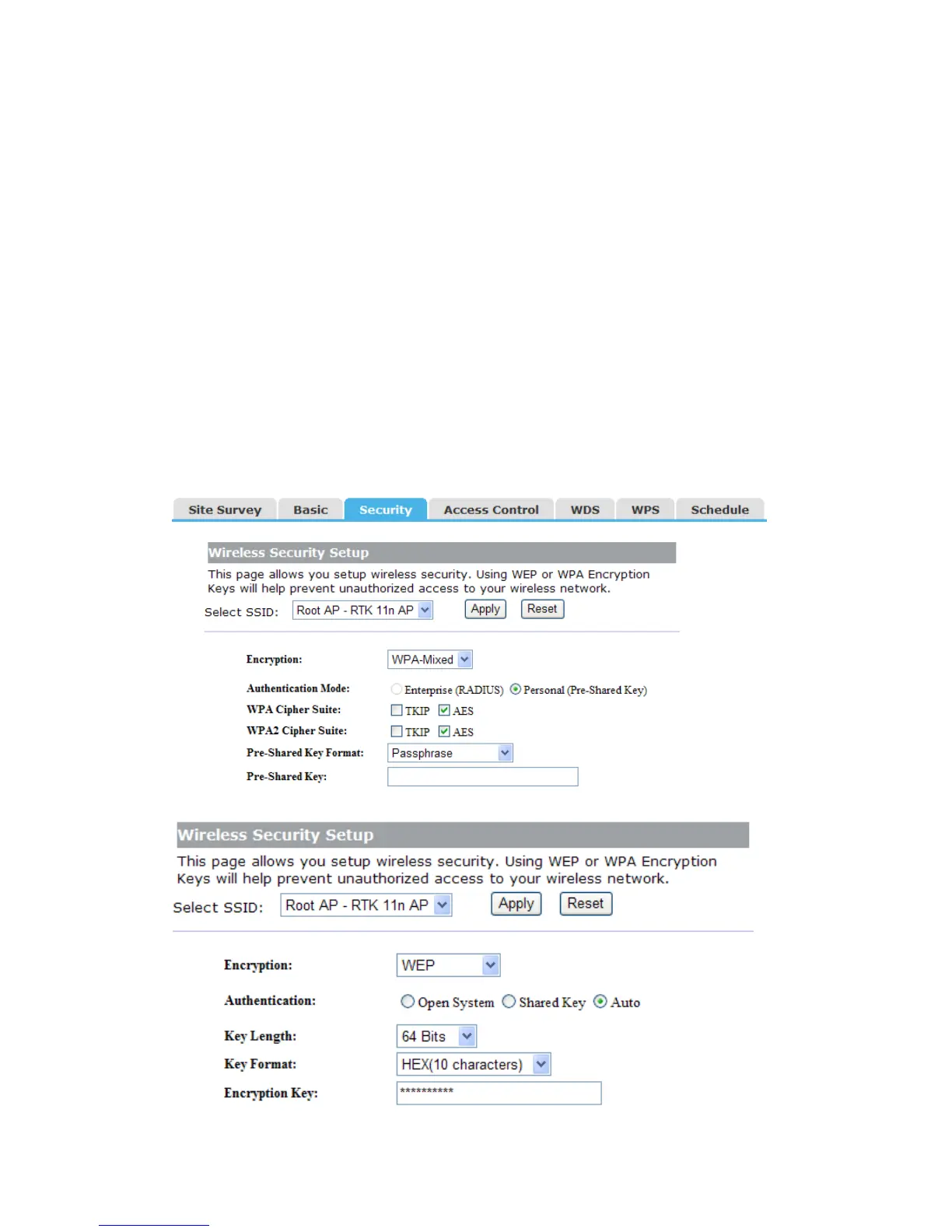
This page allows you setup wireless security. Using WEP or WPA Encryption Keys will
help prevent unauthorized access to your wireless network.
The following picture shows how to set the WEP security.


 To Next Page