25
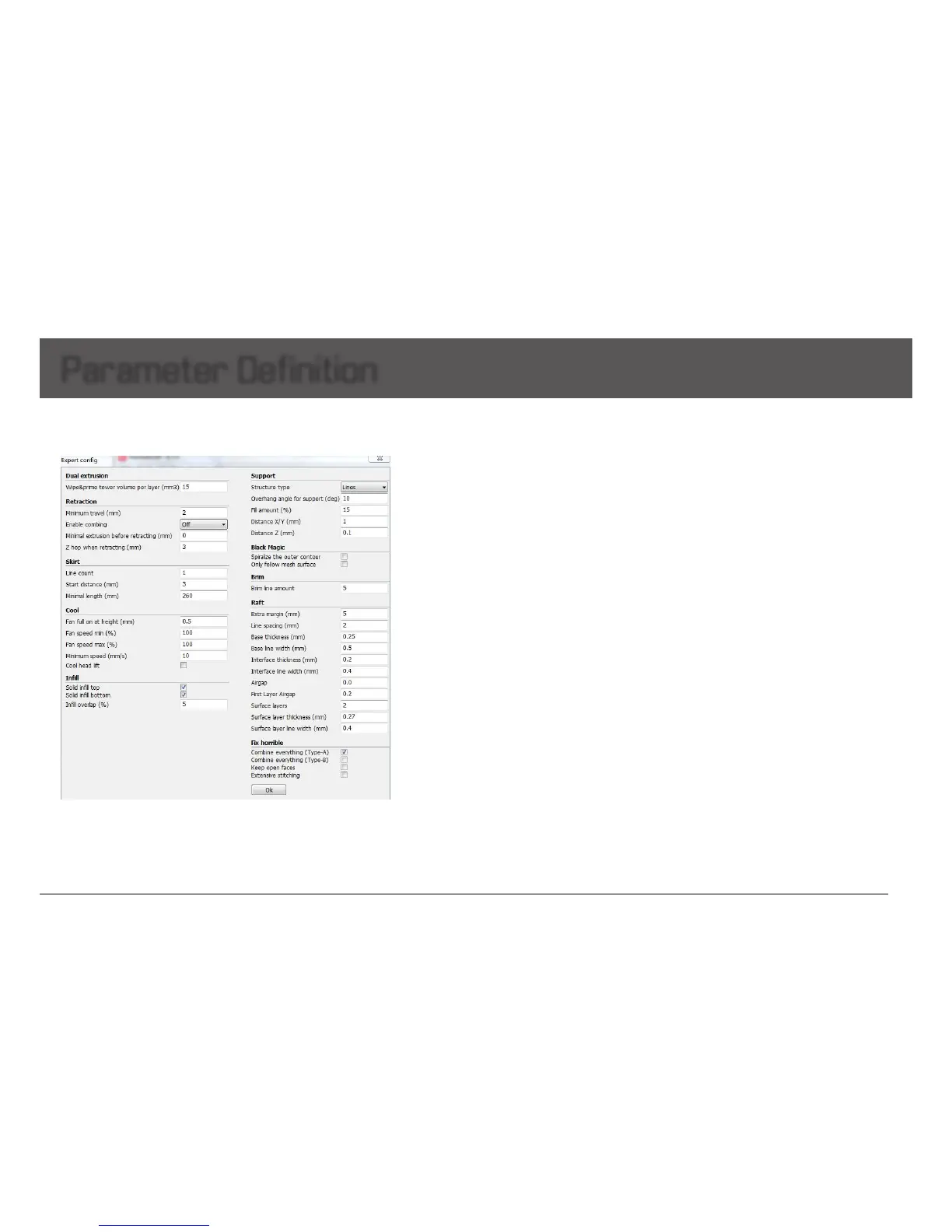
Dual Extrusion
-Wipe & prime tower volume per layer: The wipe-
tower is a tower printed on every layer when switching
betweennozzles.Theamountofmaterialputinthe
wipe/primetower.Thisisdoneinvolumebecause
in general you want to extruder a certain amount of
volume to get the extruder going, independent on the
layerheight.Thismeansthatwiththinnerlayers,your
towergetsbigger.
Retraction
-Minimum travel: minimum amount of travel needed
foraretractiontocarryall.Tomakesureyoudonot
get a lot of retraction in a small area, value = 2 is
recommended as best performance, too small will lead
tofrequentretraction.
-Enable combing: combing is the act of avoiding
holesintheprintfromtheheadtotravelover.Enable
combing extruder will always touch the surface of
modelbutdisableretraction.Ifcombingisdisabled
the printer head moves straight from the start point to
theendpointanditwillalwaysretract.Defaultenable
coming,butitwillincreaseprintingtime.
-Minimal extrusion before retracting: The minimal
extrusionthatneedstobedonebeforeretractingagain.
If a retraction needs to happen before this minimal is
reachedtheretractionisignored.Thisavoidsretraction
alotonthesamepieceoflamentwhichattensthe
lamentandcausesgrindingissues.Recommended
0.02atbestperformance,0meansunlimitedretraction
frequency.
-Z hop when retracting: See function prompt in the
software.
Parameter Definition
Expert Setting
Skirt
-Line count: The skirt is a line drawn around the object
attherstlayer.Thishelpstoprimeyourextruder,and
toseeiftheobjecttsonyourplatform.Recommended
settingis1withbestperformance.Settingthisto0will
disabletheskirt.Multipleskirtlinescanhelppriming
yourextruderbetterforsmallerobjects.
-Start distance: The distance between skirt line and
model.Defaultdistanceis3.
-Minimal length: The minimal length of the skirt, if this
minimal length is not reached it will add more skirt lines
toreachthisminimallength.Recommendedsettingis
260withbestperformance.Ifthelinecountissetto0
thisoptionisignored.
Cool
-Fan full on at height: The height at which the fan is
turnedoncompletely.Forthelayersbelowthisthefan
speedisscaledlinearwiththefanoffatlayer0.
-Fan speed min: Minimal fan speed during normal
printing.
-Fan speed max: Maximal fan speed when automatic
slowingdownprinting.
-Minimum speed: minimum printing speed of
eachlayer.Recommendedsettingis10withbest
performance.Tooslowwillresultinnozzleoozing.
-Cool head lift: lifting the head, if the minimal layer
time is not enough, to extend the cooling time for
modelcooling.


 To Next Page