5
Getting StartedGetting Started Basic Connections
Advanced ConnectionsBasic Operations Advanced Operations TroubleshootingExplanation terms Specifi cations Index
ENGLISH
Part names and functions
For buttons not explained here, see the page indicated in parentheses ( ).
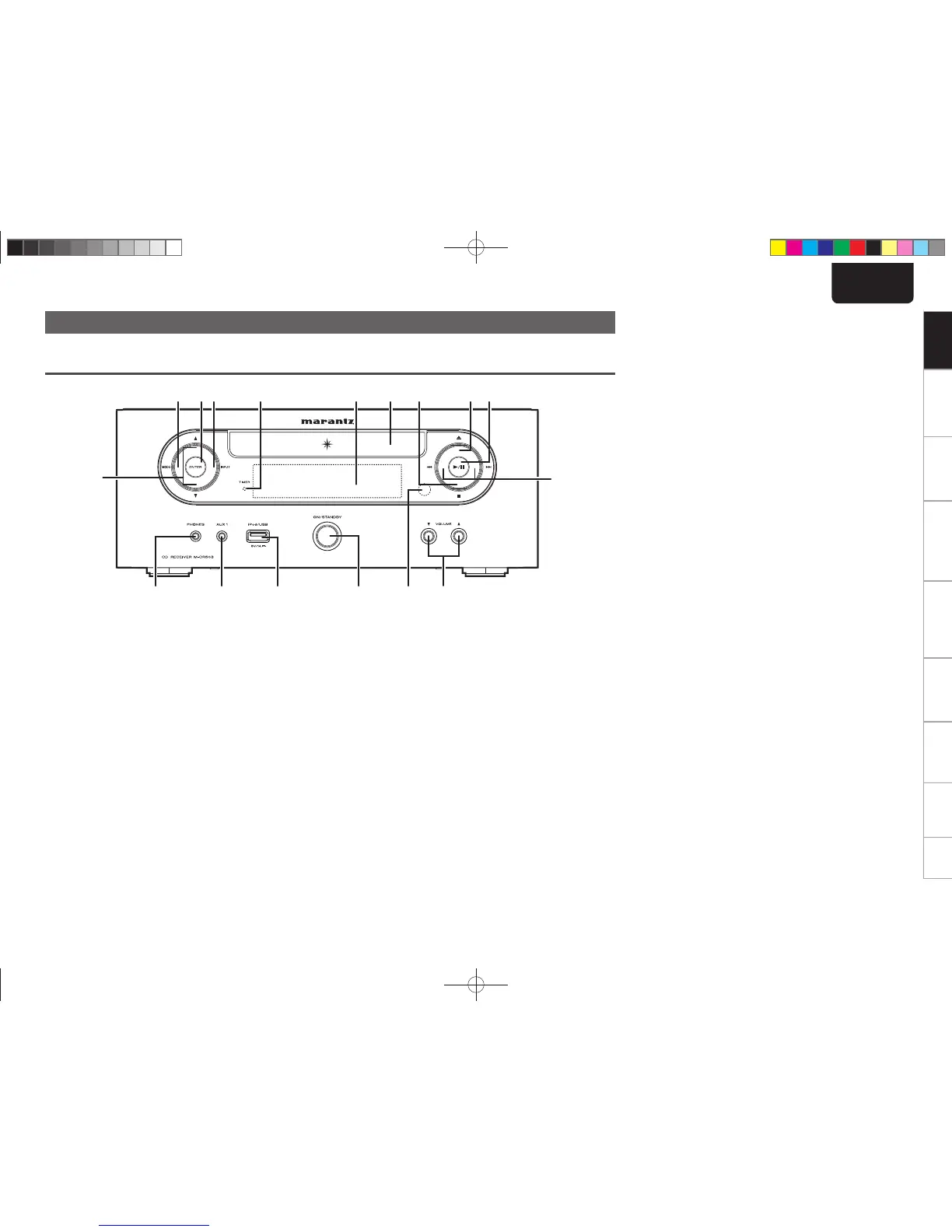
Front panel
Q7
Q3 Q2 Q1Q4 oiQ0
u
Q5Q6
qrtyew
q Headphones jack (PHONES) ··················································· (14)
Used to connect headphones.
w AUX1 input jack ······································································· (24)
Used to connect portable audio devices.
e USB port (iPod/USB) ······························································ (20)
Used to connect USB devices.
r Power operation button (ON/STANDBY) ····························· (12)
t Remote control sensor ····························································· (4)
y Volume up/down button (VOLUME df) ······························ (13)
Adjusts the audio volume.
u Reverse-skip/Forward-skip buttons (8, 9)
• TUNER mode
Selects the previous/next preset channel.
• DISC, iPod/USB mode
Selects the previous/next track.
i Play/Pause button (1/3) ·················································· (14, 25)
o Disc tray open/close button (5) ············································· (12)
Used to open/close the disc tray.
Q0 Stop button (2) ································································· (14, 25)
Q1 Disc tray ····················································································· (3)
Tray used to insert a compact disc.
Q2 Display ························································································ (6)
Displays play status, settings, etc.
Q3 TIMER indicator ······································································· (27)
Q4 INPUT button ··········································································· (13)
Selects the input source.
Q5 ENTER button ·········································································· (13)
Used to confi rm an item.
• TUNER mode ........................................................................... (17)
Used to register a broadcast station.
Q6 MODE button
• SET UP mode ........................................................................... (13)
Calls up the SETUP menu when pressed continuously.
• TUNER mode ........................................................................... (16)
Used to select reception band.
Q7 u/i buttons
• SET UP mode ........................................................................... (13)
Used to select the item to be set.
• TUNER mode ........................................................................... (16)
Used when switching frequencies.
• DISC, iPod/USB mode ...................................................... (22, 25)
Used to select folder.
1.M-CR503NENG4th0610.indd51.M-CR503NENG4th0610.indd5 2010/06/1118:24:152010/06/1118:24:15















 To Next Page