29
Getting Started Basic Connections
Advanced ConnectionsBasic Operations Advanced OperationsAdvanced Operations TroubleshootingExplanation terms Specifi cations Index
ENGLISH
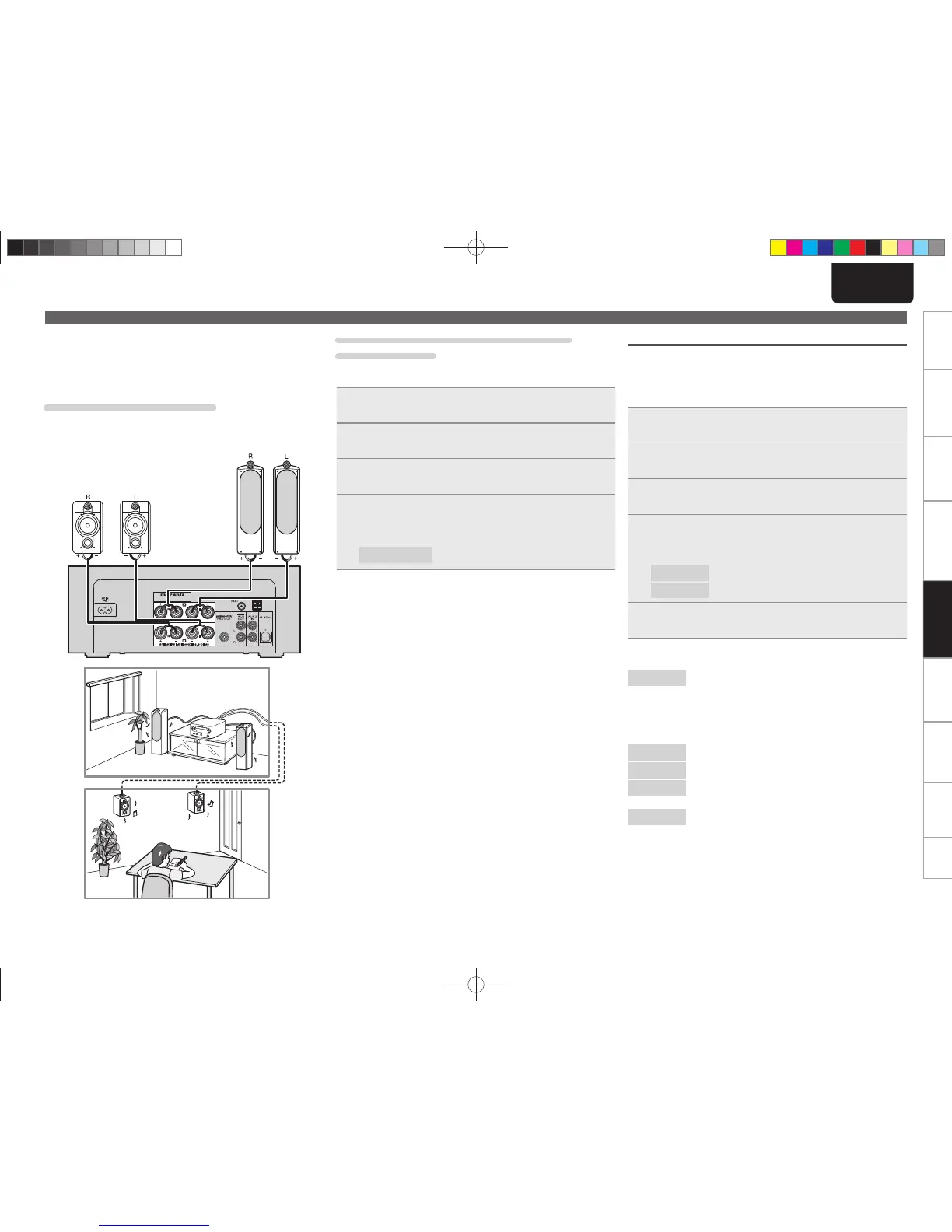
n Listening to music in two locations using a
multi-drive connection
You can listen to music in different rooms using this unit with two
pairs of speaker systems.
Connecting the speaker cables
Carefully check the left (L) and right (R) channels and + (red) and –
(black) polarities on the speakers being connected to the unit, and be
sure to connect the channels and polarities correctly.
M-CR503
Setting AMP characteristics
• Amp properties can be changed according to the location speakers
are installed.
• Five types of characteristics can be selected.
• Different characteristics can be selected for Speaker A and Speaker
B.
1
Press [MENU] or press <MODE> for 3 or more
seconds.
2
Use ui to select “SPEAKER SETUP”, then press
[ENTER/MEMO], [p] or <ENTER>.
3
Use ui to select “SPK OPTIMISE”, then press
[ENTER/MEMO], [p] or <ENTER>.
4
Use ui to select the speaker you want to set for
audio output and then press [ENTER/MEMO], [p] or
<ENTER>.
SPEAKER A
Sets the characteristics of Speaker A.
SPEAKER B
Sets the characteristics of Speaker B.
5
Use ui to select the characteristics you want to set,
then press [ENTER/MEMO], [p] or <ENTER>.
[Selectable items]
FLAT
Properties are fl at. (Default)
This enhances bass frequencies when speakers are
placed directly on furniture or on a rack.
If you feel that there is too much bass, select your
favorite properties from among RESPONSE1 to
RESPONSE4.
RESPONSE 1
Cuts low frequencies 60 Hz or under by –12 dB/oct.
RESPONSE 2
Cuts low frequencies 100 Hz or under by –12 dB/oct.
RESPONSE 3
Cuts low frequencies 60 Hz or under by –12 dB/oct.
Also, raises the 400 Hz region by 3 dB.
RESPONSE 4
Cuts low frequencies 100 Hz or under by –12 dB/oct.
Also, raises the 400 Hz region by 3 dB.
Adjusting the audio level balance between
speakers A and B
With the output of Speaker A fi xed, the audio level of Speaker B can
be adjusted within the range –6 dB to +6 dB.
1
Press [MENU] or press <MODE> for 3 or more
seconds.
2
Use ui to select “SPEAKER SETUP”, then press
[ENTER/MEMO], [p] or <ENTER>.
3
Use ui to select “VOLUME OFFSET”, then press
[ENTER/MEMO], [p] or <ENTER>.
4
Use ui to ajust volume offset, then press [ENTER/
MEMO]
, [p] or <ENTER>.
[Adjustable range]
-6 dB – +6 dB
Setting the speakers
1.M-CR503NENG4th0610.indd291.M-CR503NENG4th0610.indd29 2010/06/1118:24:222010/06/1118:24:22















 To Next Page