14
ENGLISH
1/ 32
8 / 9
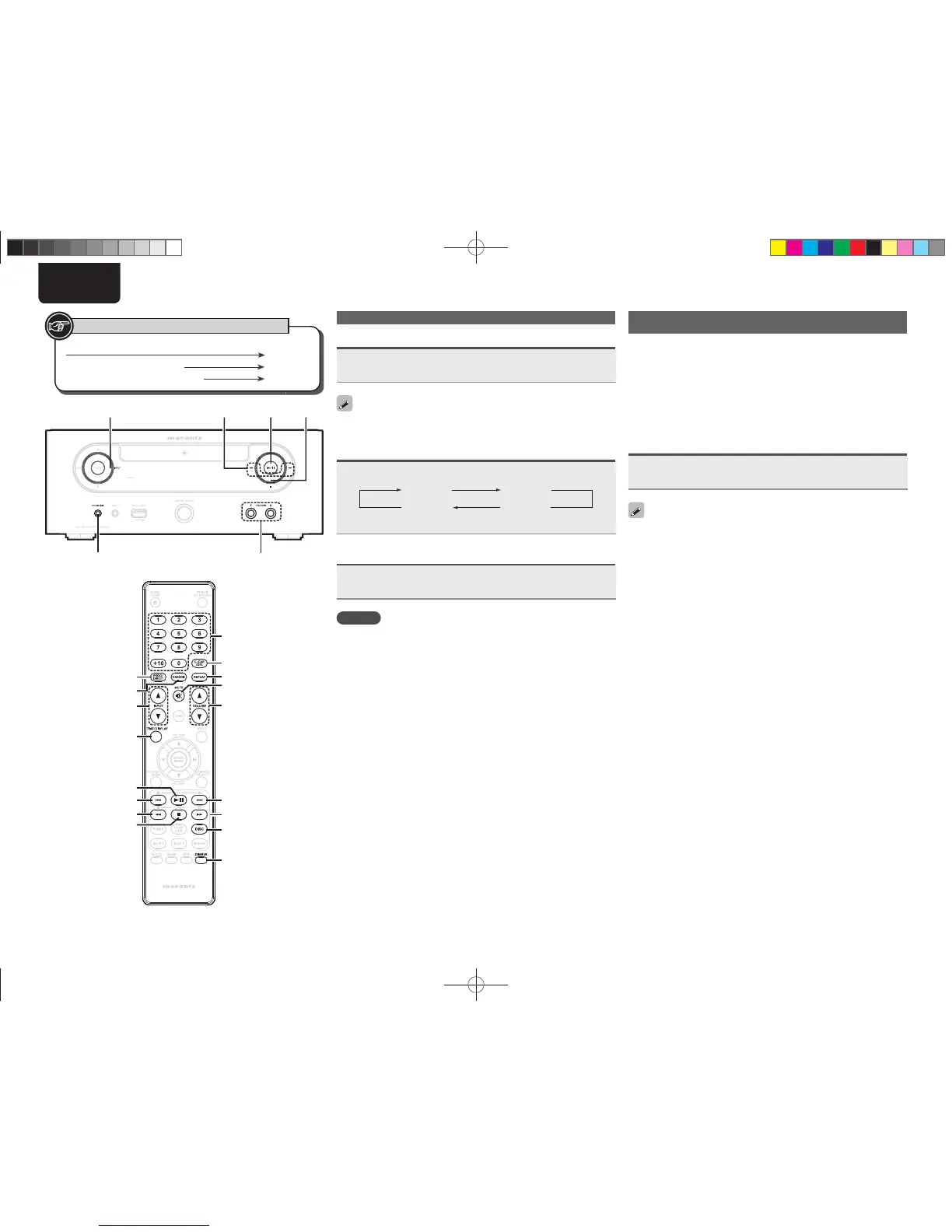
<PHONES>
<INPUT>
VOLUME df
VOLUME df
8
[6]
13
2
NUMBER
[PROG/DIRECT]
[RANDOM]
[CLEAR/DEL]
[REPEAT]
[TIME/DISPLAY]
9
[7]
[DISC]
[MUTE]
[DIMMER]
[INPUT df]
Button located on both the main unit and the remote control
BUTTON
Button only on the main unit
<BUTTON>
Button only on the remote control
[BUTTON]
Symbols used to indicate buttons in this guide
Operations possible during playback
Muting the sound
Press [MUTE].
“MUTE ON” is displayed.
To cancel, press [MUTE] again.
(The mute mode is also canceled when VOLUME df is pressed.)
Switching the display’s brightness
Press [DIMMER].
Bright Dim
DarkOff
• The display’s brightness switches each time the button is pressed.
Listening with headphones
Plug the headphones (sold separately) into the <PHONES>.
• The sound from the speakers is automatically cut off.
NOTE
To prevent hearing loss, do not raise the volume level excessively
when using headphones.
CD playback
This section explains how to playback CDs. For details on how to
playback other media, see the sections below.
n MP3 and WMA fi les playback (vpage21)
n iPod
®
playback (vpage23)
n Portable audio player playback (vpage24)
n USB memory device playback (vpage25)
Playing CDs
Press 1/3.
The “1” indicator lights and playback begins.
• If the input source is set to something other than “DISC”, press
[DISC] to switch the input source to “DISC” and start playback
(vpage30 “Auto input source selector function”).
• The input source can also be switched to “DISC” using [INPUT df]
or <INPUT>.
n Stopping playback
Press 2.
n Stopping playback temporarily
Press 1/3.
3 is displayed.
• To resume playback, press 1/3.
n Fast-forwarding and fast-reversing (searching)
During playback, press and hold in [6, 7].
n Moving to the beginning of tracks (skipping)
During playback, press 8, 9.
• The disc skips as many tracks as times the button is pressed.
• When you press reverse once, playback returns to the beginning
of the current track.
n To play the desired track (remote control only)
Press [NUMBER] (0 – 9, +10) to select the track.
GExampleH Track 4 : [4]
GExampleH Track 12 : [+10], [2]
GExampleH Track 20 : [+10], [+10], [0]
1.M-CR503NENG4th0610.indd141.M-CR503NENG4th0610.indd14 2010/06/1118:24:172010/06/1118:24:17















 To Next Page