26
ENGLISH
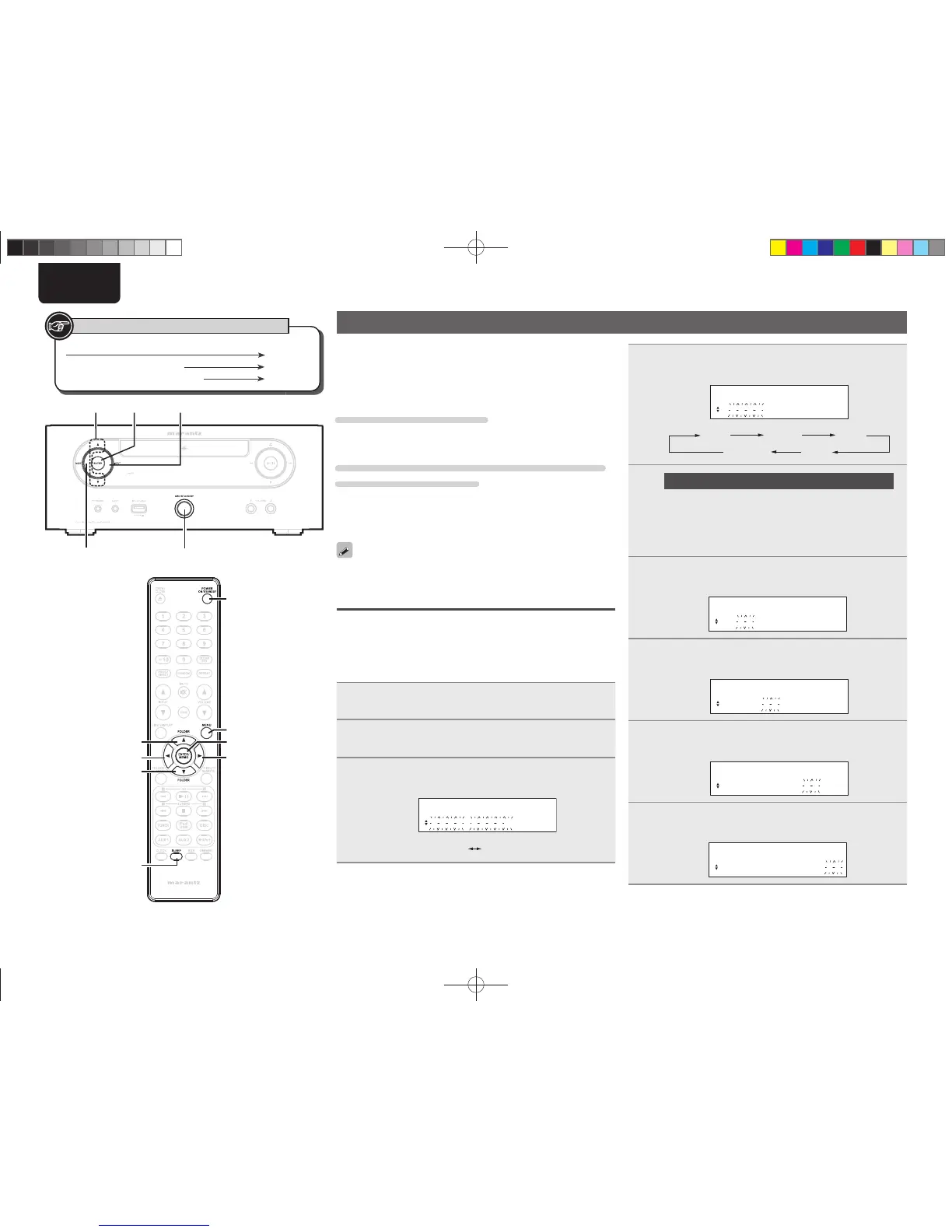
Setting the timer
This device can playback using the timer playback (everyday timer,
once timer) and sleep timer.
n Timer operation when the time settings for
timers overlap
When the sleep timer is set
Automatically stops playback after the time set for the sleep timer
has elapsed.
When the once timer and everyday timer are both
set (sleep timer is not set)
• Automatically starts playback at the earlier timer start time set for
either of the timers.
• Automatically stops playback at the earlier timer stop time set for
either of the timers.
If the current time is not set, enter timer setting mode to get time
setting mode.
Setting the timer
• Everyday timer (“EVERY DAY”)
Playback starts and stops (the power standby) at the set times each
day.
• Once timer (“ONCE”)
Playback starts and stops (the power standby) once only at the set
times.
1
Press [MENU] or press <MODE> for 3 or more
seconds.
2
Use ui to select “TIMER SETUP”, then press
[ENTER/MEMO], [p] or <ENTER>.
3
Use ui to select the timer mode, then press
[ENTER/MEMO], [p] or <ENTER>.
MODE SELECT
ONCE TIMER
ONCE
EVERYDAY
u
/
i
<ENTER> <INPUT>
ON/STANDBY
<MODE>
ON/STANDBY
[SLEEP]
[ENTER/MEMO]
[p]
[MENU]
i
[o]
u
Button located on both the main unit and the remote control
BUTTON
Button only on the main unit
<BUTTON>
Button only on the remote control
[BUTTON]
Symbols used to indicate buttons in this guide
4
Use ui to select the input source, then press
[ENTER/MEMO], [p] or <ENTER>.
INPUT SELECT
DISC
DISC TUNER AUX1
iPod/USB AUX2
5
Only when the “TUNER” function is selected
Use ui to select the preset number, then press
[ENTER/MEMO], [p] or <ENTER>.
• When no name has been registered for the selected preset
number, the program service or frequency appears after the
preset number is displayed.
6
Use ui to select “hours” for the timer start time,
then press [ENTER/MEMO], [p] or <ENTER>.
ON TIME
10:00> 00:00
7
Use ui to select “minutes” for the timer start
time, then press [ENTER/MEMO], [p] or <ENTER>.
ON TIME
10:30> 00:00
8
Use ui to select “hours” for the timer stop time,
then press [ENTER/MEMO], [p] or <ENTER>.
OFF TIME
10:30> 11:00
9
Use ui to select “minutes” for the timer stop time,
then press [ENTER/MEMO], [p] or <ENTER>.
OFF TIME
10:30> 11:30
1.M-CR503NENG4th0610.indd261.M-CR503NENG4th0610.indd26 2010/06/1118:24:212010/06/1118:24:21















 To Next Page