14
ENGLISH
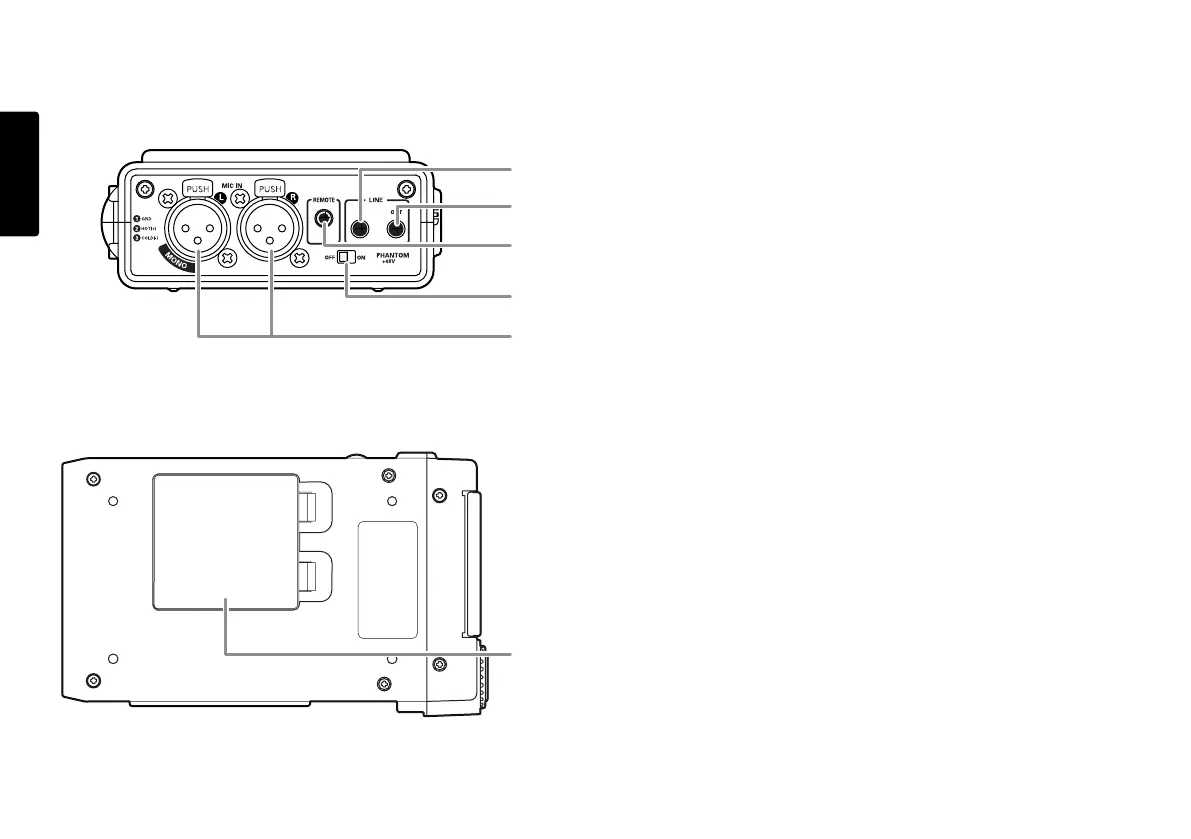
Rear side
26. LINE IN/OUT jack
Plug external line level audio devices in this jack.
a. LINE IN
Plug stereo audio cable in this jack to record from the
output of an external unit.
b. LINE OUT
Plug stereo audio cable in this jack to connect to the
input of an amplifier or other external unit..
Set “Output” of the preset menu to LINE (See Page 44).
27. REMOTE jack
This jack accepts the optional wired remote Marantz
model RC600PMD. Model RC600PMD connects via a
TRRS (Tip Ring Ring Sleeve) connector.
Model RC600PMD permits:
• Starting recording (Same as the REC button).
• Pausing recording (Same as the REC PAUSE button).
• Adding EDL marks (Same as the MARK button).
28. PHANTOM power switch
Switch to on to provide +48V of power for a condenser
microphone(s).
29. MIC IN jacks
Plug external microphones in the MIC IN jacks.
For mono recording, use the Left jack.
30. Battery compartment
Pick and pull to open the Battery compartment.
26-a
26-b
27
28
29
30



 To Next Page