EasyManua.ls Logo

Marantz SR3053 - Connecting Video Components

Marantz SR3053
31 pages
Print Icon
To Next Page IconTo Next Page
To Previous Page IconTo Previous Page
Loading...
NAMES AND
FUNCTIONS
10
BASIC
CONNECTIONS
BASIC
OPERATION
ADVANCED
CONNECTIONS
SETUP
ADVANCED
OPERATION
TROUBLESHOOTING
OTHERS
BASIC
CONNECTIONS
BASIC CONNECTIONS
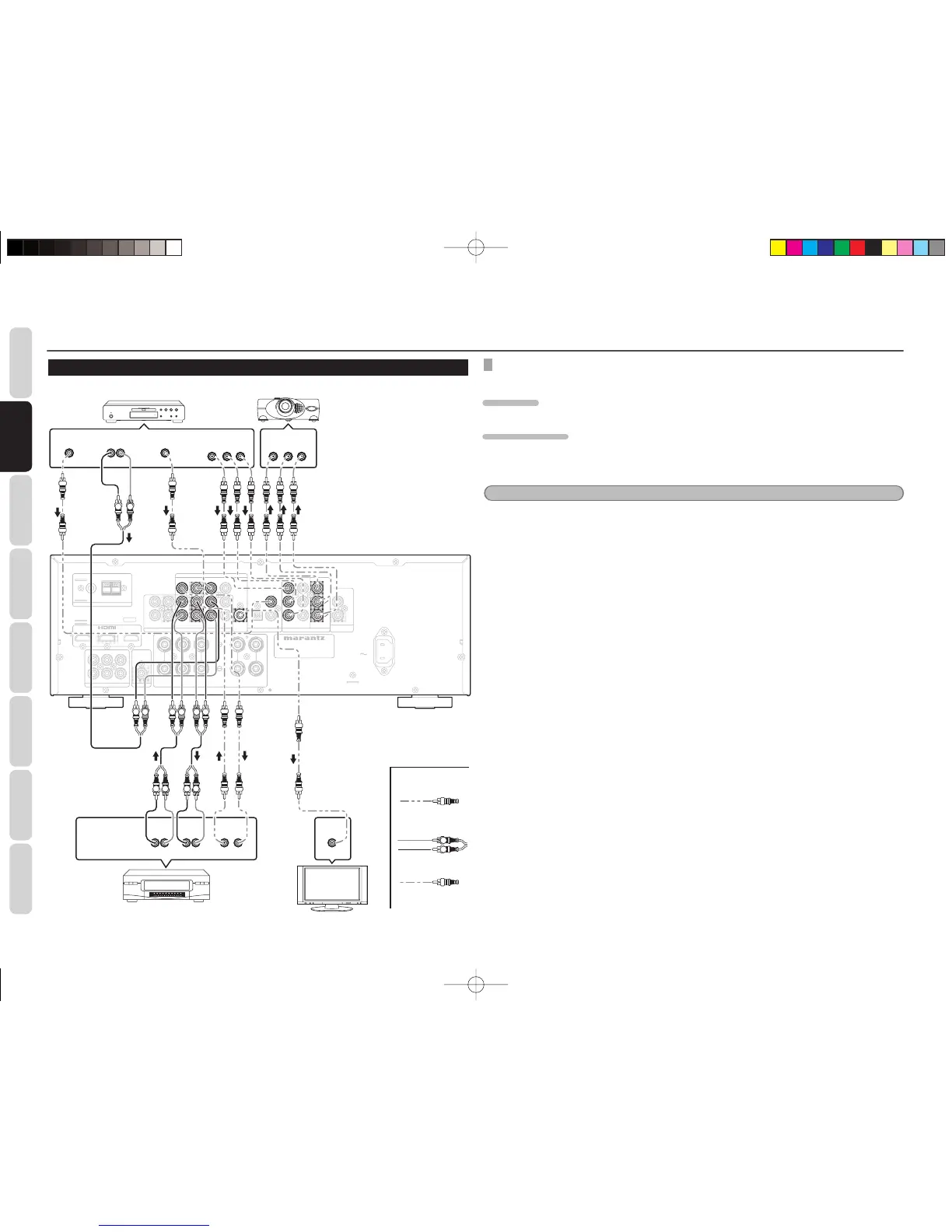
CONNECTING VIDEO COMPONENTS
VIDEO, COMPONENT JACKS
There are 2 types of video jacks on the rear panel.
VIDEO JACK
The video signal for the VIDEO jacks is the conventional composite video signal.
COMPONENT JACK
Make component video connections to a TV or monitor with component inputs to produce higher quality
video images. Use a component video cable or 3 video cable to connect the component video out jacks on
the unit to the monitor.
Notes
Be sure to connect the left and right audio channels properly.
Red connectors are for the R (right) channel, and white connectors are the for L (left) channel.
Be sure to connect the inputs and outputs of the video signals properly.
You may need to setup the digital audio output format of your DVD player, or other digital source components.
Refer to the instructions of the each component connected to the digital input jacks.
• There is no Dolby Digital RF input jack. Use an external RF demodulator with a Dolby Digital decoder to
connect the Dolby Digital RF output jack of the DVD player to the digital input jack on this unit.
MODEL NO. SR3053

MODEL NO . SR3053
AC IN
AC IN
FM
FM
(
(
75
75
Ω
Ω
)
)
GND
GND
AM
AM
ANTENNA
ANTENNA
DVD
DVD
L
L
SL
SL
C
C
R
R
L
L
R
R
L
L
SUB
SUB
WOOFER
WOOFER
R
R
SR
SR
5.1CH INPUT
5.1CH INPUT
PRE OUT
PRE OUT
SW
SW
SURROUND
SURROUND
FRONT
FRONT
MONITOR OUT
MONITOR OUT
BLU-RAY
BLU-RAY
VIDEO
VIDEO
OUT
OUT
IN
IN
L
L
R
R
Y
Y
VCR
VCR
OUT
OUT
DVD
DVD
IN
IN
BLU-RAY
BLU-RAY
VCR
VCR
DVD
DVD
BLU-RAY
BLU-RAY
IN
IN
MONITOR
MONITOR
OUT
OUT
IN
IN
DVD
DVD
BLU-RAY
BLU-RAY
OUT
OUT
REMOTE
REMOTE
CONTROL
CONTROL
ANALOG AUDIO
ANALOG AUDIO
DIGITAL AUDIO IN
DIGITAL AUDIO IN
IN
IN
COMPONENT VIDEO
COMPONENT VIDEO
MONITOR
MONITOR
OUT
OUT
P
P
B
B
C
C
B
B
P
P
R
R
C
C
R
R
SPEAKER SYSTEMS : 6-8 OHMS
CENTER
CENTER
BLU-RAY
BLU-RAY
CD
CD
COAXIAL
COAXIAL
OPTICAL
OPTICAL
DVD
DVD
CD
CD
/
/
TAPE
TAPE
VIDEO
VIDEO
Y
Y
VCR
VCR
OUT
OUT
DVD
DVD
IN
IN
VCR
VCR
DVD
DVD
MONITOR
MONITOR
OUT
OUT
IN
IN
DVD
DVD
ANALOG AUDIO
ANALOG AUDIO
DVD
DVD
MONITOR
MONITOR
OUT
OUT
P
P
B
B
C
C
B
B
P
P
R
R
C
C
R
R
L
L
R
R
COMPONENT VIDEO
COMPONENT VIDEO
DIGITAL AUDIO IN
DIGITAL AUDIO IN
COAXIAL
COAXIAL
LR
AUD IO
OUT
DIGITAL
OUT
VIDEO
OUT
LR
AUDIO
OUT
AUD IO
IN
LR
VIDEO
OUT IN
L R
L R L R LR
YC
B
/
P
B
C
R
/
P
R
COMPONENT
VIDEO OUT
YC
B
/
P
B
C
R
/
P
R
COMPONENT
VIDEO IN
VIDEO
IN
L R L R
L R
DVD player
Video projector
VCR
Video
Analog Audio
Digital Audio
(coaxial)
TV
SR3053S01ENG.indd10SR3053S01ENG.indd10 09.4.2111:46:51AM09.4.2111:46:51AM

Related product manuals