NAMES AND
FUNCTIONS
11
BASIC
CONNECTIONS
BASIC
OPERATION
ADVANCED
CONNECTIONS
SETUP
ADVANCED
OPERATION
TROUBLESHOOTING
OTHERS
BASIC
CONNECTIONS
BASIC CONNECTIONS
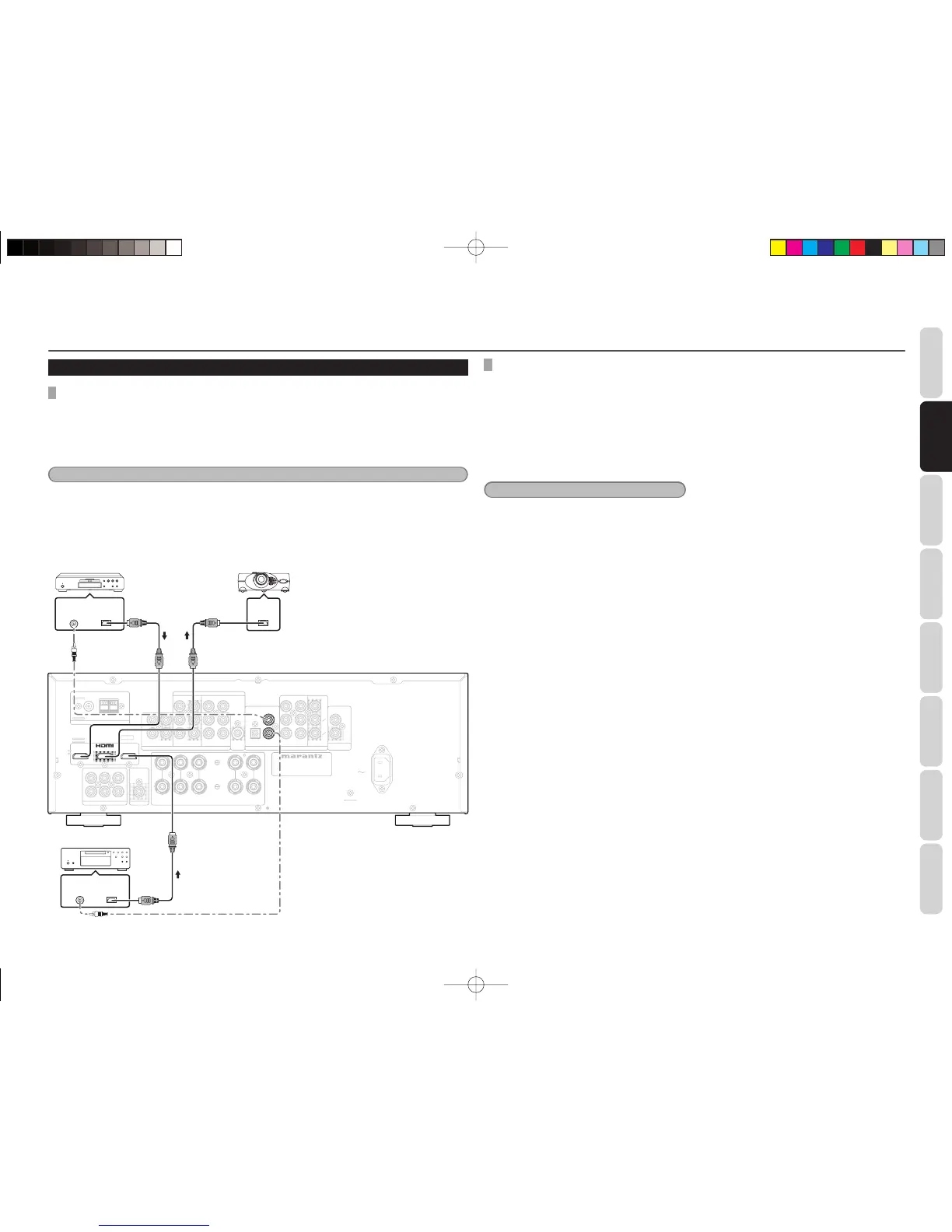
CONNECTING HDMI COMPONENTS
An HDMI cable (sold separately) is used to connect
the HDMI jack on the unit with the HDMI jack
on a Blu-ray disc player, TV, projector or other
component.
HDMI video streaming is compatible with DVI in
principle. Therefore, it is possible to connect to a TV
or monitor that has a DVI terminal using an HDMI-
DVI conversion cable or plug. When connecting to a
DVI terminal, connect the audio signal separately.
Notes
• Some HDMI components can be controlled over
the HDMI cable, but this unit cannot control other
components this way.
• When connected to a monitor (i.e., TV, projector,
etc.) that does not support HDCP, video and
audio are not output.
• DVI cables come with 24-pin and 29-pin plugs.
This unit supports 24-pin DVI-D cables; 29-pin
DVI cables cannot connect to it.
• When multiple components are connected to this
unit, turn power to unused components off to
prevent interference between them.
• Disconnecting or connecting cables with the
power on can damage the equipment. Turn the
power off before disconnecting or connecting
cables.
• If the DVD player or other device with DVI output
is connected to the unit, a separate audio cable
(optical-digital, coaxial digital or analog) is
needed for the audio signals.
• Depending on the quality of the cable used, the
HDMI signal may be affected by noise.
CONNECTING HDMI COMPONENTS
HDMI JACK
This unit has 2 HDMI inputs and one HDMI output. There is only a pass-through mode in HDMI of this unit.
This unit does not support HDMI repeater. So, the sound of HDMI audio is not output from the speaker as
this unit.
When output the sound from the Blu-ray and DVD sources that connects HDMI cable with this unit, a
separate audio cable (coax digital or analog) is needed for the audio signals.
Notes
• When the HDMI output is connected to a display monitor that does not support HDCP*, signals are not output.
To view images in HDMI, it is necessary to connect to a display that supports HDCP*.
• There may be no image output if connected to a TV or display that is not compatible with the above format.
• Refer to the instruction manual of the TV or display to be connected to the unit for detailed information
regarding the HDMI terminal.
* HDCP: High-bandwidth Digital Content Protection
MODEL NO. SR3053


 To Next Page