NAMES AND
FUNCTIONS
22
BASIC
CONNECTIONS
BASIC
OPERATION
ADVANCED
CONNECTIONS
SETUP
ADVANCED
OPERATION
TROUBLESHOOTING
OTHERS
ADVANCED
OPERATION
ADVANCED OPERATION
REMOTE CONTROLLER OPERATION
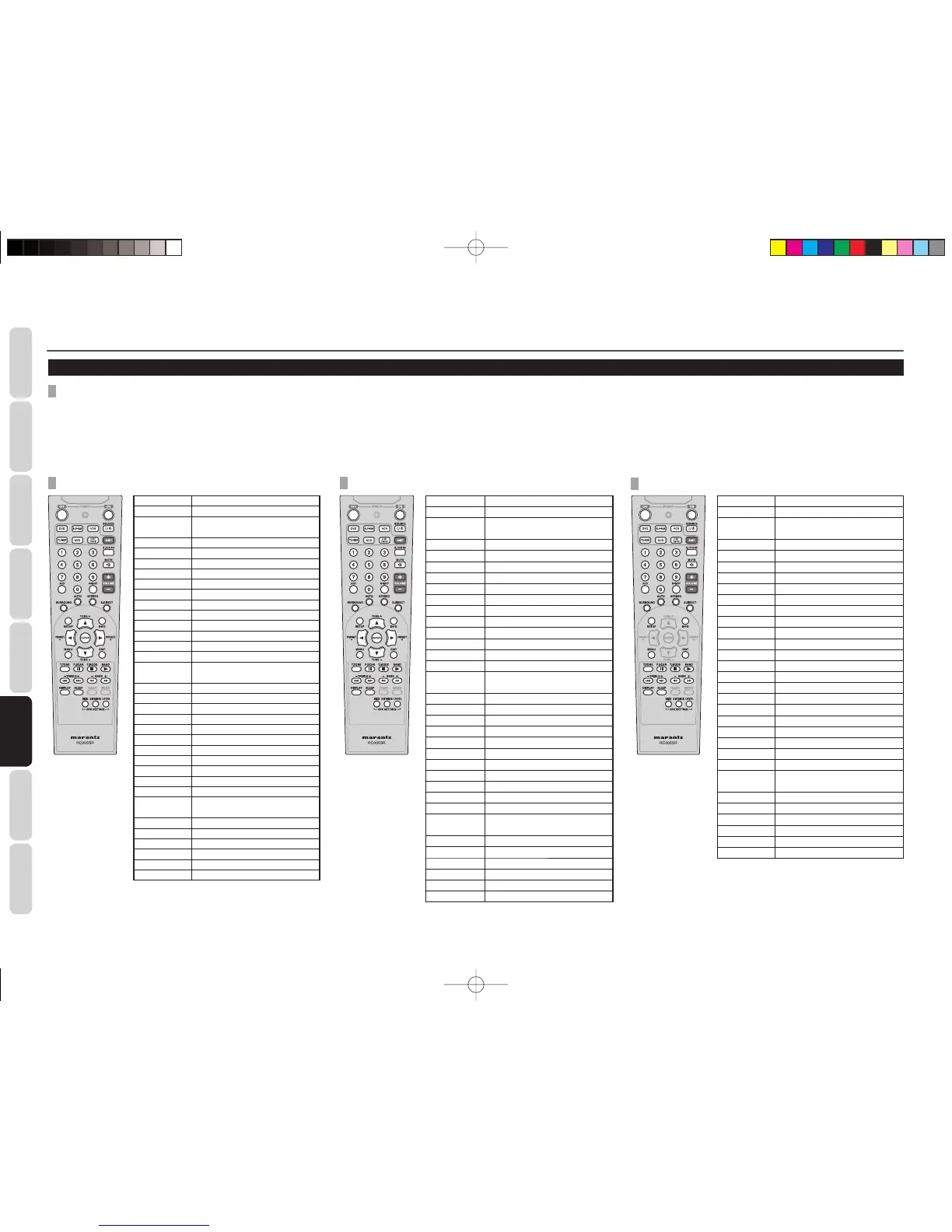
CONTROLLING MARANTZ COMPONENTS
1. Press the desired SOURCE button.
2. Press the desired operation buttons to play the selected component.
• For details, refer to the component’s user guide.
• It may not be possible to operate some models.
POWER ON Turns the BD player on
POWER OFF Turns the BD player off
SOURCE
ON/OFF
Turns the BD player on and off
AMP AMP function enabled
SOURCE AMP function enabled
5.1 CH IN AMP function enabled
MUTE AMP function enabled
VOLUME+/– AMP function enabled
0-9 Inputs the numeric
A/D AMP function enabled
NIGHT AMP function enabled
SURROUND AMP function enabled
AUTO AMP function enabled
STEREO AMP function enabled
S.DIRECT AMP function enabled
SETUP
Calls up the setup menu of the
BD player
INFO Display the information of BD
Cursor Moves the cursor for setting
ENTER Enters the setting
MENU Calls up the menu of BD disc
EXIT Exits from SETUP MENU
T.TONE AMP function enabled
;
PAUSE
9
STOP
u
PLAY
TREBLE –/+ AMP function enabled
BASS –/+ AMP function enabled
∞ / §
Skips forward or previous chapter
/ track
5 / 6 Searches forward or backward
DISPLAY AMP function enabled
SLEEP AMP function enabled
SIZE AMP function enabled
DISTANCE AMP function enabled
LEVEL AMP function enabled
POWER ON Turns the DVD player on
POWER OFF
Turns the DVD player off
SOURCE
ON/OFF
Turns the DVD player on and off
AMP AMP function enabled
SOURCE AMP function enabled
5.1 CH IN AMP function enabled
MUTE AMP function enabled
VOLUME+/-
AMP function enabled
0-9 Inputs the numeric
A/D AMP function enabled
NIGHT AMP function enabled
SURROUND
AMP function enabled
AUTO AMP function enabled
STEREO AMP function enabled
S.DIRECT AMP function enabled
SETUP
Calls up the setup menu of the
DVD player
INFO
Displays the disc information
Cursor Moves the cursor for setting
ENTER Enters the setting
MENU Calls up the menu of DVD disc
EXIT Exits from SETUP MENU
T.TONE AMP function enabled
;
PAUSE
9
STOP
u
PLAY
TREBLE-/+ AMP function enabled
BASS-/+ AMP function enabled
∞ / §
Skips forward or previous chapter
/ track
5 / 6 Searches forward or backward
DISPLAY AMP function enabled
SLEEP AMP function enabled
SIZE AMP function enabled
DISTANCE AMP function enabled
LEVEL AMP function enabled
CONTROLLING A MARANTZ CD/TAPE (CD MODE)
POWER ON Turns the CD player on
POWER OFF
Turns the CD player off
SOURCE
ON/OFF
Turns the CD player on and off
AMP AMP function enabled
SOURCE AMP function enabled
5.1 CH IN AMP function enabled
MUTE AMP function enabled
VOLUME+/-
AMP function enabled
0-9 Inputs the numeric
A/D AMP function enabled
NIGHT AMP function enabled
SURROUND
AMP function enabled
AUTO AMP function enabled
STEREO AMP function enabled
S.DIRECT AMP function enabled
INFO
Displays the disc information
MENU Calls up the menu
EXIT Exits from SETUP MENU
T.TONE AMP function enabled
;
PAUSE
9
STOP
u
PLAY
TREBLE-/+ AMP function enabled
BASS-/+ AMP function enabled
∞ / §
Skips forward or previous chapter
/ track
5 / 6 Searches forward or backward
DISPLAY AMP function enabled
SLEEP AMP function enabled
SIZE AMP function enabled
DISTANCE AMP function enabled
LEVEL AMP function enabled
It isn’t possible to control tape decks.
CONTROLLING A MARANTZ BLU-RAY DISC (BD MODE) CONTROLLING A MARANTZ DVD (DVD MODE)
SR3053S01ENG.indd22SR3053S01ENG.indd22 09.4.2111:46:55AM09.4.2111:46:55AM


 To Next Page