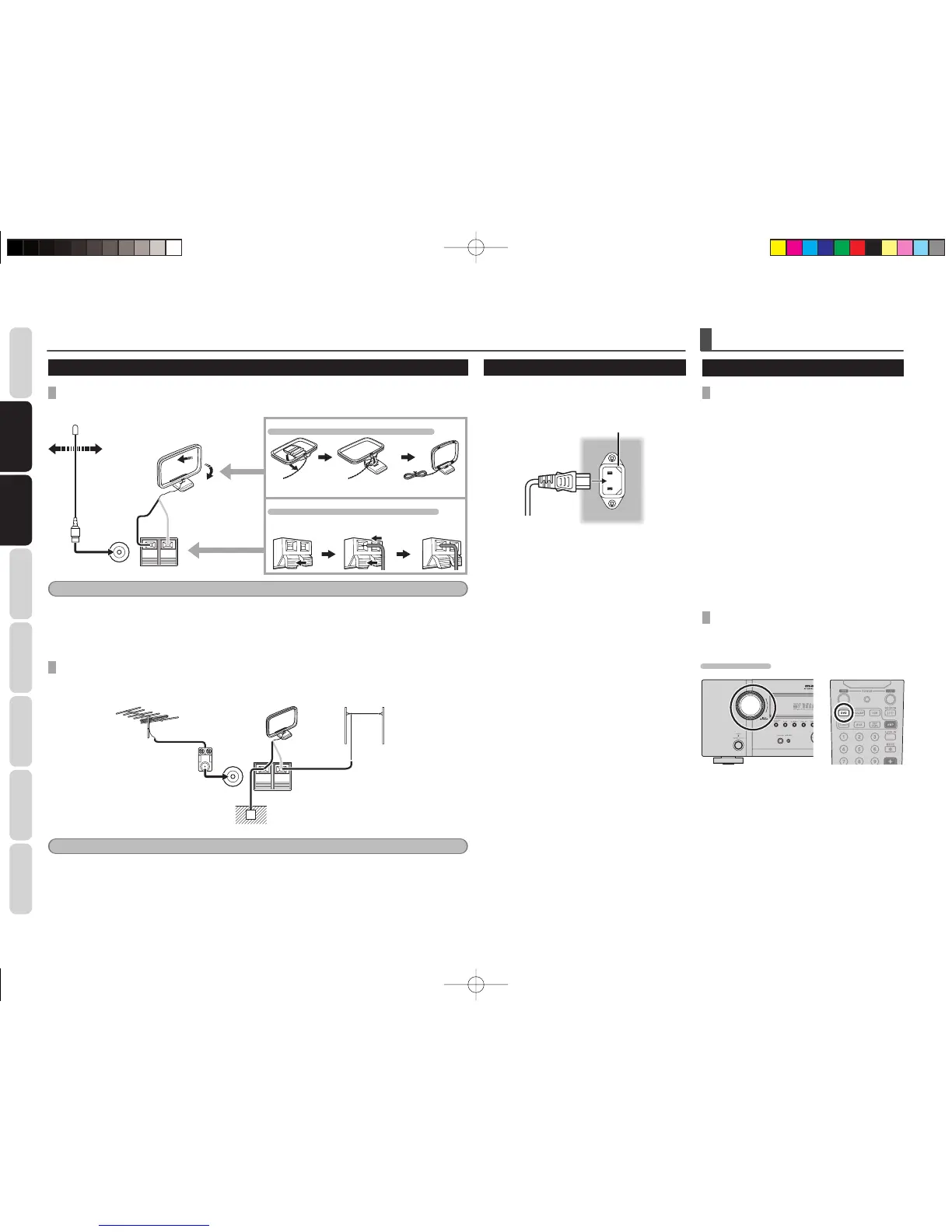
ASSEMBLING THE AM LOOP ANTENNA
Insertting the tabs into the base as shown.
CONNECTING THE AM ANTENNA CABLE
Press and hold Insert wire Release
WhiteBlack
Note
• During use, extend the FM antenna and move it in various directions until the clearest sound is received.
Fix it with push pins or similar implements in that cause the least amount of distortion.
• Set in the direction and position it to where you receive the clearest sound. Put it as far away as possible from
the unit, televisions,speaker cables and power cable.
CONNECTING AN OUTDOOR ANTENNAS
If you experience poor reception quality, an outdoor antenna may improve the quality.
Keep the antenna from noise sources (neon signes, busy roads, power lines, transformers, etc)
FM
FM External
Antenna
AM Loop Antenna
Black
White
Ground
AM External
Antenna
16 to 32ft (5 to 10m)
Vinyl-coated wire
Note
• Do not remove the AM loop antenna.
• Do not connect the supplied FM antenna.
• The terminal marked “GND” on this unit is not for safety grounding.
CONNECTING OF AC POWER CABLE
1. Plug the supplied AC power cable to the
AC IN socket on the rear panel of the main
unit.
AC IN
2. Plug the power cable into an AC outlet.
BASIC OPERATION
AMP OPERATION
TURNING ON THE UNIT
1. Turn the power of the equipment connected
to this unit on.
2. Press the POWER ON/OFF button on the
unit. The power of the main unit switches
on/off each time this button is pressed.
Pressing POWER OFF or SOURCE ON/OFF
after pressing the AMP button on the
remote controller causes the STANDBY
indicator on the unit to light, and the unit to
go into standby mode.
To turn the power on while in standby
mode, press the ENTER button on the unit
or the AMP button on the remote controller,
then press POWER ON or SOURCE ON/
OFF.
SELECTING AN INPUT SOURCE
Before you can listen to any input media, you must
fi rst select the input source on the unit.
EXAMPLE : DVD
To select DVD, turn the INPUT SOURCE knob on
the front panel or press the DVD button on the
remote controller two times in a row.
After you have selected DVD, simply turn on the
DVD player and play the DVD.
• As the input source is changed, the new input
name will appear in the display, on the front-
panel.
• As the input is changed, this unit will automatically
switch to the digital input, surround mode, and
night mode status which were entered during the
confi guration process for that source.
SR3053S01ENG.indd12SR3053S01ENG.indd12 09.4.2111:46:52AM09.4.2111:46:52AM


 To Next Page