ENGLISH
ADVANCED
OPERATION
8---";'-+1
2
.
B~--+1.
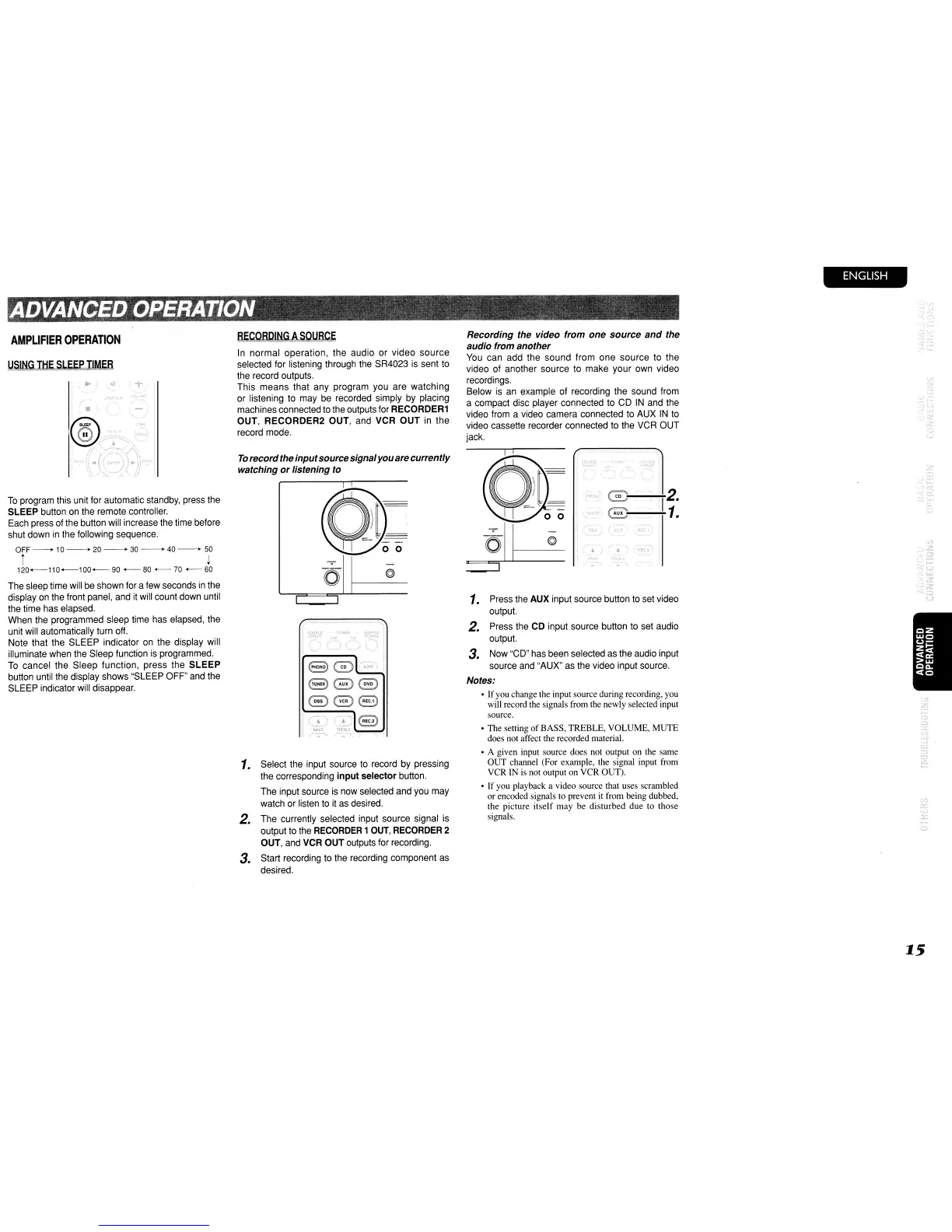
Recording the video from one source
and
the
audio from another
You
can add the sound from one source to the
video of another source to make your own video
recordings.
Below
is
an
example of recording the sound from
a compact disc player connected to
CO
IN
and the
video from a video camera connected to AUX
IN
to
video cassette recorder connected to the VCR OUT
jack.
"0'"
To
recordthe inputsourcesignalyouarecurrently
watching
or
listening to
In
normal operation, the audio
or
video
source
selected for listening through the SR4023
is
sent to
the record outputs.
This means that any program you are watching
or listening to may be recorded simply by placing
machines connected to the outputs for RECORDER1
OUT, RECORDER2 OUT, and VCR OUT in the
record mode.
AMPLIFIER
OPERATION
To
program this unit for automatic standby, press the
SLEEP button on the remote controller.
Each press
of
the button will increase the time before
shut down
in
the following sequence.
OFF
--
10
->
20
->
30
->
40
->
50
i
~
120+-110+-100+-
90
+-
80
+-70
60
see
eee
1.
Select the input source to record by pressing
the corresponding
input
selector button.
The input source is now selected and you may
watch or listen to
it
as
desired.
2. The currently selected input source signal is
output to the
RECORDER
1
OUT,
RECORDER
2
OUT, and VCR OUT outputs for recording.
3. Start recording to the recording component
as
desired.
.;:
• The setting
of
BASS, TREBLE, VOLUME, MUTE
does not affect the recorded material.
• A given input source does not output on the same
OUT channel (For example, the signal input from
VCR
IN
is
not output on VCR OUT).
• If you playback a video source that uses scrambled
or encoded signals to prevent
it
from being dubbed,
the picture itself may be disturbed due to those
signals.
1.
Press the AUX input source button to set video
output.
2. Press the CD input source button to set audio
output.
3. Now "CD" has been selected as the audio input
source and "AUX" as the video input source.
Notes:
• If you change the input source during recording, you
will record the signals from the newly selected input
source.
~.
I
•
A11P
i
The sleep time will be shown for a few seconds
in
the
display on the front panel, and
it
will count down until
the time has elapsed.
When the programmed sleep time has elapsed, the
unit will automatically turn off.
Note that the SLEEP indicator on the display will
illuminate when the Sleep function
is
programmed.
To
cancel the Sleep function, press the
SLEEP
button until the display shows "SLEEP OFF" and the
SLEEP indicator will disappear.
15



 To Next Page