ENGLISH
REMOTE
CONTROLLER
OPERATION
THE
C,QNJRQll
~.fJJNcnoN
TAw.E
+
T
rnaraniZ
ACOO2$A
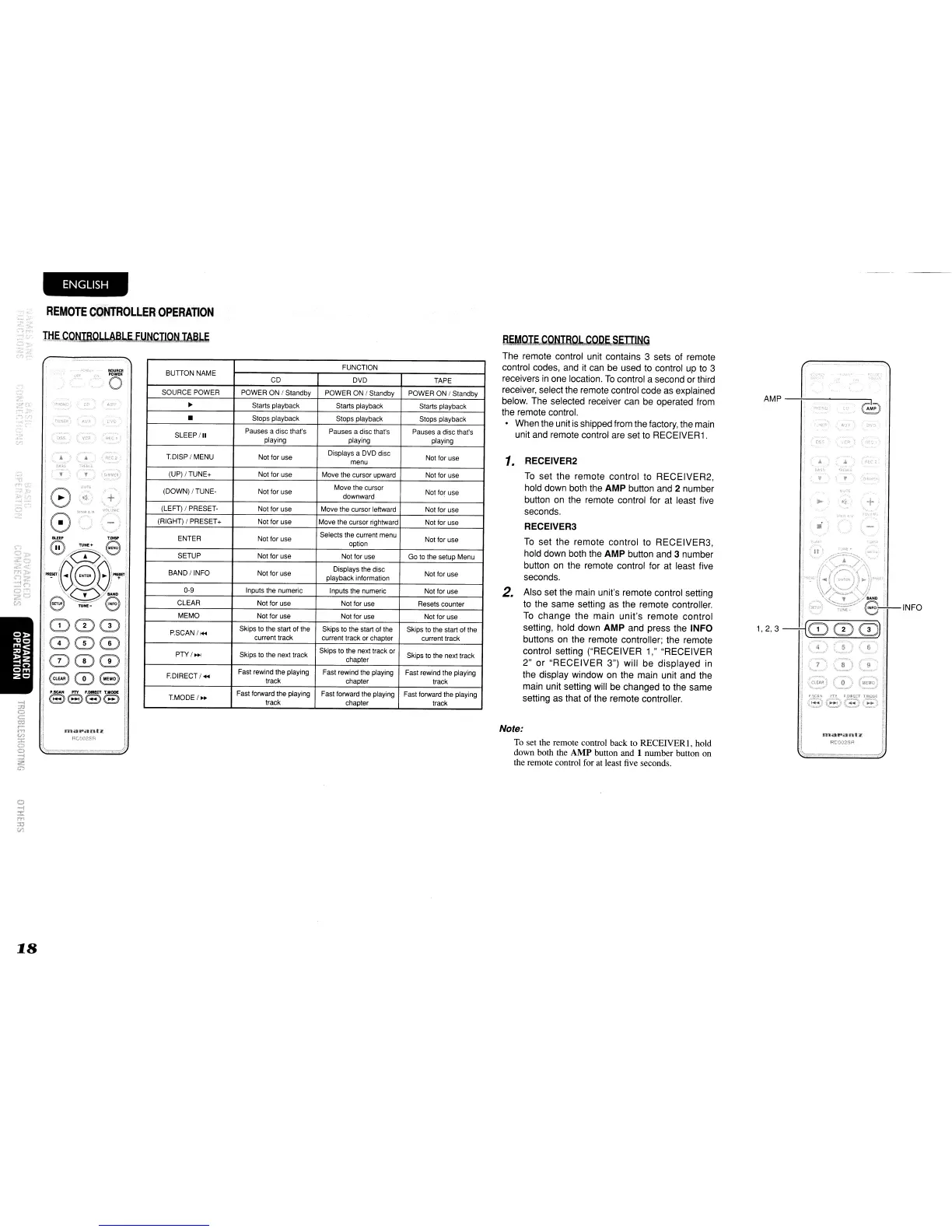
AMP
-+-
..
-
...
-.o----e-,~p
1.
RECEIVER2
To
set the remote control to RECEIVER2,
hold down both the
AMP button and 2 number
button
on
the remote control for at least five
seconds.
RECEIVER3
To
set the remote control to RECEIVER3,
hold down both the
AMP button and 3 number
button
on
the remote control for at least five
seconds.
2. Also set the main unit's remote control setting
to
the same setting
as
the remote controller.
To
change the main unit's remote control
setting, hold down
AMP and press the INFO
buttons
on
the remote controller; the remote
control setting ("RECEIVER 1," "RECEIVER
2" or "RECEIVER 3") will be displayed
in
the display window
on
the main unit and the
main unit setting will be changed to the same
setting as that of the remote controller.
/3.EMQI~CQNIBOL
C0J2f.SWlNg
The remote control unit contains 3 sets of remote
control codes, and
it
can
be
used
to
control up
to
3
receivers
in
one location.
To
control a second or third
receiver, select the remote control code
as
explained
below. The selected receiver can be operated from
the remote control.
When the unit
is
shipped from the factory, the main
unit and remote control are set
to
RECEIVER1.
Note:
To set the remote control back to RECEIVER I, hold
down both the AMP button and 1 number button on
the remote control for at least five seconds.
FUNCTION
BUnONNAME
CD DVD TAPE
SOURCE POWER POWER ON / Standby POWER ON / Standby POWER ON / Standby
~
Starts playback Starts playback Starts playback
•
Stops playback
Stops playback Stops playback
SLEEP/II
Pauses
a
disc
that's
Pauses
a
disc
that's
Pauses
a
disc
that's
playing playing
playing
T.DISP / MENU Not for use
Displays a DVD disc
Not tor use
menu
(UP)/TUNE+
Not for use Move the cursor upward Not for use
(DOWN) / TUNE- Not tor use
Move
the
cursor
Not for use
downward
(LEFT) / PRESET-
Not
for
use
Move the cursor leftward Not tor use
(RIGHT) I PRESET+ Not for use
Move the cursor rightward Not for use
ENTER Not for use
Selects
the
current
menu
Not for use
option
SETUP Not for use Not for use
Go to the setup Menu
BAND/INFO
Not
for
use
Displays the disc
Not
for
use
playback information
O-g
Inputs
the
numeric
Inputs
the
numeric
Not
for
use
CLEAR
Not tor use
Not tor use Resets counter
MEMO Not for use Not for use
Not tor use
P.SCAN/,..
Skips to the start of the Skips
to
the start ot the Skips to the start of the
current
track
current
track
or
chapter
current
track
PTY/..,.
Skips to the next track
Skips to the next track or
Skips
to
the next track
chapter
FDIRECT/..,
Fast rewind the playing Fast rewind the playing Fast rewind the playing
track
chapter track
TMODE/
..
Fast forward the playing
Fast forward the playing Fast forward the playing
track
chapter
track
""
I
r..!flol(~'
I
ana
..
anl'Z,
RCOO2SA
SOURCE
I
o
T
oss
VC~
Jlt.C
I
1808
..
,
"
o
-i
::t
m
:::c
til



 To Next Page