SORTING
PRESET
STATIONS
©
c
If
you have stations memorized, and there is a gap
in
the sequential order:
I.e. the stations are stored as follows
1)
87.5 MHz
2)
93.1
MHz
3)
94.7 MHz
10) 105.9 MHz
Since there are no stations programmed for presets
4-9, you can have preset 10 become preset
4.
To
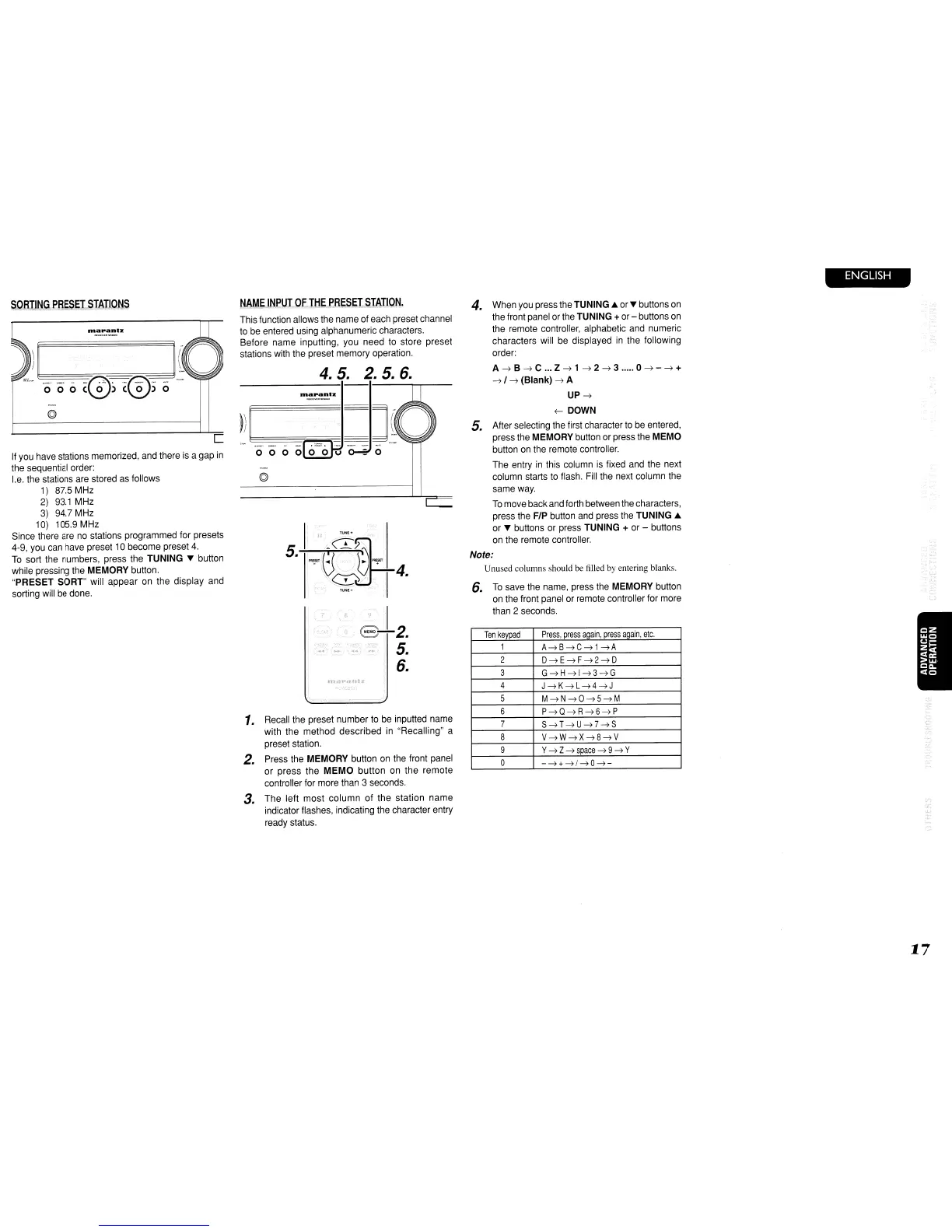
sort the numbers, press the TUNING ... button
while pressing the MEMORY button.
"PRESET SORT" will appear on the display and
sorting will be done.
NAME
INPUT
OF
THE
PRESET
STATION.
This function allows the name ofeach preset channel
to
be entered using alphanumeric characters.
Before name inputting, you need to store preset
stations with the preset memory operation.
4.5.
2.5.6.
ntIapantz.
©
1.
Recall the preset number
to
be inputted name
with the method described in "Recalling" a
preset station.
2.
Press the MEMORY button
on
the front panel
or
press
the
MEMO
button
on the remote
controller for more than 3 seconds.
3.
The
left
most
column
of
the station
name
indicator flashes, indicating the character entry
ready status.
4.
When you press the TUNING ...
or'"
buttons
on
the front panel orthe TUNING +or- buttons on
the remote controller, alphabetic and numeric
characters will be displayed
in
the following
order:
A~B~C
...
Z~1~2~3
.....
0~-~+
~
I
~
(Blank)
~
A
UP~
(-
DOWN
5.
After selecting the first character to be entered,
press the MEMORY button or press the
MEMO
button
on
the remote controller.
The entry
in
this column is fixed and the next
column starts to flash. Fill the next column the
same way.
To
move back and forth between the characters,
press the F/P button and press the TUNING ...
or ... buttons or press TUNING
+ or - buttons
on the remote controller.
Note:
Unused columns should be filled by entering blanks.
6.
To
save the name, press the MEMORY button
on the front panel or remote controller for more
than 2 seconds.
Ten
keypad
Press,
press
again,
press
again,
etc.
1
A~8~C~1~A
2
D~E~F~2~D
3
G~H~I~3~G
4
J~K~L~4~J
5
M~N~O~5~M
6
P~Q~R~6~P
7
S~T~U~7~S
8
V~W~X~8~V
9
Y
~
Z
~space
~
9
~
Y
0
-~+~/~O~-
ENGLISH
17



 To Next Page