ENGLISH
30
BASIC OPERATION
(TUNER)
LISTENING TO THE TUNER
Frequency scan step for AM is selectable.
Default setup is 9 kHz step, if your country’s
standard is 10 kHz step, Press TUNER button on
the remote more than 6 seconds. Scan step will
change.
Note:
•
Preset memory for the tuner will clear by changing
this setup.
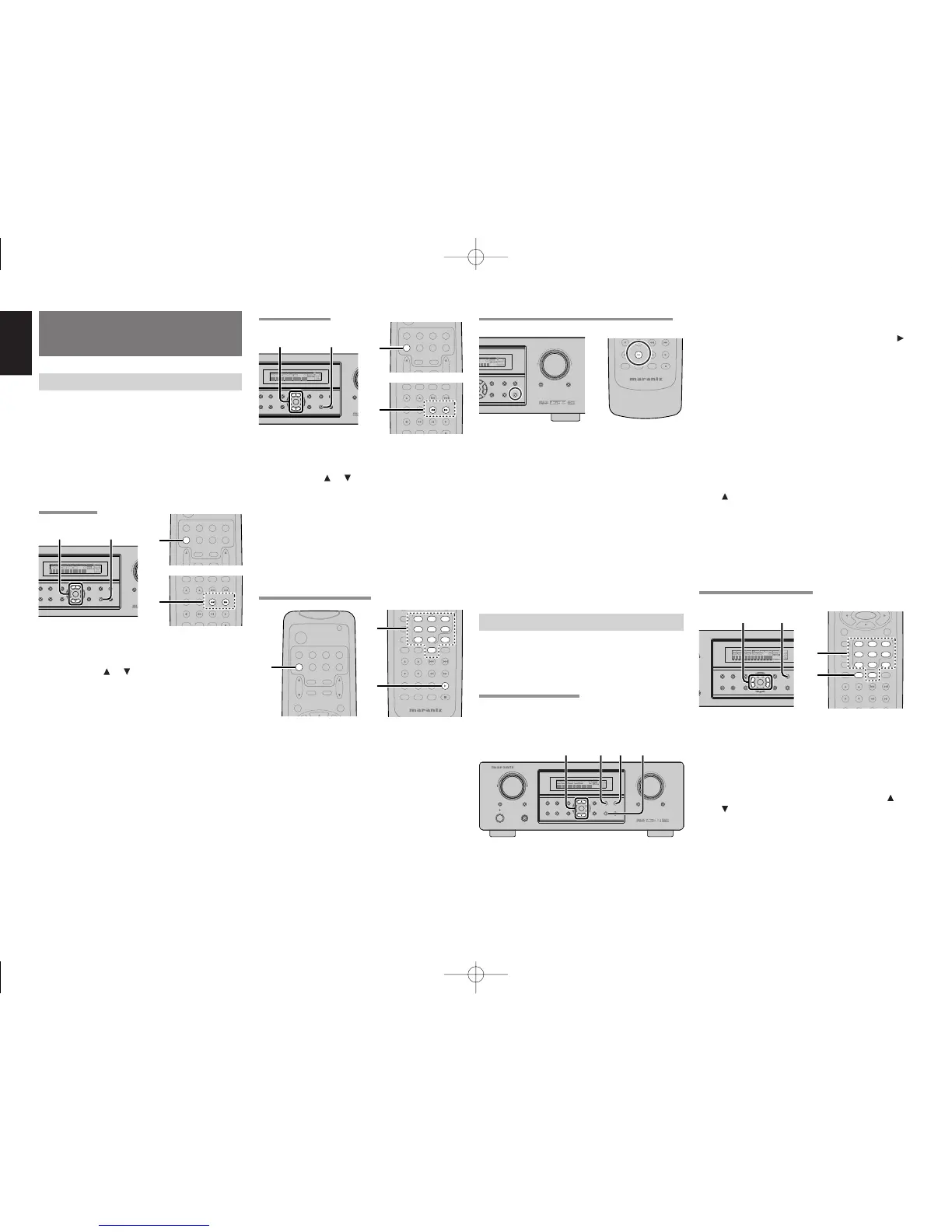
AUTO TUNING
(Using the SR4500)
1.
To select tuner and desired band (FM or AM),
press the BAND button on the front panel.
2.
Press the
or cursor buttons
on the front
panel for more than 1 second to start the auto
tuning function.
3.
Automatic searching begins then stops when
a station is tuned in.
(Using the remote control unit)
1.
To select tuner and desired band (FM or AM),
press the TUNER button twice within in two
seconds on the remote.
2.
Press the
55
55
5 or
66
66
6
for more than 1 second on
the remote.
3.
Automatic searching begins then stops when
a station is tuned in.
If tuning does not stop at the desired station, use
to the “Manual tuning” operation.
MANUAL TUNING
(Using the SR4500)
1.
To select tuner and desired band (FM or AM),
press the BAND button on the front panel
2.
Press the
or cursor buttons
on the front
panel to select the desired station.
(Using the remote control unit)
1.
To select tuner and desired band (FM or AM),
press the TUNER button twice within in two
seconds on the remote.
2.
Press the
55
55
5 or
66
66
6 on the remote to tune in the
desired station.
DIRECT FREQUENCY CALL
1.
To select tuner and desired band (FM or AM),
press the TUNER button twice within two
seconds on the remote.
2.
Press the F.DIRECT on the remote, display will
show “FREQ - - - -”.
3.
Input your desired station’s frequency with the
numeric buttons on the remote.
4.
The desired station will automatically be tuned.
(FM) TUNING MODE (AUTO STEREO OR MONO)
When in the auto stereo mode, AUTO indicator will
be illuminated on the display.
The “ST” indicator is illuminated when a stereo
broadcast is tuned in.
At open frequencies, the noise is muted and the
“TUNED” and “ST” indicators are not illuminated.
If the signal is weak, it may be difficult to tune into the
station in stereo. In such a case, press the T-MODE
button on the front panel or remote.
“AUTO” indicator is not illuminated, if FM stereo
broadcasts are received in monaural and the “ST”
indicator is not illuminated.
To return to auto stereo mode, press the T-MODE
button or press T-MODE button on the remote again.
AUTO indicator is illuminated on the display.
PRESET MEMORY
With this unit you can preset up to 50 FM/AM stations
in any order.
For each station, you can memorize the frequency
and reception mode if desired.
AUTO PRESET MEMORY
This function automatically scans the FM and AM
band and enters all stations with proper signal
strength into the memory.
1.
To select FM , press the BAND button on the
front panel.
2.
While pressing the MEMO button, press the
cursor button.
“AUTO PRESET” will appear on the display,
and scanning starts from the lowest frequency.
3.
Each time the tuner finds a station, scanning
will pause and the station will be played for five
seconds.
During this time, the following operations are
possible.
The band can be changed by the BAND button.
4.
If no button is pressed during this period, the
current station is memorized in location Preset
02.
If you wish to skip the current station, press the
cursor button during this period, this station
is skipped and auto presetting continues.
5.
Operation stops automatically when all 50
preset memory positions are filled or when
auto scanning attains the highest end of all
bands. If you desire to stop the auto preset
memory at anytime, press the CLEAR button.
MANUAL PRESET MEMORY
(Using the SR4500)
1.
Tune into the radio station you desire (Refer to
the “MANUAL TUNING” or “AUTO TUNING”
section).
2.
Press the MEMO button on the front panel. “– –“
(preset number) starts blinking on the display.
3.
Select the preset number by pressing the
or
cursor
buttons, while this is still blinking
(approx. 5 seconds)
4.
Press the MEMO button again to enter. The
display stops blinking.
The station is now stored in the specified
preset memory location.



 To Next Page