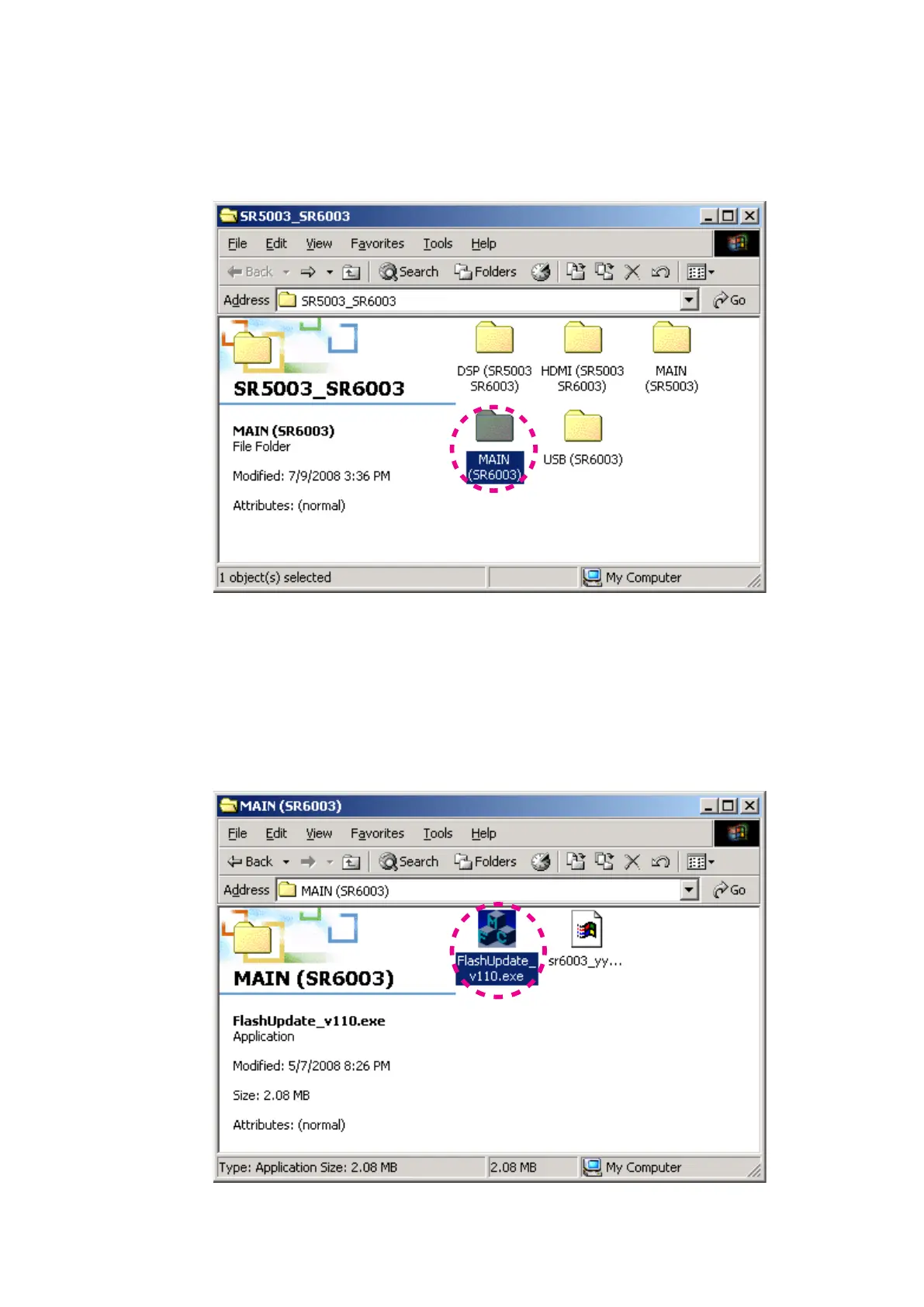
Mode 1: Update/Download MAIN CPU’s software to
internal Flash-ROM
Update/Download software for MAIN CPU (Mode 1)
Put the "MAIN (SR6003)" folder into anywhere on your 1.
PC's hard disc.
Connect RS-232C on the rear panel of the unit and
2.
Serial Port of windows PC with RS-232C cable.
Connect the mains cord into the unit.3.
And press the 4. POWER ON/OFF (STANDBY) button for
turn on the unit.
Double click the FlashUpdate_v110.exe. And launch the 5.
Flash Update.
Mode 1: Update/Download MAIN CPU's software to
internal Flash-ROM
Upd
ate/Downloa
d software for MAIN CPU (Mode 1)
"MAIN (SR6003)"
フォルダをPCの任意のフォルダにコピ1.
ーします。
本機のリアパネルにある
RS-232CコネクタとWindows 2.
PC
のSerialポートをRS-232Cケーブルで接続します。
本機に電源ケーブルを差します。
3.
本機の4. POWER ON/OFF (STANDBY)ボタンを押して電源
を入れます。
FlashUpdate_v110.exeをダブルクリックし、Flash 5.
Update
を起動します。



 To Next Page