47 48
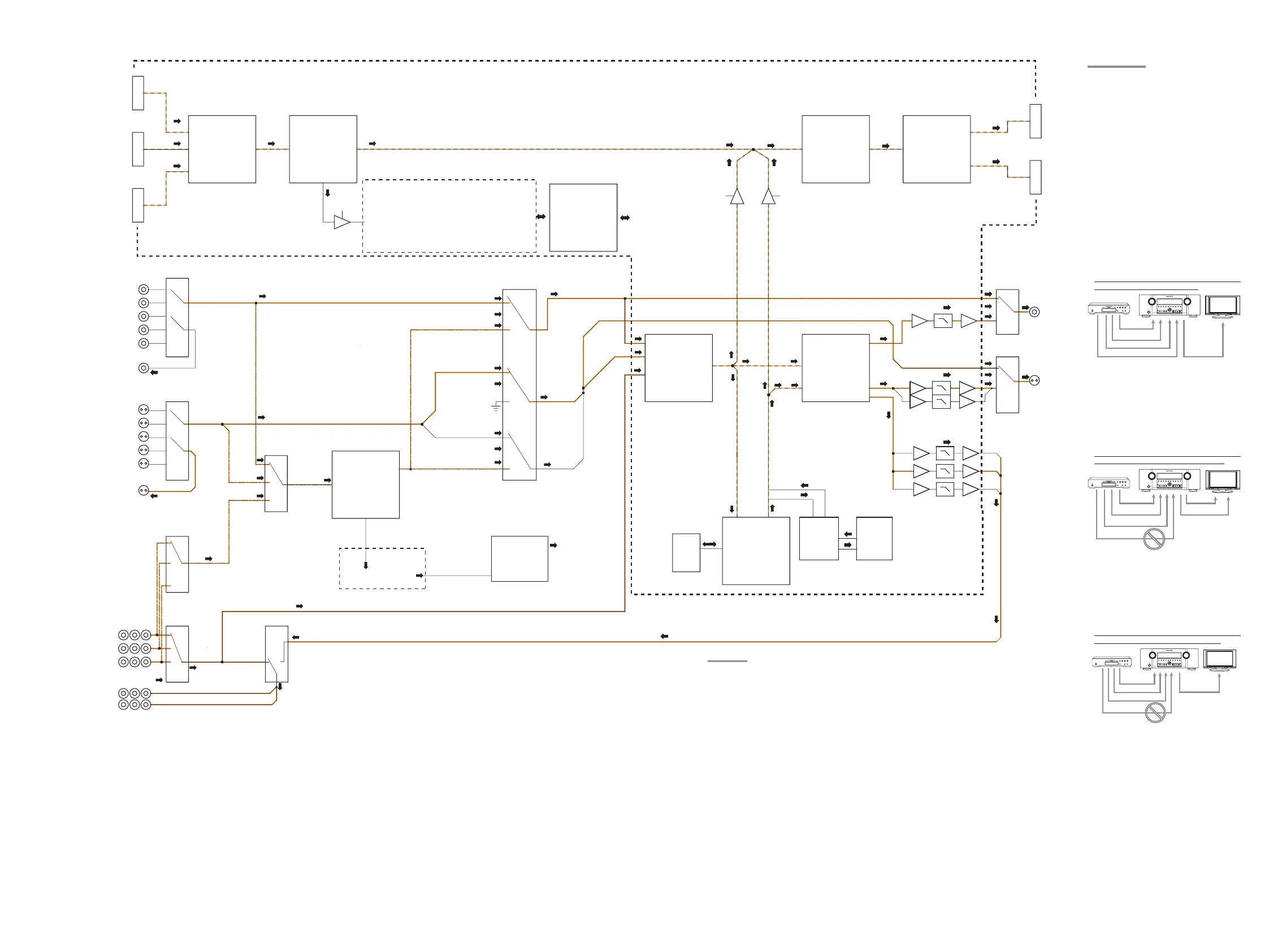
HDMI1-IN
HDMI2-IN
HDMI3-IN
TMDS SW
SiI9185A
HDMI Rx
HDMI Part
VIDEO Part
SiI9135CTU
HDMI Tx
SiI9134CTU
TMDS SW
TMDS442
HDMI1-OUT
HDMI2-OUT
DSP Part
[CVBS]
[Y/C]
75 ohm
75 ohm
75 ohm
COMP OUT2
COMP OUT1
COMP3
COMP2
COMP1
COMP Y[SYNC]
4051+TR
75 ohm
VCR1 REC OUT
DSS
VCR1
DVD
TV
AUX
AN15881A [1/3]
CVBS_IN
VCR1 REC OUT
DSS
VCR1
DVD
TV
AUX
Y/C_IN
AN15881A [2/3]
75 ohm
AN15881A [3/3]
CVBS
Y/C
NJM2535
OSD
SYNC DET
SYNC DET[V_SYNC]
OSD_OUT[Y]
Y THRU
Y/Cb/Cr THRU
Y/Cb/Cr CONVERT Y/Cb/Cr CONVERT
Y/Cb/Cr CONVERT
CVBS CONVERT
Y/C CONVERT
C_MUTE
C THRU
Y/C THRU
CVBS OSD
CVBS THRU
NJM2285
SDRAM
IPOOC773
IPSD2
I/P Scaler
VIDEO A/D
ADV7403
VIDEO D/A
ADV7342
GUI
SC_CLK
POCLKO
VCX541 BUS SW
VCX541
CVBS
Y/C
Y/Cb/Cr
CVBS
Y/C
Y/Cb/Cr
Y
NJM2244
NJM2244[Y]
NJM2264[C]
HDMI MCU
R5F212AASNFP
MAIN MCU
OSD_OUT[Y]
Y_OSD
CVBS THRU/OSD_OUT[Y] CVBS THRU
C THRU/MUTE
Y THRU/OSD_OUT[Y]
LC74782
SR6003 : W9864G2GH6
SR5003 : M12L64164A-5TG
MONITOR OUT
MONITOR OUT
CVBS_SEL
Y/C_SEL
NJM2586A
Y/Cb/Cr
Y/Cb/Cr
COMP IN
TC74HC4094FN
MCU_EX
OSD CLK/DATA, CE_EX
C_MUTE, Y_OSD, CVBS_OSD
Y/C SEL, CVBS SEL
RESET : HDMI MCU, ADV7403, IPOOC773
MAIN MCU
RESET
SDA2/SCL2
: SiI9185A/9134CTU/9135CTU
: SiI9185A/9134CTU/9135CTU, TMDS442
SDA1/SCL1
: HDMI MCU, ADV7403, ADV7342
OSD CLK/DATA,CE_EX
: LC74782
OB
(SR6003 only)
(SR6003 only)
TC7HBL6125
(SR6003 only)
NB3N502
(SR6003 only)
HDMI DSD
SPDIF
45
ENGLISH
BASIC
CONNECTIONS
BASIC OPERATION
ADVANCED
CONNECTIONS
SETUP
ADVANCED
OPERATION
TROUBLESHOOTING
OTHERS
NAMES AND
FUNCTION
ADVANCED
OPERATION
Notes:
• The HDMI video signal input from the playback
device is not output from the COMPONENT
VIDEO MONITOR OUT terminal of the unit.
Notes of OSD menu system:
• The setup menu can be displayed through all
video out terminals (“HDMI”, “COMPONENT”,
“SVIDEO” and “VIDEO”).
• OSD information is output only to the VIDEO and
S-VIDEO MONITOR OUT terminals.
OSD information is also output when the video
conversion feature is on and the video signal input
to the VIDEO or S-VIDEO input jack of the unit
is converted and output from the COMPONENT
VIDEO or HDMI MONITOR OUT terminals.
I/P CONVERT
The video circuit of the unit is equipped with an I/P
conversion feature.
When this feature is on, 480i/576i analog video
signals (VIDEO, S-VIDEO or COMPONENT VIDEO)
input from a playback device can be converted
to 480p/576p and progressively output to the
COMPONENT VIDEO or HDMI MONITOR OUT
terminals of the unit.
(For setting instructions, see page 36)
Note:
When a monitor is connected to the HDMI MONITOR
OUT terminal, and HDMI RESOLUTION is set to
720p, 1080i, 1080p, or AUTO, the I/P CONVERT for
COMPONENT VIDEO OUTPUT does not function.
HDMI OUT
HDMI OUTPUT 1 or 2 can be selected and used
with this unit.
Each time the HDMI button on the remote controller
is pressed, OUTPUT 1 is switched to OUTPUT 2 or
vice versa.
HDMI OUT 1 and HDMI OUT 2 cannot be output
simultaneously.
HDMI-O = OUT1
CONNECTION EXAMPLE
• When a monitor is connected to the HDMI
MONITOR OUT terminal of the unit
VIDEO
or S-VIDEO
or component
HDMI
or HDMI
Notes:
• If the resolution of the component video signal input
from the playback device is other than 480i/576i,
480p/576P, 1080i or 720p, images are not output
from the HDMI MONITOR OUT terminal of the
unit.
• If the resolution of the S-Video or Video signal input
from the playback device is other than 480i/576i,
images are not output from the HDMI MONITOR
OUT terminal of the unit.
• When a monitor is connected to the VIDEO or S-
VIDEO MONITOR OUT terminals of the unit
VIDEO
or S-VIDEO
VIDEO
or S-VIDEO
or component
HDMI
Notes:
• The HDMI video signal input from the playback
device is not output from the VIDEO or S-VIDEO
MONITOR OUT terminals of the unit.
• If the resolution of the component video signal input
from the playback device is other than 480i/576i,
it is not output from the VIDEO or S-VIDEO
MONITOR OUT terminals of the unit.
• When a monitor is connected to the COMPONENT
VIDEO MONITOR OUT terminal of the unit
VIDEO
or S-VIDEO
component
or component
HDMI
VIDEO CONVERT
ANALOG VIDEO CONVERSION
This unit is equipped to convert video signals
for monitor output. Because of this, indifferent of
the connection (VIDEO, S-VIDEO, COMPONENT
VIDEO) between the playback device and this unit,
listening and viewing are possible with a single
higher grade cable between the MONITOR OUT
terminal of the unit and the monitor.
UP-CONVERSION FROM ANALOG VIDEO
SIGNALS TO HDMI
The up-conversion feature of this unit can output
the input analog video signals (for component video
signals of 480i/576i, 480p/576P, 1080i and 720p
resolution, and S-Video and Video (composite)
of 480i/576i resolution) to the HDMI MONITOR
terminal.
Notes:
• HDMI video input is only output to the HDMI
MONITOR OUT terminal of the unit. If connecting
a playback device such as a DVD player to the
HDMI input jack, connect the HDMI MONITOR
OUT terminal of the unit to a TV monitor.
• This mode is unavailable for the REC out terminal.
• This mode is unavailable for still picture, fast
forward and reverse play on video component.
•
If, while attempting to use the video convert feature,
the unit cannot synchronize with the display device,
“NO SIGNAL” appears on the monitor or noise is
generated, this feature cannot be used. All of these
signs are caused by equipment incompatibility; there
is nothing wrong with the unit.
If this occurs, set “VIDEO CONVERT” in the
“VIDEO SETUP” menu to “DISABLE”. Next,
connect the video input signal to the display component
via the MONITOR OUT terminal under VIDEO and
the S-video input signal to the display component via
the MONITOR OUT terminal under S-VIDEO.
• The video convert feature constantly monitors
input video signals and determines whether to
convert the input signals or not. However, some
input video signals cannot be detected correctly.
If this occurs, set “VIDEO CONVERT” in the
“VIDEO SETUP” menu to “DISABLE”.
HDMI RESOLUTION
This function is used to output the analog video
signal to HDMI as follows.
• 480i/576i signals can be converted to 480p/576p,
1080i, 720p or 1080p signals, while 480p/576p
signals can be converted to 1080i, 720p or 1080p
signals.
• 720p signals can be converted to 1080i or 1080p.
• 1080i signals can be converted to 1080p.
• The output resolution can be set for HDMI OUT 1
and HDMI OUT 2.
Notes:
• Do not set to 1080i, 720p or 1080p when connected
to a monitor that does not support 1080i, 720p or
1080p signals. The SETUP MENU will not be
displayed. If the SETUP MENU is not displayed,
change settings while viewing the main unit display
panel.
• The resolution of analog component output cannot
be changed.
• HDMI OUT 1 and HDMI OUT 2 cannot be output
simultaneously.
SR6003N01ENG33.indd45 08.7.303:25:38PM
45
ENGLISH
BASIC
CONNECTIONS
BASIC OPERATION
ADVANCED
CONNECTIONS
SETUP
ADVANCED
OPERATION
TROUBLESHOOTING
OTHERS
NAMES AND
FUNCTION
ADVANCED
OPERATION
Notes:
• The HDMI video signal input from the playback
device is not output from the COMPONENT
VIDEO MONITOR OUT terminal of the unit.
Notes of OSD menu system:
• The setup menu can be displayed through all
video out terminals (“HDMI”, “COMPONENT”,
“SVIDEO” and “VIDEO”).
• OSD information is output only to the VIDEO and
S-VIDEO MONITOR OUT terminals.
OSD information is also output when the video
conversion feature is on and the video signal input
to the VIDEO or S-VIDEO input jack of the unit
is converted and output from the COMPONENT
VIDEO or HDMI MONITOR OUT terminals.
I/P CONVERT
The video circuit of the unit is equipped with an I/P
conversion feature.
When this feature is on, 480i/576i analog video
signals (VIDEO, S-VIDEO or COMPONENT VIDEO)
input from a playback device can be converted
to 480p/576p and progressively output to the
COMPONENT VIDEO or HDMI MONITOR OUT
terminals of the unit.
(For setting instructions, see page 36)
Note:
When a monitor is connected to the HDMI MONITOR
OUT terminal, and HDMI RESOLUTION is set to
720p, 1080i, 1080p, or AUTO, the I/P CONVERT for
COMPONENT VIDEO OUTPUT does not function.
HDMI OUT
HDMI OUTPUT 1 or 2 can be selected and used
with this unit.
Each time the HDMI button on the remote controller
is pressed, OUTPUT 1 is switched to OUTPUT 2 or
vice versa.
HDMI OUT 1 and HDMI OUT 2 cannot be output
simultaneously.
HDMI-O = OUT1
CONNECTION EXAMPLE
• When a monitor is connected to the HDMI
MONITOR OUT terminal of the unit
VIDEO
or S-VIDEO
or component
HDMI
or HDMI
Notes:
• If the resolution of the component video signal input
from the playback device is other than 480i/576i,
480p/576P, 1080i or 720p, images are not output
from the HDMI MONITOR OUT terminal of the
unit.
• If the resolution of the S-Video or Video signal input
from the playback device is other than 480i/576i,
images are not output from the HDMI MONITOR
OUT terminal of the unit.
• When a monitor is connected to the VIDEO or S-
VIDEO MONITOR OUT terminals of the unit
VIDEO
or S-VIDEO
VIDEO
or S-VIDEO
or component
HDMI
Notes:
• The HDMI video signal input from the playback
device is not output from the VIDEO or S-VIDEO
MONITOR OUT terminals of the unit.
• If the resolution of the component video signal input
from the playback device is other than 480i/576i,
it is not output from the VIDEO or S-VIDEO
MONITOR OUT terminals of the unit.
• When a monitor is connected to the COMPONENT
VIDEO MONITOR OUT terminal of the unit
VIDEO
or S-VIDEO
component
or component
HDMI
VIDEO CONVERT
ANALOG VIDEO CONVERSION
This unit is equipped to convert video signals
for monitor output. Because of this, indifferent of
the connection (VIDEO, S-VIDEO, COMPONENT
VIDEO) between the playback device and this unit,
listening and viewing are possible with a single
higher grade cable between the MONITOR OUT
terminal of the unit and the monitor.
UP-CONVERSION FROM ANALOG VIDEO
SIGNALS TO HDMI
The up-conversion feature of this unit can output
the input analog video signals (for component video
signals of 480i/576i, 480p/576P, 1080i and 720p
resolution, and S-Video and Video (composite)
of 480i/576i resolution) to the HDMI MONITOR
terminal.
Notes:
• HDMI video input is only output to the HDMI
MONITOR OUT terminal of the unit. If connecting
a playback device such as a DVD player to the
HDMI input jack, connect the HDMI MONITOR
OUT terminal of the unit to a TV monitor.
• This mode is unavailable for the REC out terminal.
• This mode is unavailable for still picture, fast
forward and reverse play on video component.
•
If, while attempting to use the video convert feature,
the unit cannot synchronize with the display device,
“NO SIGNAL” appears on the monitor or noise is
generated, this feature cannot be used. All of these
signs are caused by equipment incompatibility; there
is nothing wrong with the unit.
If this occurs, set “VIDEO CONVERT” in the
“VIDEO SETUP” menu to “DISABLE”. Next,
connect the video input signal to the display component
via the MONITOR OUT terminal under VIDEO and
the S-video input signal to the display component via
the MONITOR OUT terminal under S-VIDEO.
• The video convert feature constantly monitors
input video signals and determines whether to
convert the input signals or not. However, some
input video signals cannot be detected correctly.
If this occurs, set “VIDEO CONVERT” in the
“VIDEO SETUP” menu to “DISABLE”.
HDMI RESOLUTION
This function is used to output the analog video
signal to HDMI as follows.
• 480i/576i signals can be converted to 480p/576p,
1080i, 720p or 1080p signals, while 480p/576p
signals can be converted to 1080i, 720p or 1080p
signals.
• 720p signals can be converted to 1080i or 1080p.
• 1080i signals can be converted to 1080p.
• The output resolution can be set for HDMI OUT 1
and HDMI OUT 2.
Notes:
• Do not set to 1080i, 720p or 1080p when connected
to a monitor that does not support 1080i, 720p or
1080p signals. The SETUP MENU will not be
displayed. If the SETUP MENU is not displayed,
change settings while viewing the main unit display
panel.
• The resolution of analog component output cannot
be changed.
• HDMI OUT 1 and HDMI OUT 2 cannot be output
simultaneously.
SR6003N01ENG33.indd45 08.7.303:25:38PM
45
ENGLISH
BASIC
CONNECTIONS
BASIC OPERATION
ADVANCED
CONNECTIONS
SETUP
ADVANCED
OPERATION
TROUBLESHOOTING
OTHERS
NAMES AND
FUNCTION
ADVANCED
OPERATION
Notes:
• The HDMI video signal input from the playback
device is not output from the COMPONENT
VIDEO MONITOR OUT terminal of the unit.
Notes of OSD menu system:
• The setup menu can be displayed through all
video out terminals (“HDMI”, “COMPONENT”,
“SVIDEO” and “VIDEO”).
• OSD information is output only to the VIDEO and
S-VIDEO MONITOR OUT terminals.
OSD information is also output when the video
conversion feature is on and the video signal input
to the VIDEO or S-VIDEO input jack of the unit
is converted and output from the COMPONENT
VIDEO or HDMI MONITOR OUT terminals.
I/P CONVERT
The video circuit of the unit is equipped with an I/P
conversion feature.
When this feature is on, 480i/576i analog video
signals (VIDEO, S-VIDEO or COMPONENT VIDEO)
input from a playback device can be converted
to 480p/576p and progressively output to the
COMPONENT VIDEO or HDMI MONITOR OUT
terminals of the unit.
(For setting instructions, see page 36)
Note:
When a monitor is connected to the HDMI MONITOR
OUT terminal, and HDMI RESOLUTION is set to
720p, 1080i, 1080p, or AUTO, the I/P CONVERT for
COMPONENT VIDEO OUTPUT does not function.
HDMI OUT
HDMI OUTPUT 1 or 2 can be selected and used
with this unit.
Each time the HDMI button on the remote controller
is pressed, OUTPUT 1 is switched to OUTPUT 2 or
vice versa.
HDMI OUT 1 and HDMI OUT 2 cannot be output
simultaneously.
HDMI-O = OUT1
CONNECTION EXAMPLE
• When a monitor is connected to the HDMI
MONITOR OUT terminal of the unit
VIDEO
or S-VIDEO
or component
HDMI
or HDMI
Notes:
• If the resolution of the component video signal input
from the playback device is other than 480i/576i,
480p/576P, 1080i or 720p, images are not output
from the HDMI MONITOR OUT terminal of the
unit.
• If the resolution of the S-Video or Video signal input
from the playback device is other than 480i/576i,
images are not output from the HDMI MONITOR
OUT terminal of the unit.
• When a monitor is connected to the VIDEO or S-
VIDEO MONITOR OUT terminals of the unit
VIDEO
or S-VIDEO
VIDEO
or S-VIDEO
or component
HDMI
Notes:
• The HDMI video signal input from the playback
device is not output from the VIDEO or S-VIDEO
MONITOR OUT terminals of the unit.
• If the resolution of the component video signal input
from the playback device is other than 480i/576i,
it is not output from the VIDEO or S-VIDEO
MONITOR OUT terminals of the unit.
• When a monitor is connected to the COMPONENT
VIDEO MONITOR OUT terminal of the unit
VIDEO
or S-VIDEO
component
or component
HDMI
VIDEO CONVERT
ANALOG VIDEO CONVERSION
This unit is equipped to convert video signals
for monitor output. Because of this, indifferent of
the connection (VIDEO, S-VIDEO, COMPONENT
VIDEO) between the playback device and this unit,
listening and viewing are possible with a single
higher grade cable between the MONITOR OUT
terminal of the unit and the monitor.
UP-CONVERSION FROM ANALOG VIDEO
SIGNALS TO HDMI
The up-conversion feature of this unit can output
the input analog video signals (for component video
signals of 480i/576i, 480p/576P, 1080i and 720p
resolution, and S-Video and Video (composite)
of 480i/576i resolution) to the HDMI MONITOR
terminal.
Notes:
• HDMI video input is only output to the HDMI
MONITOR OUT terminal of the unit. If connecting
a playback device such as a DVD player to the
HDMI input jack, connect the HDMI MONITOR
OUT terminal of the unit to a TV monitor.
• This mode is unavailable for the REC out terminal.
• This mode is unavailable for still picture, fast
forward and reverse play on video component.
•
If, while attempting to use the video convert feature,
the unit cannot synchronize with the display device,
“NO SIGNAL” appears on the monitor or noise is
generated, this feature cannot be used. All of these
signs are caused by equipment incompatibility; there
is nothing wrong with the unit.
If this occurs, set “VIDEO CONVERT” in the
“VIDEO SETUP” menu to “DISABLE”. Next,
connect the video input signal to the display component
via the MONITOR OUT terminal under VIDEO and
the S-video input signal to the display component via
the MONITOR OUT terminal under S-VIDEO.
• The video convert feature constantly monitors
input video signals and determines whether to
convert the input signals or not. However, some
input video signals cannot be detected correctly.
If this occurs, set “VIDEO CONVERT” in the
“VIDEO SETUP” menu to “DISABLE”.
HDMI RESOLUTION
This function is used to output the analog video
signal to HDMI as follows.
• 480i/576i signals can be converted to 480p/576p,
1080i, 720p or 1080p signals, while 480p/576p
signals can be converted to 1080i, 720p or 1080p
signals.
• 720p signals can be converted to 1080i or 1080p.
• 1080i signals can be converted to 1080p.
• The output resolution can be set for HDMI OUT 1
and HDMI OUT 2.
Notes:
• Do not set to 1080i, 720p or 1080p when connected
to a monitor that does not support 1080i, 720p or
1080p signals. The SETUP MENU will not be
displayed. If the SETUP MENU is not displayed,
change settings while viewing the main unit display
panel.
• The resolution of analog component output cannot
be changed.
• HDMI OUT 1 and HDMI OUT 2 cannot be output
simultaneously.
SR6003N01ENG33.indd45 08.7.303:25:38PM
45
ENGLISH
BASIC
CONNECTIONS
BASIC OPERATION
ADVANCED
CONNECTIONS
SETUP
ADVANCED
OPERATION
TROUBLESHOOTING
OTHERS
NAMES AND
FUNCTION
ADVANCED
OPERATION
Notes:
• The HDMI video signal input from the playback
device is not output from the COMPONENT
VIDEO MONITOR OUT terminal of the unit.
Notes of OSD menu system:
• The setup menu can be displayed through all
video out terminals (“HDMI”, “COMPONENT”,
“SVIDEO” and “VIDEO”).
• OSD information is output only to the VIDEO and
S-VIDEO MONITOR OUT terminals.
OSD information is also output when the video
conversion feature is on and the video signal input
to the VIDEO or S-VIDEO input jack of the unit
is converted and output from the COMPONENT
VIDEO or HDMI MONITOR OUT terminals.
I/P CONVERT
The video circuit of the unit is equipped with an I/P
conversion feature.
When this feature is on, 480i/576i analog video
signals (VIDEO, S-VIDEO or COMPONENT VIDEO)
input from a playback device can be converted
to 480p/576p and progressively output to the
COMPONENT VIDEO or HDMI MONITOR OUT
terminals of the unit.
(For setting instructions, see page 36)
Note:
When a monitor is connected to the HDMI MONITOR
OUT terminal, and HDMI RESOLUTION is set to
720p, 1080i, 1080p, or AUTO, the I/P CONVERT for
COMPONENT VIDEO OUTPUT does not function.
HDMI OUT
HDMI OUTPUT 1 or 2 can be selected and used
with this unit.
Each time the HDMI button on the remote controller
is pressed, OUTPUT 1 is switched to OUTPUT 2 or
vice versa.
HDMI OUT 1 and HDMI OUT 2 cannot be output
simultaneously.
HDMI-O = OUT1
CONNECTION EXAMPLE
• When a monitor is connected to the HDMI
MONITOR OUT terminal of the unit
VIDEO
or S-VIDEO
or component
HDMI
or HDMI
Notes:
• If the resolution of the component video signal input
from the playback device is other than 480i/576i,
480p/576P, 1080i or 720p, images are not output
from the HDMI MONITOR OUT terminal of the
unit.
• If the resolution of the S-Video or Video signal input
from the playback device is other than 480i/576i,
images are not output from the HDMI MONITOR
OUT terminal of the unit.
• When a monitor is connected to the VIDEO or S-
VIDEO MONITOR OUT terminals of the unit
VIDEO
or S-VIDEO
VIDEO
or S-VIDEO
or component
HDMI
Notes:
• The HDMI video signal input from the playback
device is not output from the VIDEO or S-VIDEO
MONITOR OUT terminals of the unit.
• If the resolution of the component video signal input
from the playback device is other than 480i/576i,
it is not output from the VIDEO or S-VIDEO
MONITOR OUT terminals of the unit.
• When a monitor is connected to the COMPONENT
VIDEO MONITOR OUT terminal of the unit
VIDEO
or S-VIDEO
component
or component
HDMI
VIDEO CONVERT
ANALOG VIDEO CONVERSION
This unit is equipped to convert video signals
for monitor output. Because of this, indifferent of
the connection (VIDEO, S-VIDEO, COMPONENT
VIDEO) between the playback device and this unit,
listening and viewing are possible with a single
higher grade cable between the MONITOR OUT
terminal of the unit and the monitor.
UP-CONVERSION FROM ANALOG VIDEO
SIGNALS TO HDMI
The up-conversion feature of this unit can output
the input analog video signals (for component video
signals of 480i/576i, 480p/576P, 1080i and 720p
resolution, and S-Video and Video (composite)
of 480i/576i resolution) to the HDMI MONITOR
terminal.
Notes:
• HDMI video input is only output to the HDMI
MONITOR OUT terminal of the unit. If connecting
a playback device such as a DVD player to the
HDMI input jack, connect the HDMI MONITOR
OUT terminal of the unit to a TV monitor.
• This mode is unavailable for the REC out terminal.
• This mode is unavailable for still picture, fast
forward and reverse play on video component.
•
If, while attempting to use the video convert feature,
the unit cannot synchronize with the display device,
“NO SIGNAL” appears on the monitor or noise is
generated, this feature cannot be used. All of these
signs are caused by equipment incompatibility; there
is nothing wrong with the unit.
If this occurs, set “VIDEO CONVERT” in the
“VIDEO SETUP” menu to “DISABLE”. Next,
connect the video input signal to the display component
via the MONITOR OUT terminal under VIDEO and
the S-video input signal to the display component via
the MONITOR OUT terminal under S-VIDEO.
• The video convert feature constantly monitors
input video signals and determines whether to
convert the input signals or not. However, some
input video signals cannot be detected correctly.
If this occurs, set “VIDEO CONVERT” in the
“VIDEO SETUP” menu to “DISABLE”.
HDMI RESOLUTION
This function is used to output the analog video
signal to HDMI as follows.
• 480i/576i signals can be converted to 480p/576p,
1080i, 720p or 1080p signals, while 480p/576p
signals can be converted to 1080i, 720p or 1080p
signals.
• 720p signals can be converted to 1080i or 1080p.
• 1080i signals can be converted to 1080p.
• The output resolution can be set for HDMI OUT 1
and HDMI OUT 2.
Notes:
• Do not set to 1080i, 720p or 1080p when connected
to a monitor that does not support 1080i, 720p or
1080p signals. The SETUP MENU will not be
displayed. If the SETUP MENU is not displayed,
change settings while viewing the main unit display
panel.
• The resolution of analog component output cannot
be changed.
• HDMI OUT 1 and HDMI OUT 2 cannot be output
simultaneously.
SR6003N01ENG33.indd45 08.7.303:25:38PM



 To Next Page
 Loading...







