21
Simple version Advanced version Information
ENGLISHDEUTSCHFRANÇAISITALIANOESPAÑOLNEDERLANDSSVENSKA
Basic version
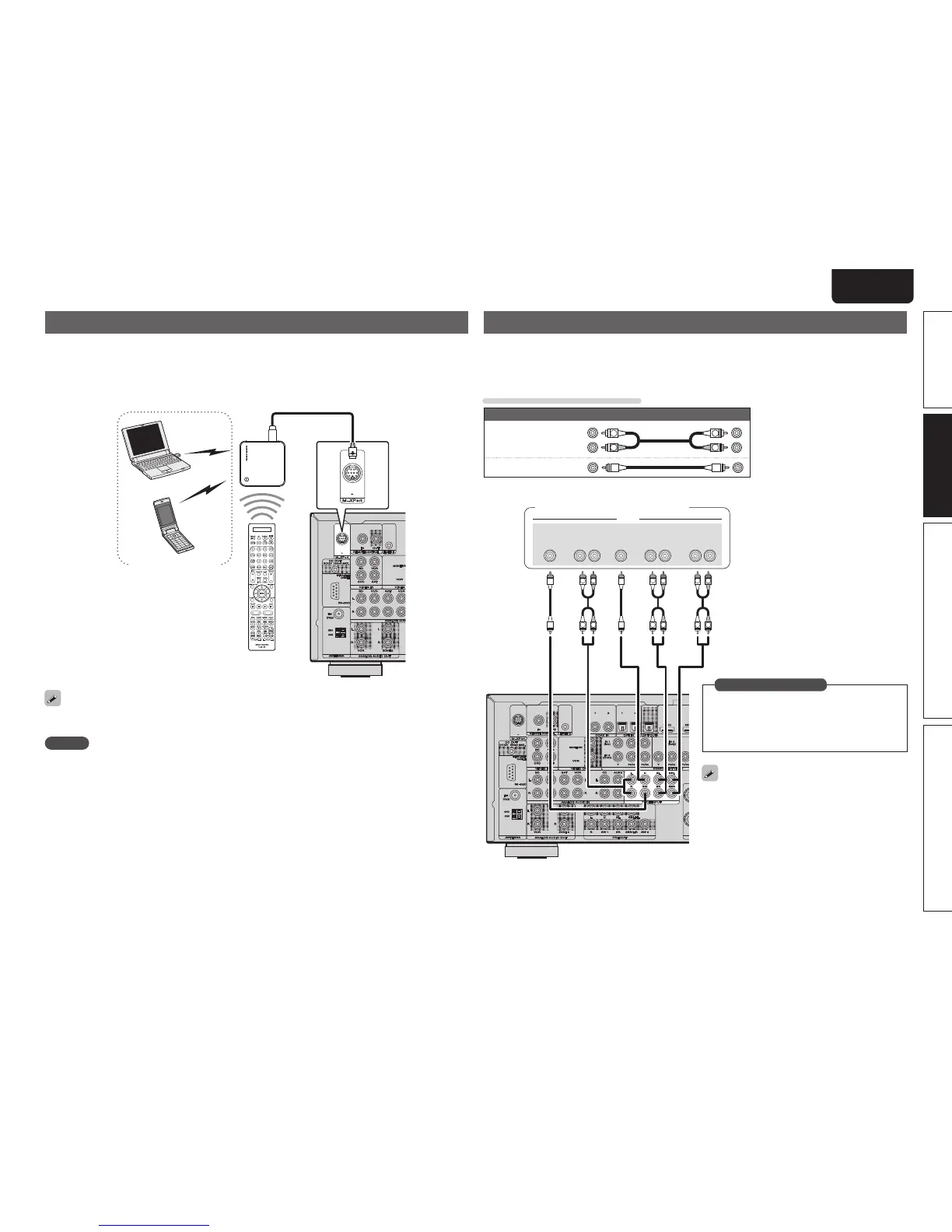
Connecting a wireless receiver (RX101)
By connecting a wireless receiver RX101 (sold separately) to this unit, you can receive and playback audio
signals from other devices using the Bluetooth Communication Function.
• Use a Bluetooth device that is A2DP compatible (vpage88 “A2DP”).
• You can also use wireless receiver RX101 as an external IR receiver.
• For instructions on the wireless receiver settings, refer to the RX101’s operating instructions.
Wireless receiver RX101
Bluetooth device
(A2DP Compatibility)
Remote control unit
You can enjoy listening to music by connecting a wireless receiver via the M-XPort input connector. In this
case, set the input source to “M-XPort”.
NOTE
To use wireless receiver RX101 as external IR receiver, set the remote sensor function of this unit to
“Remote Lock:ON” (vpage68 “Remote control settings”).
Connect a device that has a multichannel output terminal
• You can connect this unit to an external device fitted with multi-channel sound audio output jacks to enjoy
music and video.
• The video signal can be connected in the same way as a Blu-ray Disc player / DVD player (vpage17
“Connecting a Blu-ray Disc player / DVD player”).
Cables used for connections
Audio cable (sold separately)
Audio cable
(White)
(Red)
R
L
R
L
Audio cable
R
L
R
L
R
L
R
L
R
L
R
L
SUB-
WOOFER
CENTER SURROUND
BACK
RL
SURROUND
RL
FRONT
RL
AUDIO
Blu-ray Disc player / DVD player /
External decoder
When a device is connected to the SBL/SBR
terminal of 7.1CH INPUT terminals, set “Amp
Assign” (vpage61) to “Normal”.
To play analog signals input from 7.1CH INPUT
terminals, set “Input Mode” (vpage 54) to
“7.1CH IN”.
“7.1CH IN” can also be selected with
A/D on
the remote control unit.
in Set as Necessary



 To Next Page