36
ENGLISH DEUTSCH FRANÇAIS ITALIANO ESPAÑOL NEDERLANDS SVENSKA
Connect
• For the method of connecting the 7.1-channel system with surround back speakers, see page 5.
• For the method of connecting the TV, see page 6.
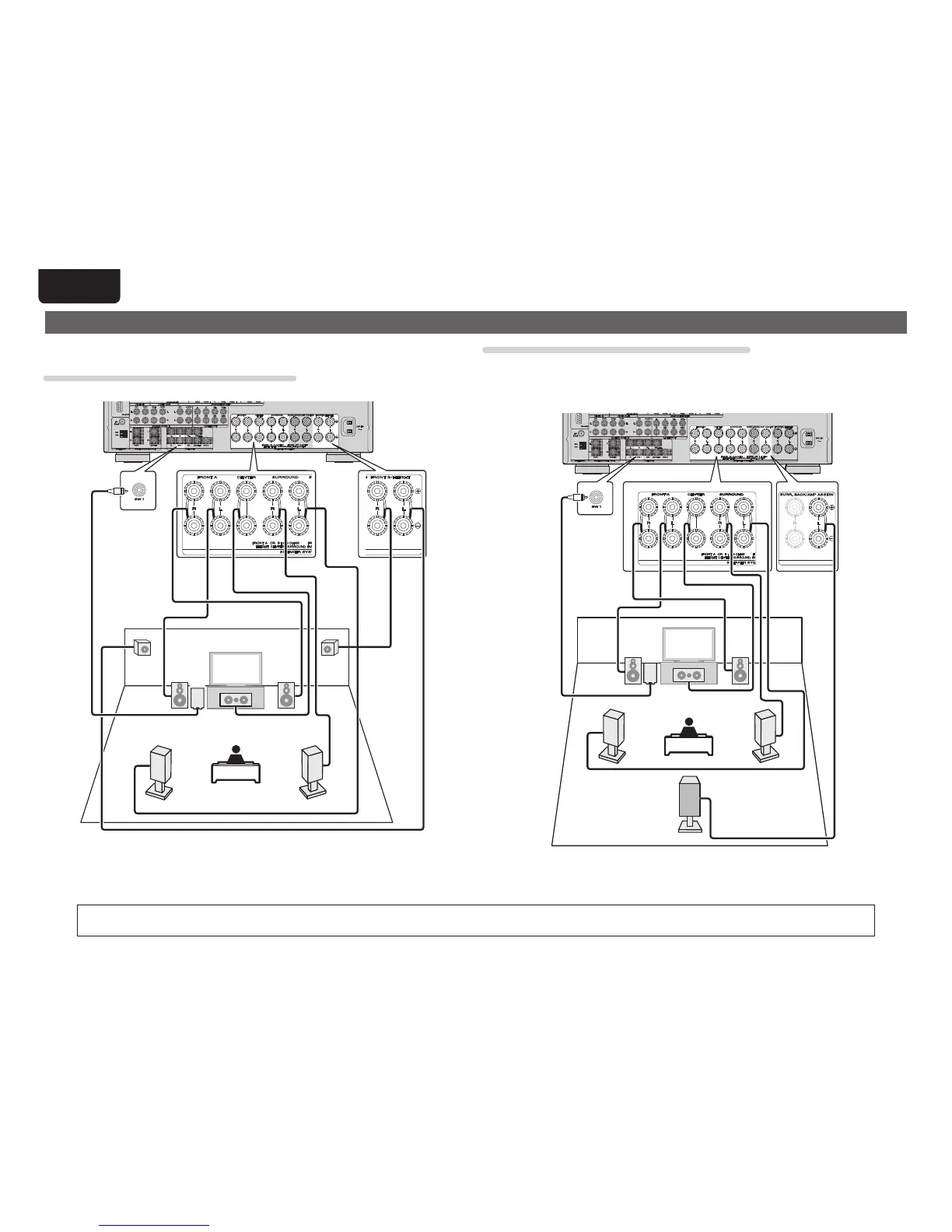
7.1-channel (Front height speaker) connection
For 7.1-channel (Front height speaker) playback, set “Set up “Amp Assign”” (vpage39) to “Normal”.
FL FR
FHRFHL
C
SW
SL
SR
For speaker impedance and speaker cable connections, see page 5.
6.1-channel (Surround back speaker) connection
If using only one surround back speaker (with a 6.1-channel connection), connect to the “L” side of the
SURR. BACK/AMP ASSIGN terminal.
For speaker settings in this case, see “When 6.1ch (Surround back speaker) installed” (vpage35).
For 6.1-channel (Surround back speaker) playback, set “Set up “Amp Assign”” (vpage39) to “Normal”.
FL FR
C
SB
SL
SR
SW



 To Next Page