60
ENGLISH DEUTSCH FRANÇAIS ITALIANO ESPAÑOL NEDERLANDS SVENSKA
Audio/Video Adjust
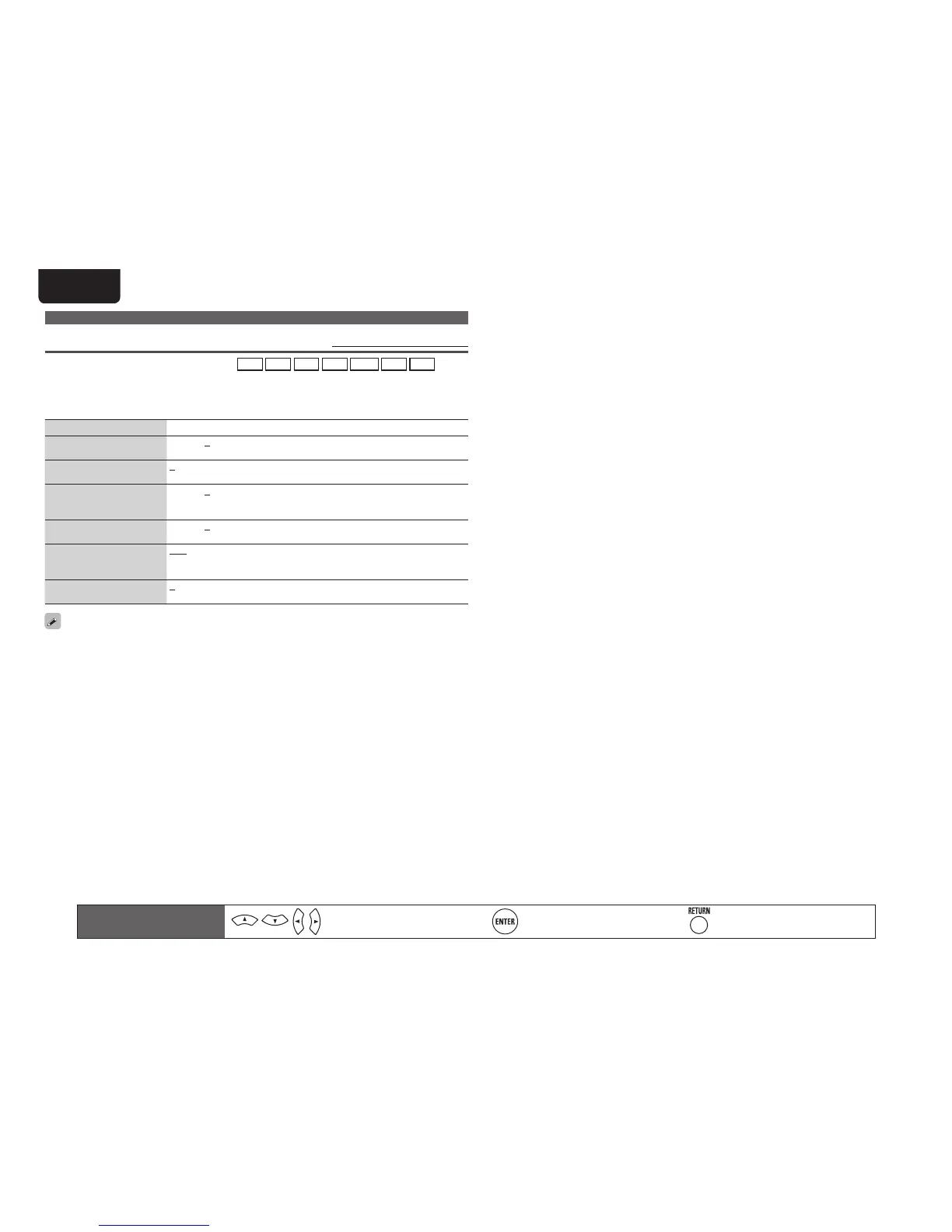
Picture Adjust Default settings are underlined.
• This item can be set when the input source is
BD
DVD
VCR
SAT
GAME
AUX1
TV
.
• With input sources other than the ones above, this item can be set when “Video Select” is selected. In
this case, the original input source settings are called out.
• Can be set when the “Video Convert” setting (vpage53) is “ON”.
• “GAME” or “TV” can be set when “HDMI” (vpage52) or “Component” (vpage53) has been assigned.
Setting items Setting details
Contrast
Adjust picture contrast.
–6 – +6 (0)
Brightness
Adjust picture brightness.
0 – +12
Chroma Level
Adjust picture chroma level
(saturation).
–6 – +6 (0)
Hue
Adjust color hue.
–6 – +6 (0)
DNR
Reduce overall picture
noise.
OFF / Low / Mid / High
Enhancer
Emphasize picture contours.
0 – +12
• “DNR” and “Enhancer” are each effective with HDMI output.
• The value set at “Picture Adjust” is stored in the memory individually for each input source.
Remote control operation
buttons
Move the cursor
(Up/Down/Left/Right)
Confirm the setting Return to previous menu



 To Next Page