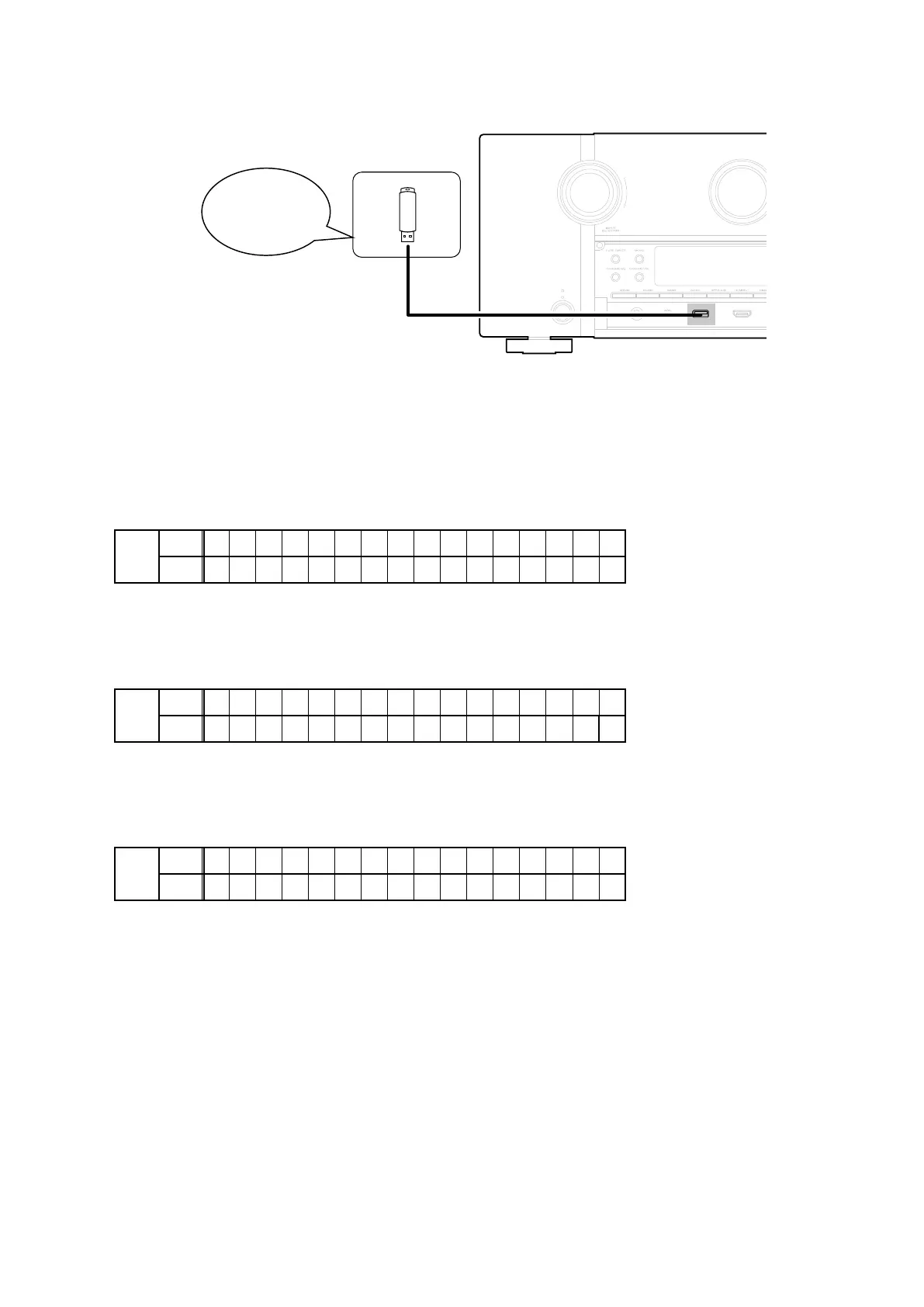
1.4. Insert the USB memory in the USB port.
NOTE
:
Remove the LAN cable from this unit when performing updates.
1.5. Start the update.
Hold down buttons "
HDMI OUT
" and "
STATUS
" at the same time and press the power button to turn on the power.
1.6. Display during USB update
The following message appears on the display after around 30 seconds
Display
FLD
L1
* F I R M W A R E U P D A T E
L2
U S B U p d a t e S t a r t
1.7. Press the "ENTER" key on the remote control unit or this unit.
Then start Firmware Update.
Display
FLD
L1
P l e a s e w a i t . . .
L2
U p d a t e F i l e C h e c k
1.8. The rmware update nishes.
The following message appears on the display:
Display
FLD
L1
F i r m U p d a t e
•
L2
U p d a t e C o m p l e t e
--- Precautions for Updates ---
• Never remove the USB memory before the update is nished.
• Never turn off the power before an update is completed.
• It takes around 1 hour to complete the update.
Once an update is started, normal operations cannot be performed until it is completed.
The GUI menu settings and image adjustment settings of this unit may be initialized.
Take note of your settings beforehand and recongure them after the update.
Download firmware in
USB flash drive.
85



 To Next Page