4.0 Operation
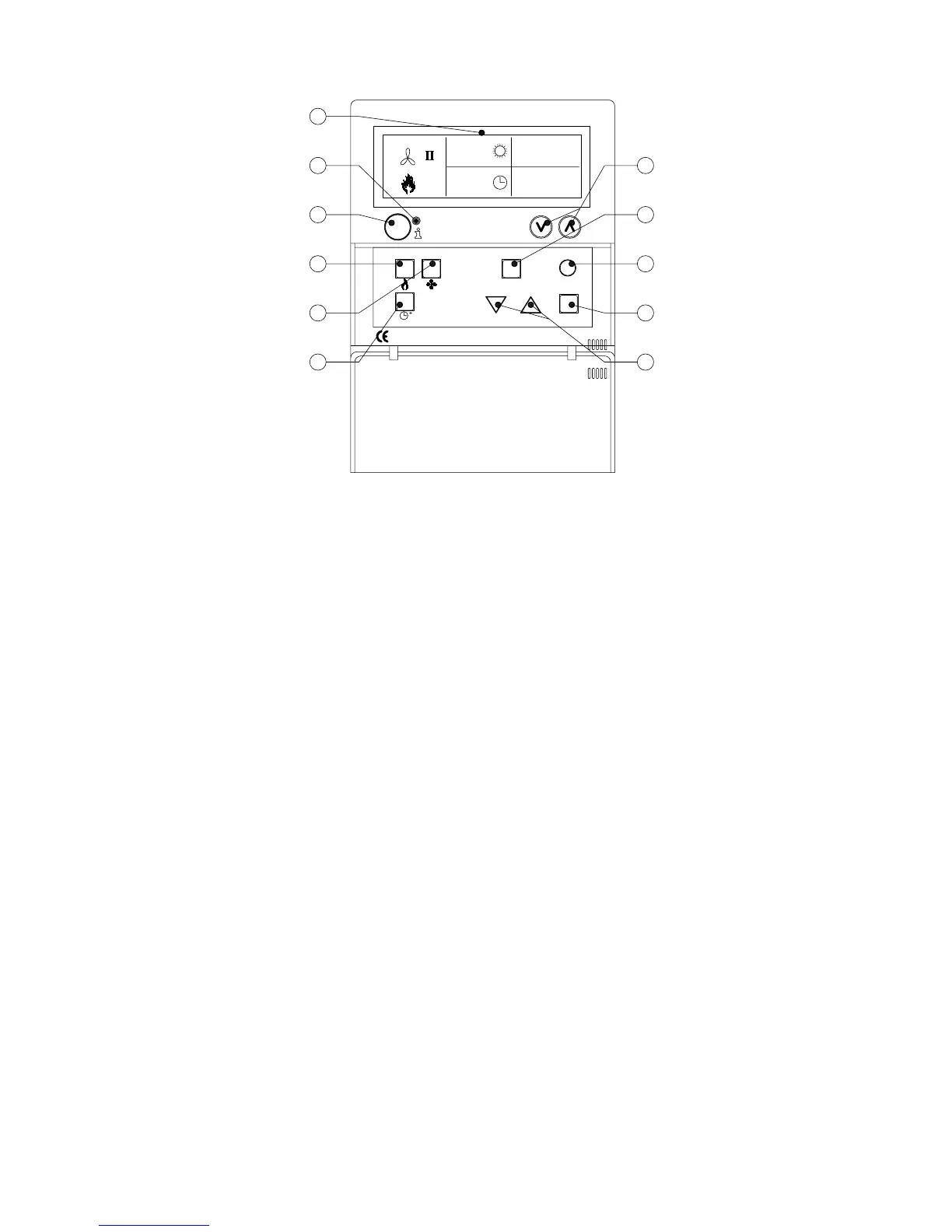
B
C
A
G
H
I
J
KF
E
D
12.0
08:00
01-03-2011
18.0 °C
RESETESC
OK
4.1 Explanation of buttons
A - Display
B - Red led i
Lights up when there is a Malfunction Message.
C - Info push-button (blue)
With this the actual (Malfunction) Messages can be passed through from the air heaters.
D - Push-button for switching the heating mode on and off.
E - Push-button for switching the ventilator on and off.
F - Push-button for switching the overtime timer on and off.
Every push increases the time by 15 mins.
You switch the timer off again by keeping the push-button pressed in.
G - No function
H - ESC Push-button
Menu or item left without executing changes
I - RESET Push-button
Reset a Malfunction
J - OK Push-button
Conrm a choice or proceed in order to change the next gure.
K - (up) and (down) buttons
The menu proceeds if a setting is increased or decreased.
8


 To Next Page