T: +44 (0)1443 230935 F: +44 (0)1443 231531 E:
www.markes.com
2.4.3 The Set Gas Flow function
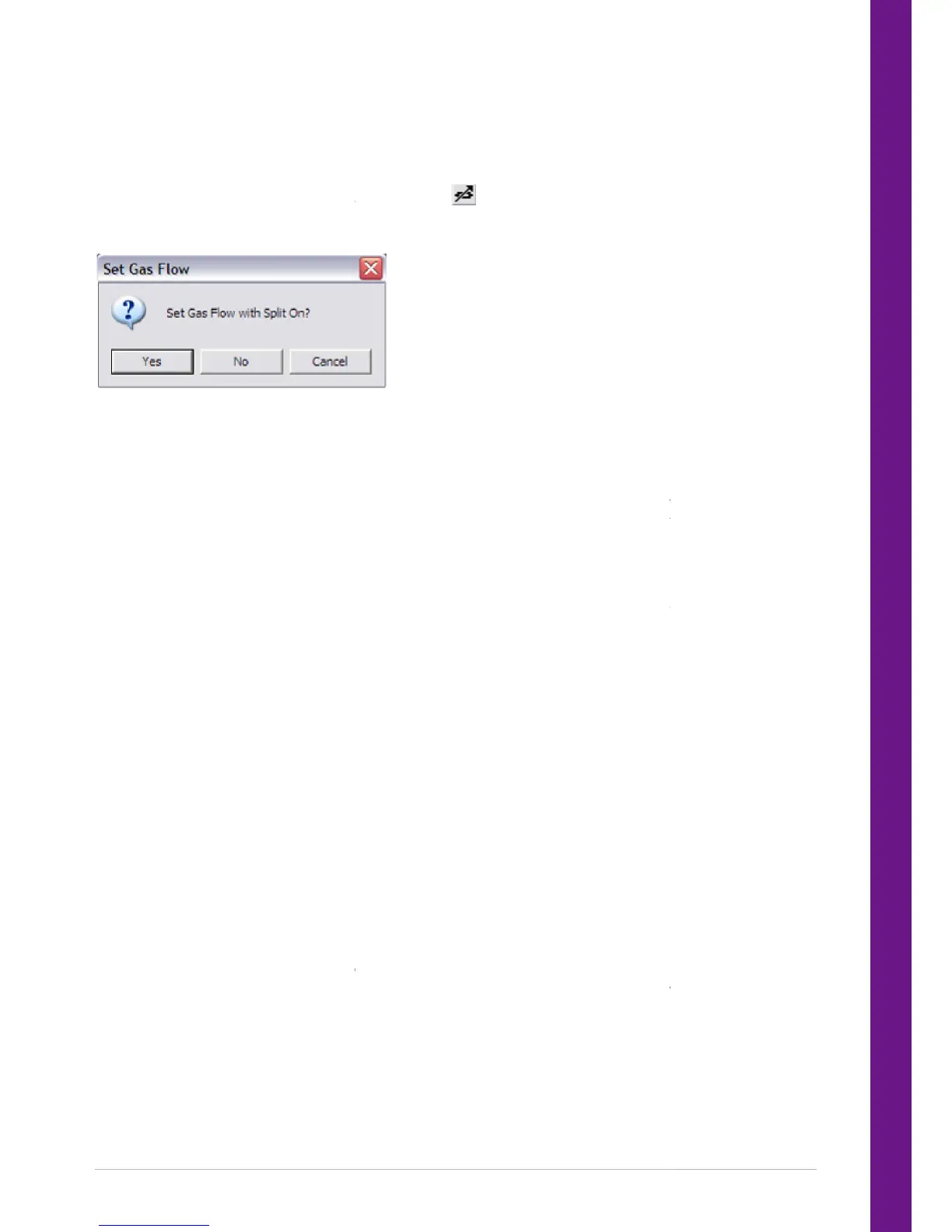
The Set Gas Flow function is accessed by selecting Instrument and then Set Gas Flow from the drop down
menu. Alternatively, click on the Set Gas Flows icon
cting Set Gas Flows a dialogue box is displayed.
If the analysis method is to include a split (single or double) then answer ‘Yes’ to the question in the box.
The UNITY 2 flow path will then alter to allow both the desorb flow and the split flow to
measured at the split and desorb flow vents.
If the analysis method is completely splitless or if only the desorb flow needs to be set, then answer ‘No’ to
the question in the box. The UNITY 2 flow path will then alter so that there is no
flow, to be adjusted and measured.
2.4.4
Measuring and adjusting flows during Set Gas Flow
A flow meter is used to measure the gas flows on UNITY 2 (non Electronic Carrier Control, ECC). A simple
bubble flow meter will suffice, howev
er a digital one is more convenient and is available from Markes
International Ltd. (C-FLMTR).
NOTE:
When UNITY 2 is setup with ECC, the flow can be read from the GC. However it can be useful to
confirm the flow readings with a flow meter. See Electronic
Most applications will require a flow meter with a minimum working range of 1 and 100 ml/min.
If a manual bubble flow meter is being used, then a stopwatch will also be required. It only m
to adjust and measure flows for the current controlling method.
To measure the flow, push the flow meter tubing over the relevant copper outlet pipe. Flows are adjusted
by turning the adjustment knob clockwise to close the needle valve and redu
to open and increase the flow.
NOTE:
The flows measured using Set Gas Flows are approximate. Approximate flows and split ratios are
sufficient for most methods, as there will be minimal run to run flow/split ratio variability
to know absolute flow rates for some reason, re
before the start of sample analysis. Measure the desorb and split flow (if applicable) during tube
desorption and the split flow again
(if applicable) during trap desorption. The split flow may be slightly
lower during trap desorption than during tube desorption because of the relatively higher impedance of
the narrow cold trap tube.
The Set Gas Flow function is accessed by selecting Instrument and then Set Gas Flow from the drop down
menu. Alternatively, click on the Set Gas Flows icon
cting Set Gas Flows a dialogue box is displayed.
If the analysis method is to include a split (single or double) then answer ‘Yes’ to the question in the box.
The UNITY 2 flow path will then alter to allow both the desorb flow and the split flow to
measured at the split and desorb flow vents.
If the analysis method is completely splitless or if only the desorb flow needs to be set, then answer ‘No’ to
the question in the box. The UNITY 2 flow path will then alter so that there is no
split flow, only the desorb
Measuring and adjusting flows during Set Gas Flow
A flow meter is used to measure the gas flows on UNITY 2 (non Electronic Carrier Control, ECC). A simple
er a digital one is more convenient and is available from Markes
When UNITY 2 is setup with ECC, the flow can be read from the GC. However it can be useful to
confirm the flow readings with a flow meter. See Electronic Carrier Control (ECC) Installation Manual for
Most applications will require a flow meter with a minimum working range of 1 and 100 ml/min.
If a manual bubble flow meter is being used, then a stopwatch will also be required. It only m
to adjust and measure flows for the current controlling method.
To measure the flow, push the flow meter tubing over the relevant copper outlet pipe. Flows are adjusted
by turning the adjustment knob clockwise to close the needle valve and reduce the flow and anticlockwise
The flows measured using Set Gas Flows are approximate. Approximate flows and split ratios are
sufficient for most methods, as there will be minimal run to run flow/split ratio variability
to know absolute flow rates for some reason, re
measure the actual flows by desorbing a blank tube
before the start of sample analysis. Measure the desorb and split flow (if applicable) during tube
(if applicable) during trap desorption. The split flow may be slightly
lower during trap desorption than during tube desorption because of the relatively higher impedance of
The Set Gas Flow function is accessed by selecting Instrument and then Set Gas Flow from the drop down
If the analysis method is to include a split (single or double) then answer ‘Yes’ to the question in the box.
The UNITY 2 flow path will then alter to allow both the desorb flow and the split flow to
If the analysis method is completely splitless or if only the desorb flow needs to be set, then answer ‘No’ to
split flow, only the desorb
A flow meter is used to measure the gas flows on UNITY 2 (non Electronic Carrier Control, ECC). A simple
er a digital one is more convenient and is available from Markes
When UNITY 2 is setup with ECC, the flow can be read from the GC. However it can be useful to
Carrier Control (ECC) Installation Manual for
Most applications will require a flow meter with a minimum working range of 1 and 100 ml/min.
If a manual bubble flow meter is being used, then a stopwatch will also be required. It only m
To measure the flow, push the flow meter tubing over the relevant copper outlet pipe. Flows are adjusted
ce the flow and anticlockwise
The flows measured using Set Gas Flows are approximate. Approximate flows and split ratios are
sufficient for most methods, as there will be minimal run to run flow/split ratio variability
measure the actual flows by desorbing a blank tube
before the start of sample analysis. Measure the desorb and split flow (if applicable) during tube
(if applicable) during trap desorption. The split flow may be slightly
lower during trap desorption than during tube desorption because of the relatively higher impedance of


 To Next Page