T: +44 (0)1443 230935 F: +44 (0)1443 231531 E:
www.markes.com
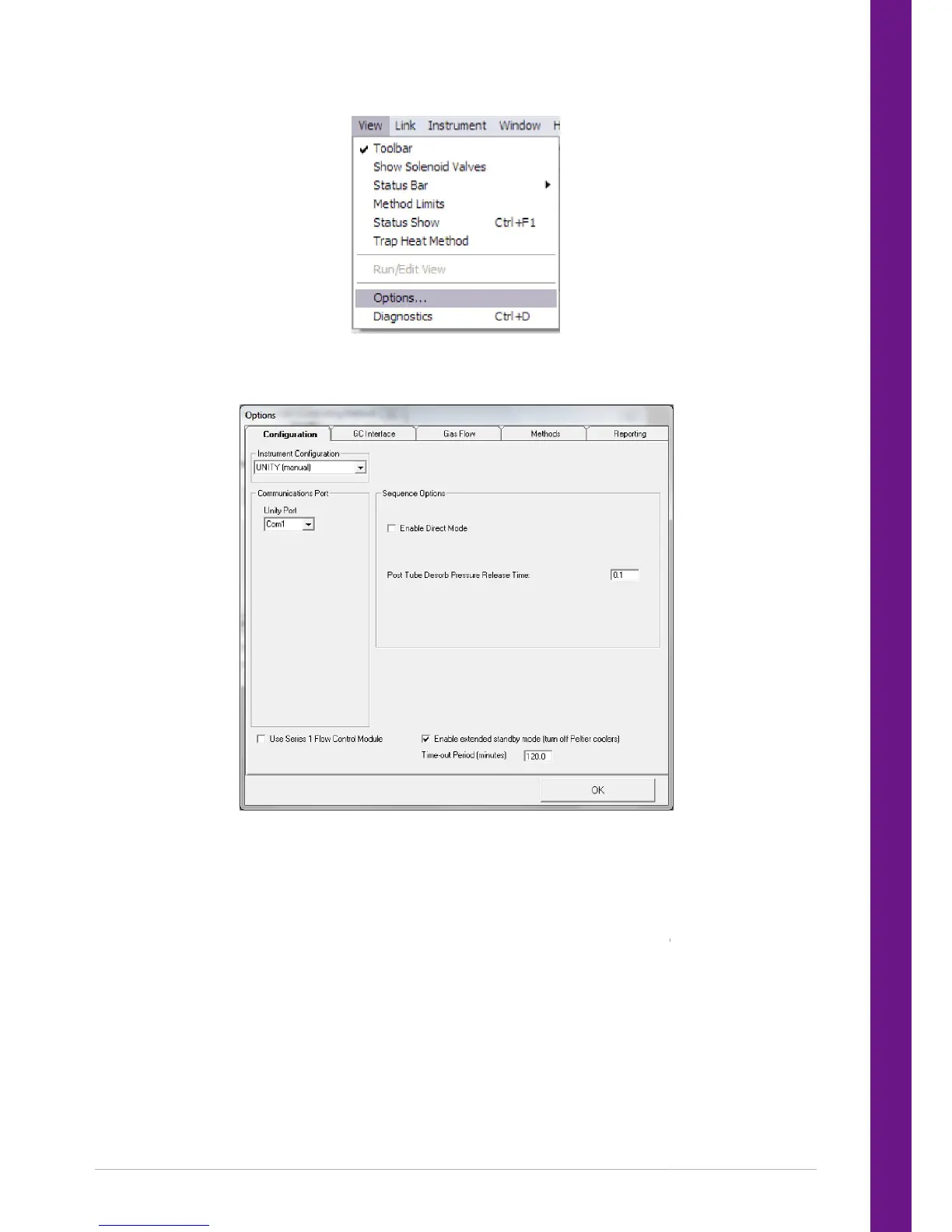
3.4.1 Configuration
The configuration page contains the current instrument configuration settings.
For UNITY 2 operation the Instrument Configuration will be set to UNITY (manual).
The communications port determines serial port number (e.g. Com1) that is used for communicating with
UNITY.
Sequence Options –
Enable Direct Mode
If the Enable Direct Mode option is selected an additional mode of operation will be available. Additional
hardware is required for this mode to be used correctly. Direct mode is only required when the any of the
The configuration page contains the current instrument configuration settings.
For UNITY 2 operation the Instrument Configuration will be set to UNITY (manual).
The communications port determines serial port number (e.g. Com1) that is used for communicating with
Enable Direct Mode
If the Enable Direct Mode option is selected an additional mode of operation will be available. Additional
hardware is required for this mode to be used correctly. Direct mode is only required when the any of the
cessories are installed:
The communications port determines serial port number (e.g. Com1) that is used for communicating with
If the Enable Direct Mode option is selected an additional mode of operation will be available. Additional
hardware is required for this mode to be used correctly. Direct mode is only required when the any of the


 To Next Page