T: +44 (0)1443 230935 F: +44 (0)1443 231531 E:
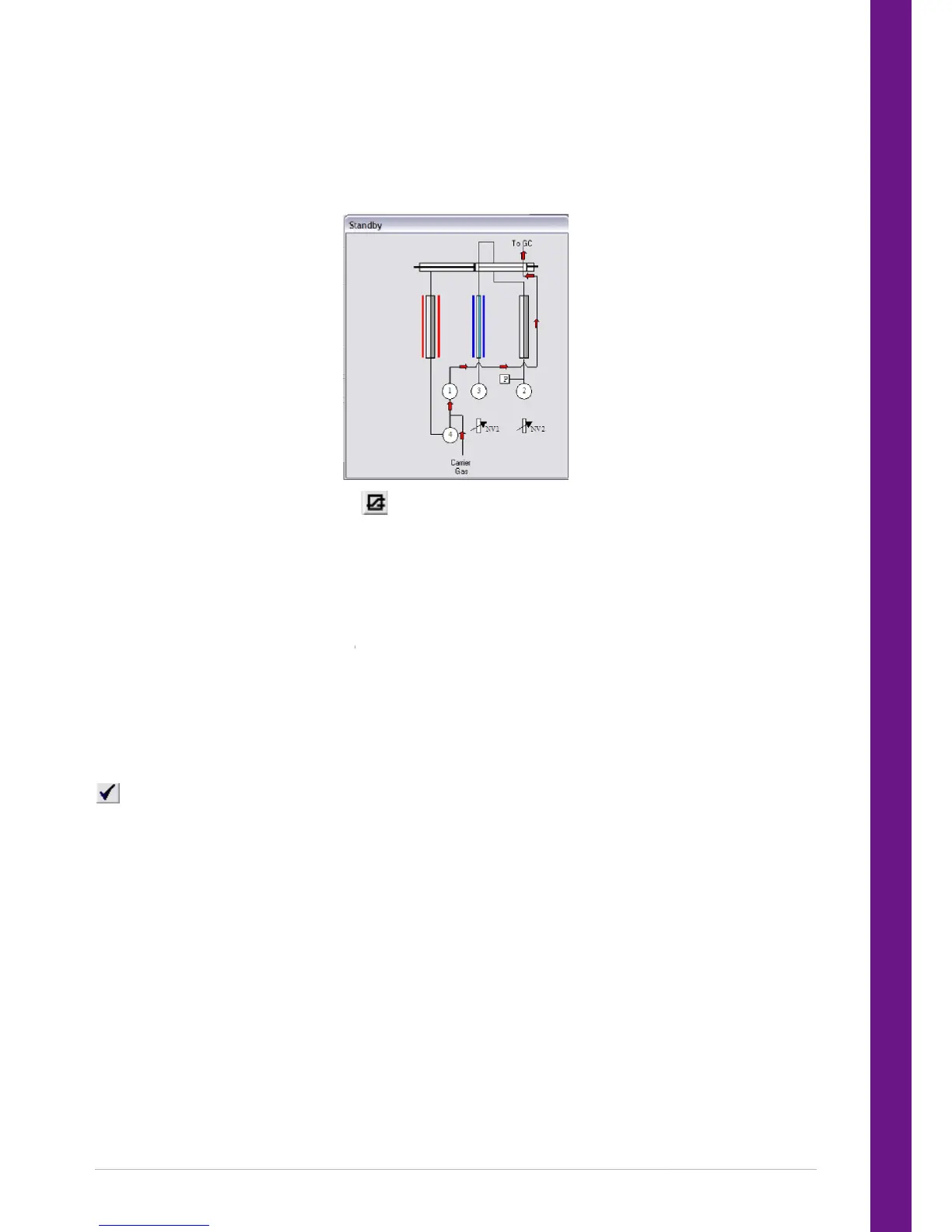
Schematic display of UNITY 2 status
A simple schematic illustrating the status of UNITY 2
This is accessed using the status icon (
The schematic display of UNITY 2 status is linked directly to operation of the instrument. The di
thus not just cosmetic, but is a representation of the actual status of the instrument.
One method is identified by UNITY 2 as that controlling the system i.e. the method dictating the set
parameters. This method is called the C
method is loaded as the controlling method.
To load another method use either the Load icon or select File and then Load from the menu. The loaded
method will not automatically become the co
as such in the bar at the top of its window, whether active or not.
To make a loaded method the controlling method, select it (to make it the active method) then click the
TY 2 immediately starts to set the new parameters. The instrument status
changes accordingly. Only one method is identified as the controlling method at any one time.
An active method is not necessarily the controlling method. The active method
modified or accessed by the operator.
The Options page is accessed in the UNITY 2 software via ‘View > Options’
Schematic display of UNITY 2 status
A simple schematic illustrating the status of UNITY 2
can be displayed on the screen at all times during
This is accessed using the status icon ( ) or by selecting View and then Status Show.
The schematic display of UNITY 2 status is linked directly to operation of the instrument. The di
thus not just cosmetic, but is a representation of the actual status of the instrument.
One method is identified by UNITY 2 as that controlling the system i.e. the method dictating the set
parameters. This method is called the Controlling Method and cannot be deleted or closed until another
method is loaded as the controlling method.
To load another method use either the Load icon or select File and then Load from the menu. The loaded
method will not automatically become the controlling method. The controlling method is always identified
as such in the bar at the top of its window, whether active or not.
To make a loaded method the controlling method, select it (to make it the active method) then click the
TY 2 immediately starts to set the new parameters. The instrument status
changes accordingly. Only one method is identified as the controlling method at any one time.
An active method is not necessarily the controlling method. The active method
modified or accessed by the operator.
The Options page is accessed in the UNITY 2 software via ‘View > Options’
can be displayed on the screen at all times during
) or by selecting View and then Status Show.
The schematic display of UNITY 2 status is linked directly to operation of the instrument. The di
One method is identified by UNITY 2 as that controlling the system i.e. the method dictating the set
ontrolling Method and cannot be deleted or closed until another
To load another method use either the Load icon or select File and then Load from the menu. The loaded
ntrolling method. The controlling method is always identified
To make a loaded method the controlling method, select it (to make it the active method) then click the
TY 2 immediately starts to set the new parameters. The instrument status
changes accordingly. Only one method is identified as the controlling method at any one time.
An active method is not necessarily the controlling method. The active method


 To Next Page