T: +44 (0)1443 230935 F: +44 (0)1443 231531 E:
Should the stop sequence button be pressed during a linking sequence, a
a number of options appears. This enables the user to either continue running, or stop the sequence at
one of the stages listed.
NOTE:
GC cycle time will operate in the same manner as a single tube desorption.
3.3.2 The Trap Heat Method
UNITY 2 can use two sets of parameters when undertaking Trap Heat. Either those used in the existing
Controlling Method or a special set of parameters identified as the Trap Heat Method. The choice
between these two is made under Options, see Section 2.4
default Trap Heat conditions whenever this function is accessed.
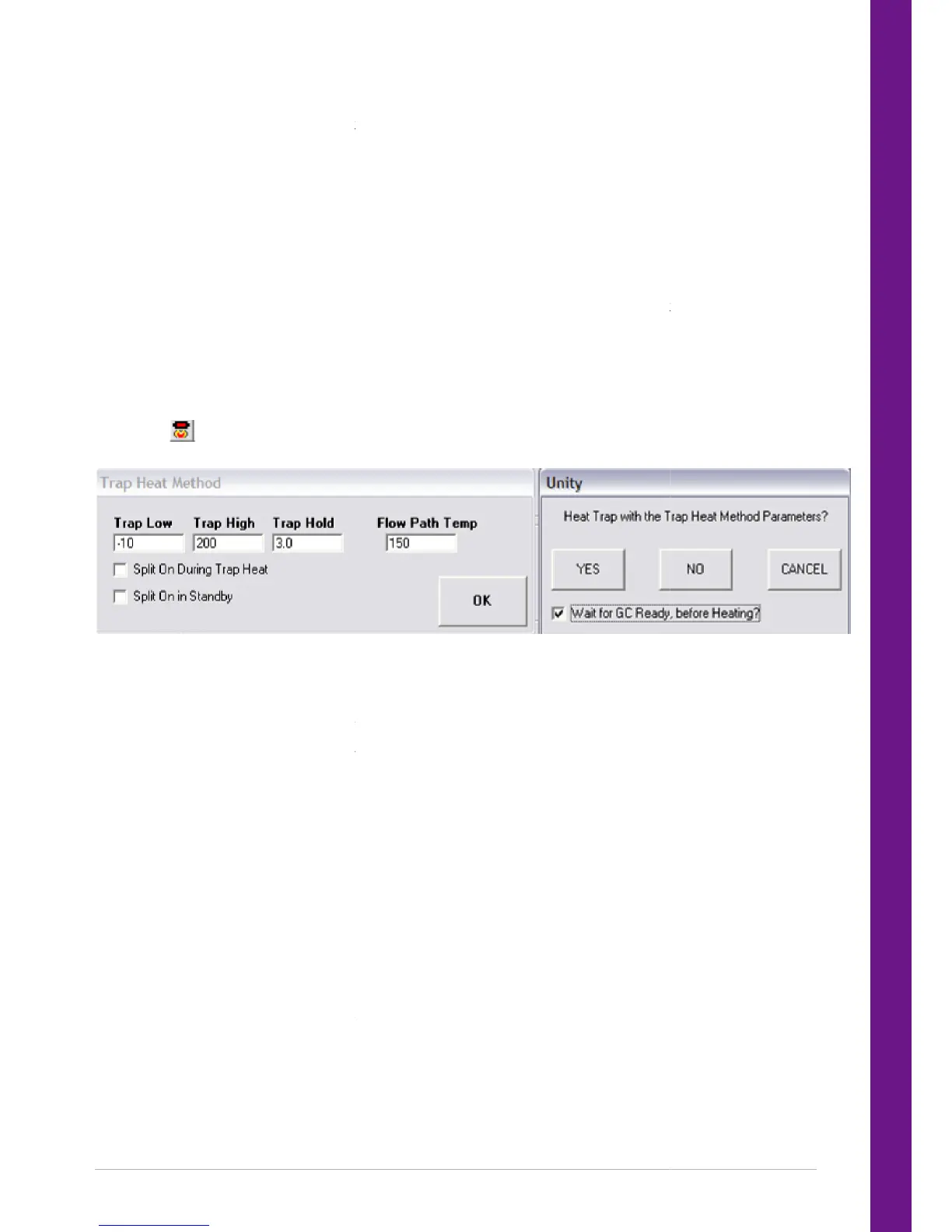
To view and edit the Trap Heat method click View > Trap Heat Method. The required parameters are
entered in the boxes. Checking the relevant box
Trap Heat is selected either by selecting Instrument and then selecting Trap Heat, or by selecting the Trap
) on the toolbar. The following dialogue box then appears.
Once Trap Heat has been selected, UNITY 2 will ask you to confirm that the default method is that which
you wish to use. For example, if the default method was set to Use Controlling Method Parameters then
the box message will read Heat Trap with the Cont
If Yes is selected, UNITY 2 proceeds with trap heat. If No is selected the instrument software immediately
takes you to the relevant section under Options to change your selection.
GC Ready, before Heating?’ option is made available. Depending on the response to this
option, UNITY 2 will either wait for an External Ready signal from the GC equipment before proceeding, or
continue the trap heat regardless of the GC status.
Ensure that the dedicated Trap Heat Method or the Controlling Method, if being used, is
compatible with the maximum temperature of the least stable sorbent in the cold trap.
When using Trap Heat several times to clean a freshly packed trap, it is advisabl
Heat Method and set the Trap Low Temperature to its maximum +50°C, in order to save the time taken
for the system to equilibrate.
Caution: F
or traps containing carbon molecular sieves Trap Heat Method must not be used until th
has been extensively purged with helium immediately prior to Trap Heat. Refer to the
cold trap certificate supplied with your trap for further information.
Should the stop sequence button be pressed during a linking sequence, a
dialogue box containing
a number of options appears. This enables the user to either continue running, or stop the sequence at
GC cycle time will operate in the same manner as a single tube desorption.
UNITY 2 can use two sets of parameters when undertaking Trap Heat. Either those used in the existing
Controlling Method or a special set of parameters identified as the Trap Heat Method. The choice
between these two is made under Options, see Section 2.4. The selected option will then appear as the
default Trap Heat conditions whenever this function is accessed.
To view and edit the Trap Heat method click View > Trap Heat Method. The required parameters are
entered in the boxes. Checking the relevant boxes will activate the split on during trap heat / standby.
Trap Heat is selected either by selecting Instrument and then selecting Trap Heat, or by selecting the Trap
) on the toolbar. The following dialogue box then appears.
Once Trap Heat has been selected, UNITY 2 will ask you to confirm that the default method is that which
you wish to use. For example, if the default method was set to Use Controlling Method Parameters then
the box message will read Heat Trap with the Controlling Method Parameters? Select Yes, No, or Cancel.
If Yes is selected, UNITY 2 proceeds with trap heat. If No is selected the instrument software immediately
takes you to the relevant section under Options to change your selection.
GC Ready, before Heating?’ option is made available. Depending on the response to this
option, UNITY 2 will either wait for an External Ready signal from the GC equipment before proceeding, or
continue the trap heat regardless of the GC status.
Ensure that the dedicated Trap Heat Method or the Controlling Method, if being used, is
compatible with the maximum temperature of the least stable sorbent in the cold trap.
When using Trap Heat several times to clean a freshly packed trap, it is advisable to use a dedicated Trap
Heat Method and set the Trap Low Temperature to its maximum +50°C, in order to save the time taken
or traps containing carbon molecular sieves Trap Heat Method must not be used until th
has been extensively purged with helium immediately prior to Trap Heat. Refer to the
cold trap certificate supplied with your trap for further information.
dialogue box containing
a number of options appears. This enables the user to either continue running, or stop the sequence at
UNITY 2 can use two sets of parameters when undertaking Trap Heat. Either those used in the existing
Controlling Method or a special set of parameters identified as the Trap Heat Method. The choice
. The selected option will then appear as the
To view and edit the Trap Heat method click View > Trap Heat Method. The required parameters are
es will activate the split on during trap heat / standby.
Trap Heat is selected either by selecting Instrument and then selecting Trap Heat, or by selecting the Trap
Once Trap Heat has been selected, UNITY 2 will ask you to confirm that the default method is that which
you wish to use. For example, if the default method was set to Use Controlling Method Parameters then
rolling Method Parameters? Select Yes, No, or Cancel.
If Yes is selected, UNITY 2 proceeds with trap heat. If No is selected the instrument software immediately
GC Ready, before Heating?’ option is made available. Depending on the response to this
option, UNITY 2 will either wait for an External Ready signal from the GC equipment before proceeding, or
Ensure that the dedicated Trap Heat Method or the Controlling Method, if being used, is
compatible with the maximum temperature of the least stable sorbent in the cold trap.
e to use a dedicated Trap
Heat Method and set the Trap Low Temperature to its maximum +50°C, in order to save the time taken
or traps containing carbon molecular sieves Trap Heat Method must not be used until th
has been extensively purged with helium immediately prior to Trap Heat. Refer to the


 To Next Page