T: +44 (0)1443 230935 F: +44 (0)1443 231531 E:
www.markes.com
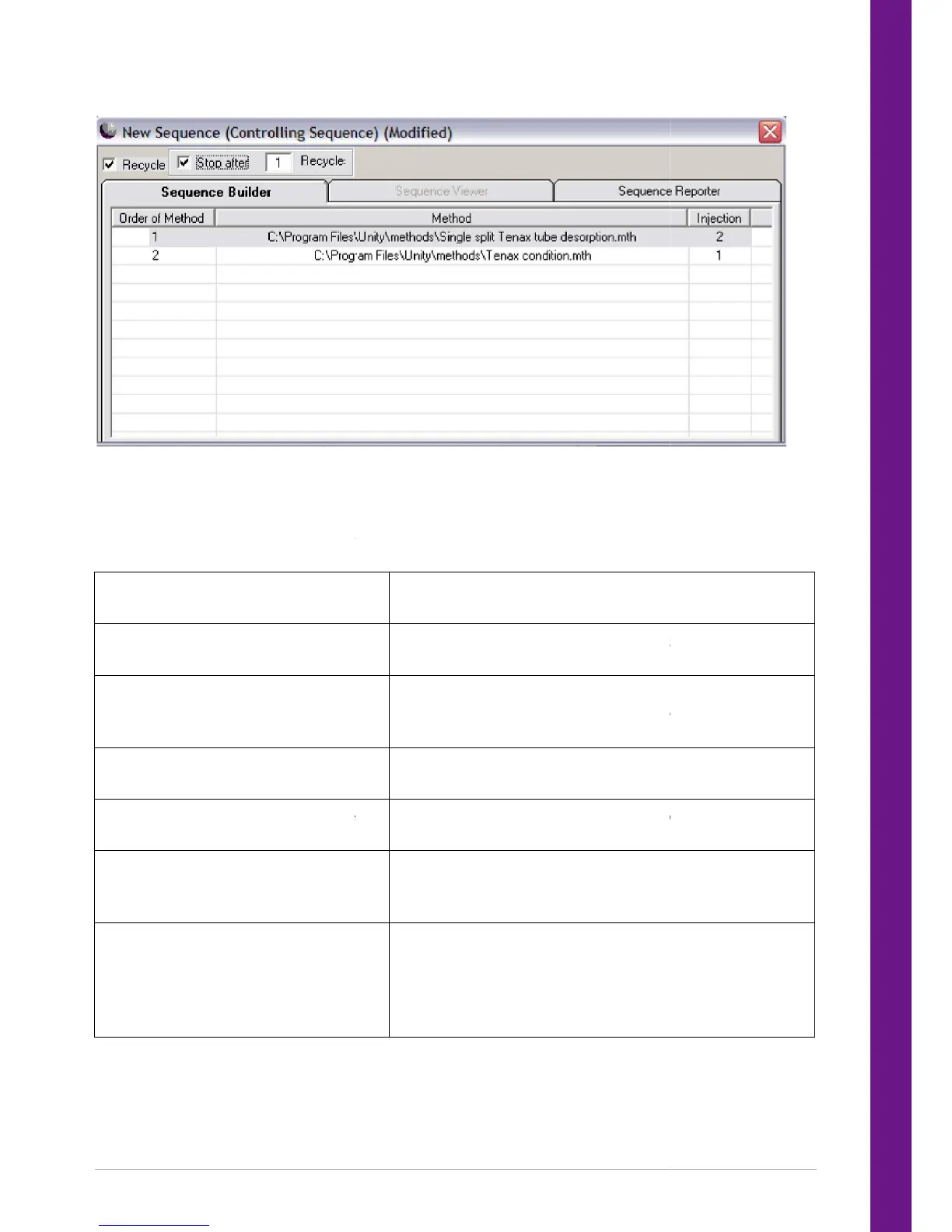
Method linking sequence
which is setup in this example to run two injections with a 2 stage desorption
method followed by a tube conditioning step.
After a method has been run the next method in the sequence is downloaded to UNITY 2 and run. The
procedures to setup and edit link
Open a new sequence
Open an existing sequence
Add an e
xisting method to the link table
Insert a previously stored sequence into
Delete a highlighted method from the
link table
Change the number of injections
Recycle the sequence
which is setup in this example to run two injections with a 2 stage desorption
method followed by a tube conditioning step.
After a method has been run the next method in the sequence is downloaded to UNITY 2 and run. The
ed sequences are:
Right click and select ‘New Sequence’ to open a new
Right click and select ‘Open Sequence’ to enable the user to
open a previously saved method linking table.
xisting method to the link table
Right click and select ‘Add Item’ from the list of options.
The appropriate method can then be selected for the
Insert a previously stored sequence into
Right click and select ‘Add Sequence
Delete a highlighted method from the
Right click and select the ‘Delete Item’ option or press the
delete key on the keyboard.
Double click on the existing number and
appropriate figure from the drop down method. The
100 injections of a particular method.
Checking the ‘recycle’ box at the top left corner of the
method linking table. This will recycle the process unt
stopped by the user. However, a set number or recycles can
be selected by checking the ‘stop after’ box, and entering
the appropriate number of repeats in the ‘cycles’ box.
which is setup in this example to run two injections with a 2 stage desorption
After a method has been run the next method in the sequence is downloaded to UNITY 2 and run. The
Right click and select ‘New Sequence’ to open a new
Right click and select ‘Open Sequence’ to enable the user to
open a previously saved method linking table.
Right click and select ‘Add Item’ from the list of options.
The appropriate method can then be selected for the
Right click and select the ‘Delete Item’ option or press the
Double click on the existing number and
appropriate figure from the drop down method. The
100 injections of a particular method.
Checking the ‘recycle’ box at the top left corner of the
method linking table. This will recycle the process unt
stopped by the user. However, a set number or recycles can
be selected by checking the ‘stop after’ box, and entering
the appropriate number of repeats in the ‘cycles’ box.


 To Next Page