Setup 15
Dimming
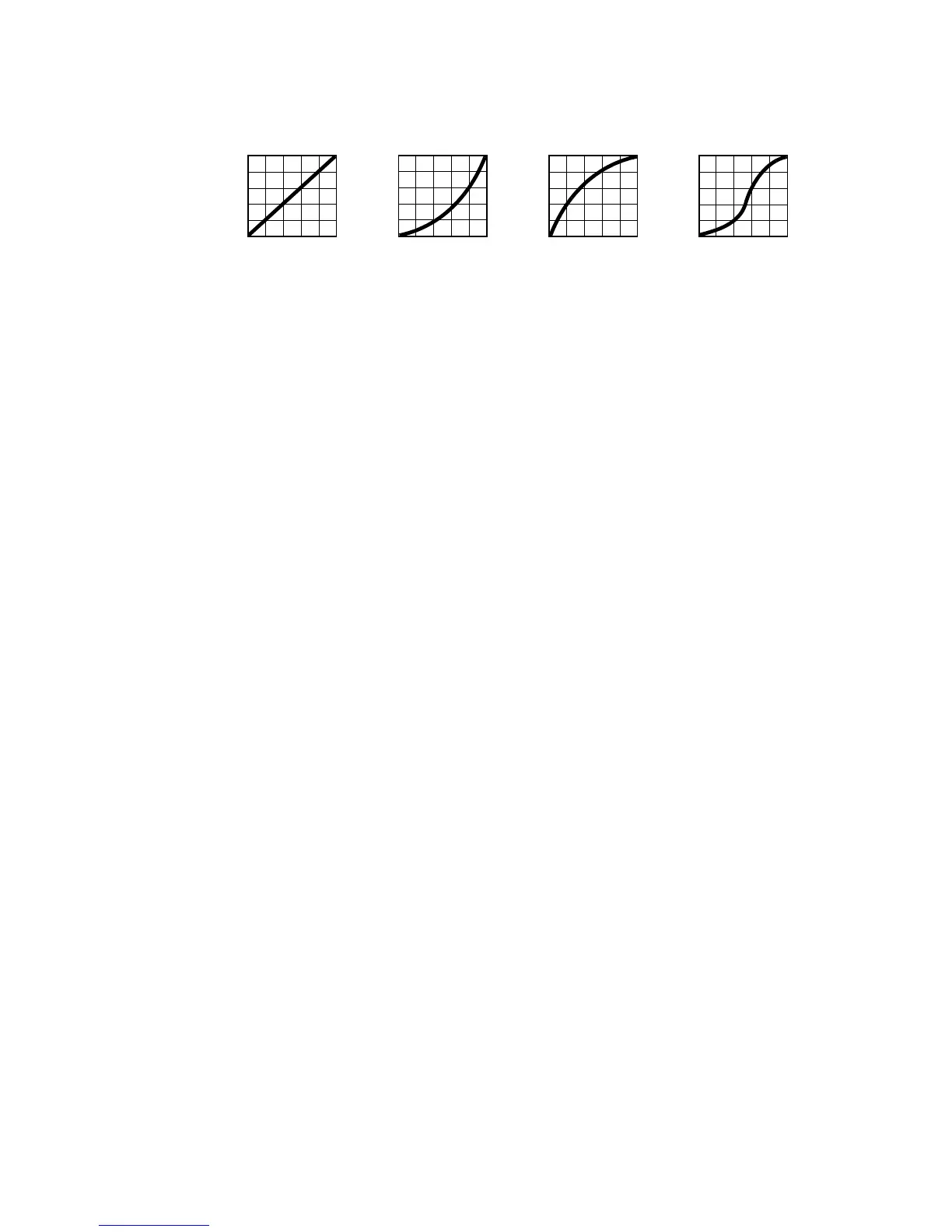
DIMMER CURVE provides four dimming options (see Figure 3):
•
LINEAR – the increase in light intensity appears to be linear as DMX value is increased.
•
SQUARE LAW – light intensity control is finer at low levels and coarser at high levels.
• INVERSE SQUARE LAW – light intensity control is coarser at low levels and finer at high levels.
•
S-CURVE – light intensity control is finer at low levels and high levels and coarser at medium levels.
Whichever
DIMMER CURVE option you select, you can choose between FAST or SMOOTH dimming
settings:
•
FAST is the default setting. It gives a virtually instantaneous reaction when you dim from one intensity to
another, but dimming slowly from one intensity to another may appear slightly uneven.
• The
SMOOTH setting gives smoother dimming during slow changes in intensity, but it limits the speed of
dimming changes slightly. This makes it ideal for slow, smooth dimming, but a short time-lag may be
noticeable if you try to dim quickly from one intensity to another.
Restoring factory default settings
The MAC Aura factory default settings can be restored by applying a FACTORY DEFAULT → LOAD
command.
Output
DMX % DMX %DMX % DMX %
Output
Output
Output
Optically linear S-curveSquare law Inverse square law
Figure 3: Dimming curve options















 To Next Page