EN-15
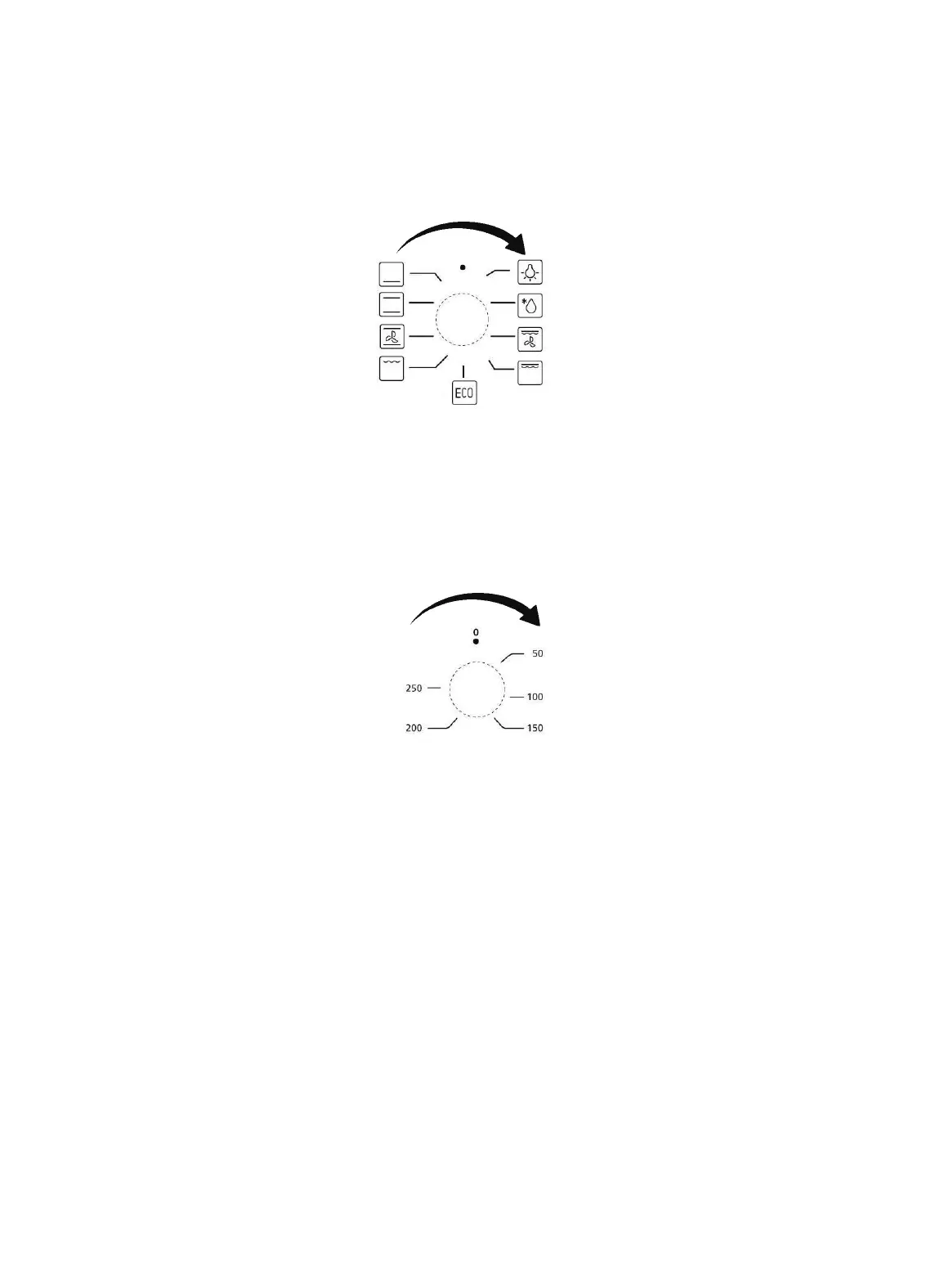
Cooking functions selection
When the knob is set to "o", the cooking function is not defined. To select one cooking
function, you can turn the knob located on the left side of the control panel. To select
the preferred cooking function, you need to turn the knob so that the pointer on it
indicates the requested function.
Temperature setting
The selection of the cooking temperature can be done in a similar way as the selection
of the cooking function. You can use the temperature knob located on the right side of
the control panel. To select the preferred cooking temperature, you need to turn the
knob so that the pointer on it indicates the requested temperature.
Powering on
Once you have setup cooking function and temperature, you can power on the
appliance by turning the time knob in the middle of the control panel. To select the
preferred cooking time, you need to turn the knob so that the pointer on it indicates
the requested time. Now the oven is powered on (you can set a maximum cooking time
of 2 hours).
Note
The knob for TIMER configuration turns on the oven. Once you move the knob from
its original position, the oven is working. Once the oven heating has started, the knob
will slowly turn anticlockwise, until the knob pointer reaches its original position "o".
Then, the oven will sound a warning beep and will turn off (once the oven is turned off,
its cavity maintains for a long time the set cooking temperature, so in order to prevent
overcooking or burnings, remove the food from oven).


 To Next Page