EN-14
GETTING TO KNOW YOUR OVEN
EQUIPMENT IDENTIFICATION
This chapter describes the control panel and accessories. It also includes information
about several functions of your appliance.
Note: Details and colors of the product may change according to the actual model.
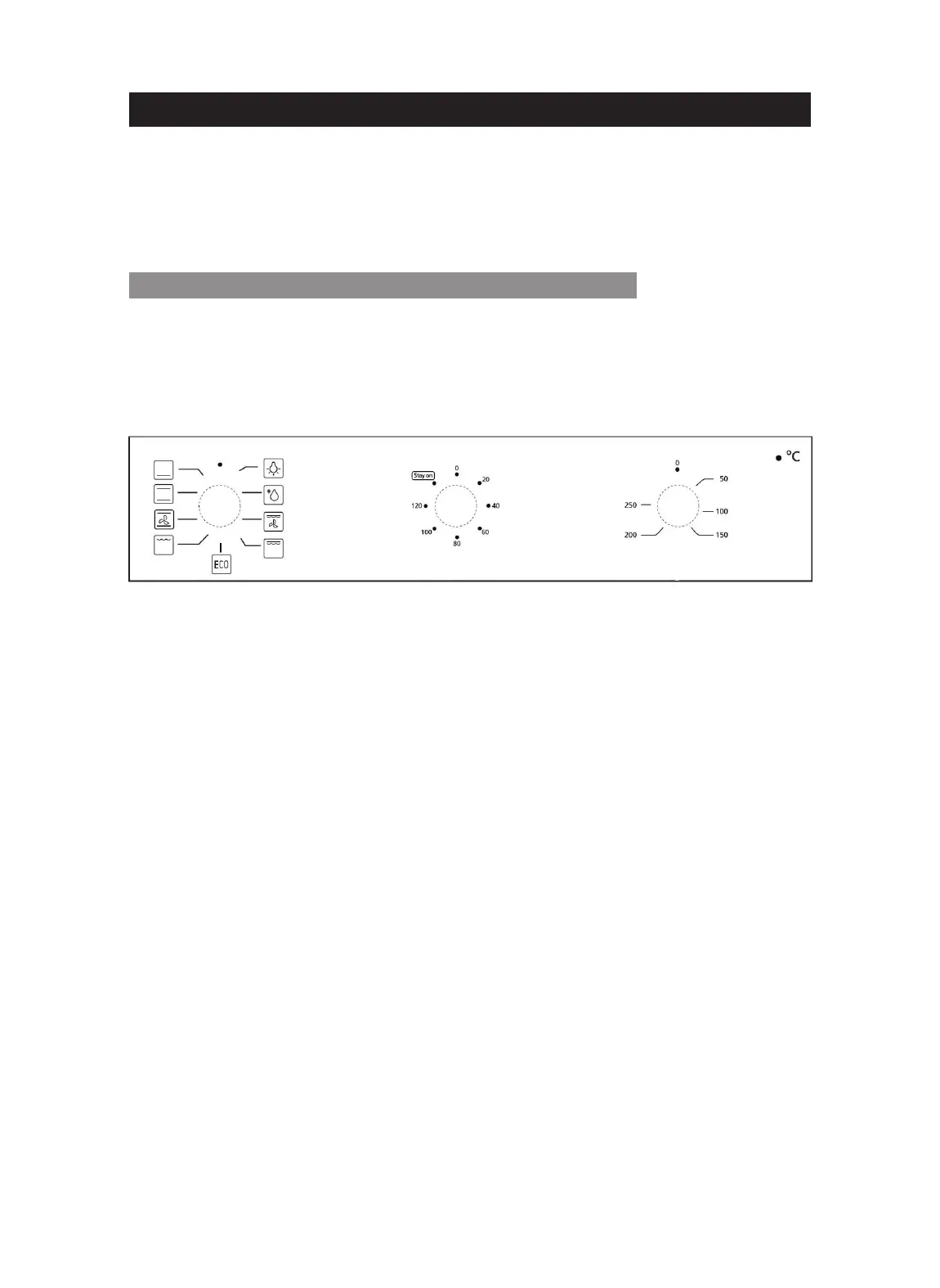
CONTROL PANEL FOR MECHANICAL MODELS
Models: MKO 82/12 M BK; MKO 802/12 PR MS XS; MKO 802/12 PR MS BK;
MKO 802 PR MS XS; MKO 902 PR M XS; MKO 902 PR M BK; MKO902 PR
M WH
Function Knob Timer Knob Temperature Knob
Warning: the picture is only for reference and could not match exactly the model you
purchased.
Knobs
Turning the knobs, you can set up the oven operation modes. Each knob is located
exactly in the middle of the icons printed on the control panel glass, so that you can
easily configure your appliance (simply and directly). The operation modes do not have
limitations, so that you can get the most from your appliance.
Light indicator
This indicator is a kind of light showing if the appliance resistances are being used or
not. When the appliance is powered on, the light indicator will turn on and off: it will
be on when at least one of the heating elements is in use, while it will be off when no
heating element is used.


 To Next Page