Hi‐TCentralizedcontroller
8
3.3 STARTPAGE
Figure4.Startpage.
OnHi‐Tstart,whilesystemloading,asplashscreenappearswithalogo.
3.4 HOMEPAGE
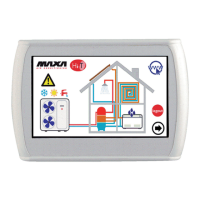
Thehomepagehasthefollowingappearance:
Figure5.Homepage–indicationmeanings.
Fromthehomepageitispossibletoaccesstothedifferentdevice’sscreens,simplytouchingthedisplayedresource.
Thesensibleareas(indicatedintheimagebyredboxes)insidethispageare:
1. Heatpump/chiller(showingtheworkingmode)
2. Statussystemandmodesystemdisplay
3. Fancoil
(withastatusmessageofdehumidificationactivemode)
4. Displayofanyactivealarmsinthesystem
5. Informationandlocationofthecompany
6. Nameofthekeyboard(accesstoinformationonthefirmwareversion)
7. ConfiguringtheEthernetnetwork
8. Log‐out(intermittentsymbolifit’sactive)
9. Arrow
navigation,nextpage.
2
3
1
11
12
13
5 6
4
7
8
9
10


 To Next Page
