EasyManua.ls Logo

Maxim Integrated MAXREFDES103 - User Manual

Maxim Integrated MAXREFDES103
42 pages
Print Icon
To Next Page IconTo Next Page
Loading...
Maxim Integrated Page 1 of 42
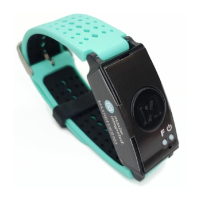
MAXREFDES103# Health Sensor Band
User Guide
UG7145; Rev 1; 1/20
Abstract
This user guide provides information about preparing and running the MAXREFDES103# health
sensor band. This platform uses a high-sensitivity PPG biosensor, power-management IC
(PMIC), and microcontrollers from Maxim Integrated
®
in a wrist-worn design that allows the
capture of biometric signals important to healthcare. The platform also contains algorithms for
calculating heart health based on the biosensor measurements.

Table of Contents

Question and Answer IconNeed help?

Do you have a question about the Maxim Integrated MAXREFDES103 and is the answer not in the manual?

Summary

Detailed Hardware Description

Required Equipment

Lists the components of the MAXREFDES103# platform.

System Diagram

Operating the Health Sensor Band

Power On;Off

Instructions on how to power the device on and off.

Button Functionality

Describes the functionality of the device's buttons.

Color Definitions for LED Status

Explains the meaning of different LED colors and blinking patterns.

How to Position the Device on the Wrist

Software Updates

Installing the PC GUI

Steps to install the PC graphical user interface for device interaction.

Updating Micro Board Firmware (.bin)

Procedure to update the main microcontroller firmware via the MAXDAP adapter.

Updating Sensor Hub Algorithm Firmware (.msbl)

Steps to update the algorithm firmware on the sensor hub.

Evaluation GUIs

Using the DeviceStudio PC GUI

Overview of the DeviceStudio PC GUI for data viewing and configuration.

Installing Windows 7 Driver for PC GUI

Manual driver installation steps for using the PC GUI on Windows 7.

USB Connection

Bluetooth LE Connection for Windows 10

Starting the PPG Measurement

Data Format of the Log File

Flash Logging of Data

Downloading the Log File

Steps to retrieve logged data from the device's flash memory.

Maxim Health Sensor Platform App for Android

Installing the App

Guide to install and set up the mobile application on an Android device.

Retrieving.csv Log File from Android

Method to access and download log files from the Android application.

Optical Heart-Rate Monitoring

Pulse Oximetry

Positioning the Health Sensor Band

Correct placement of the band on the wrist for accurate SpO2 readings.

Heart-Rate Variability

Respiration Rate

Sleep Quality

Notes on the Enclosure

Time-Alignment Method for Comparing PPG Data to ECG Data

SpO2 Calibration

Revision History

Maxim Integrated MAXREFDES103 Specifications

General IconGeneral
Product CategoryHeart Rate Monitor
ManufacturerMaxim Integrated
Product NameMAXREFDES103
TypeReference Design
Temperature SensorMAX30205
MicrocontrollerMAX32630
Communication InterfaceI2C, SPI
FunctionHeart Rate Monitoring
FeaturesOptical heart-rate sensor, low power consumption
ConnectivityBluetooth Low Energy