Mechanical Installation
General Rules
IDX 70 User Manual
mmag | 2022-04 | rel10520
3-21
3 MECHANICAL INSTALLATION
3.1 General Rules
Improper handling can cause irreversible hardware damage
• Handle the components with particular care.
• Pay special attention to cleanliness.
• Make sure that no impurities, foreign objects, or particles can penetrate the drive.
Exceeding forces and loads can cause irreversible hardware damage
• Make sure not to exceed the permitted axial and radial forces while handling the device.
• Make sure that the permitted axial and radial loads will not be exceeded while the drive is in operation.
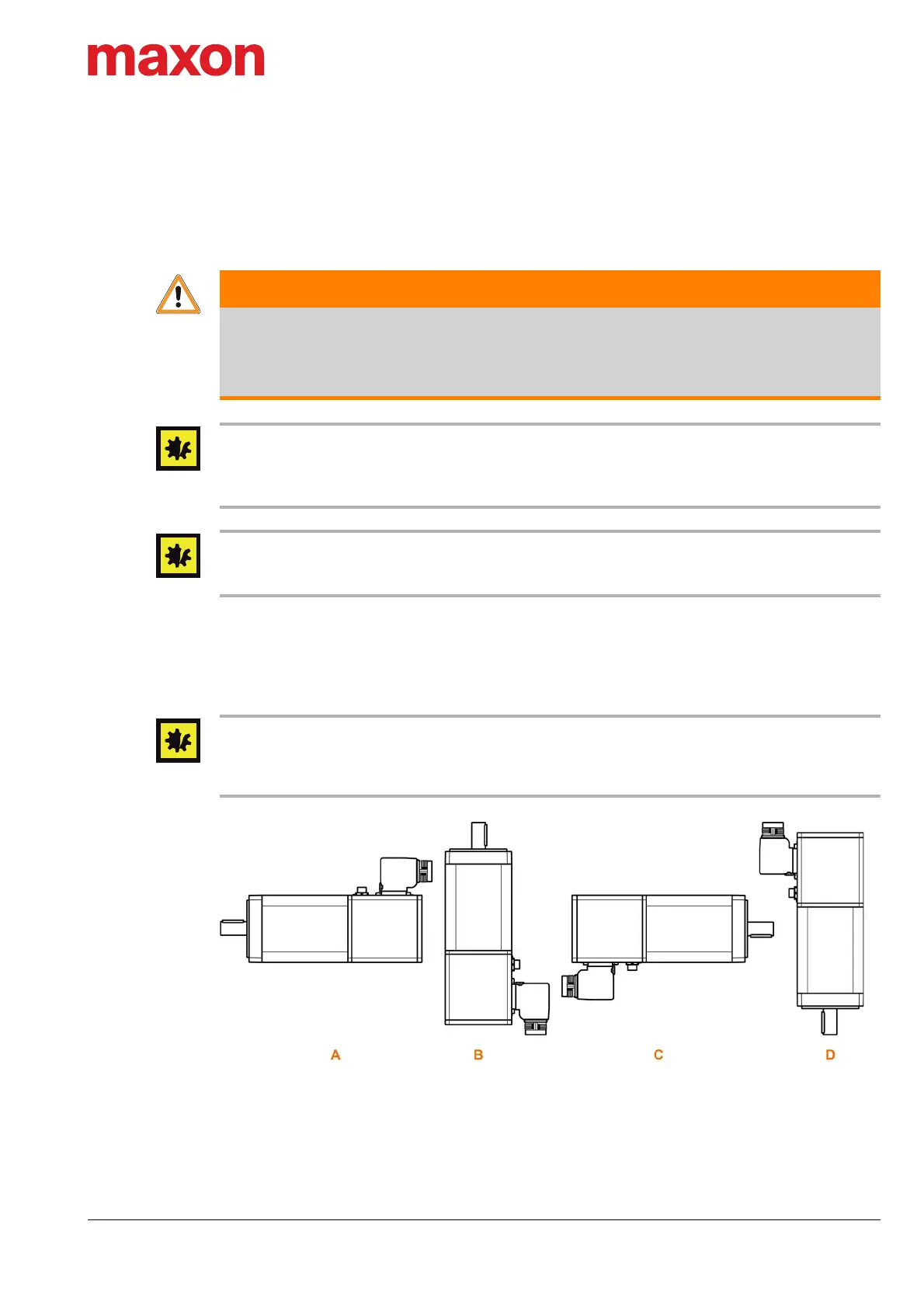
3.2 Mounting Position
The IDX drive may be mounted in any position provided that the stated environmental conditions (page 2-
14) are complied with.
Protection against ingress moisture
With the shaft end facing upward mounting position (
Figure 3-8; «B»), you must consider precautionary
measures when preparing the system for long standstill periods. Thereby, you must remove residue mois-
ture around the drive’s radial shaft seal to prevent humidity from entering the casing.
Figure 3-8 Mounting positions
WARNING
Risk of injury
Unintentional or automatic operation can lead to serious injury
• Make sure that the surrounding system is protected from automatic start-up.
• Make sure to apply all necessary safeguards against unintentional operation.


 To Next Page