23
Program the Wash Cycle
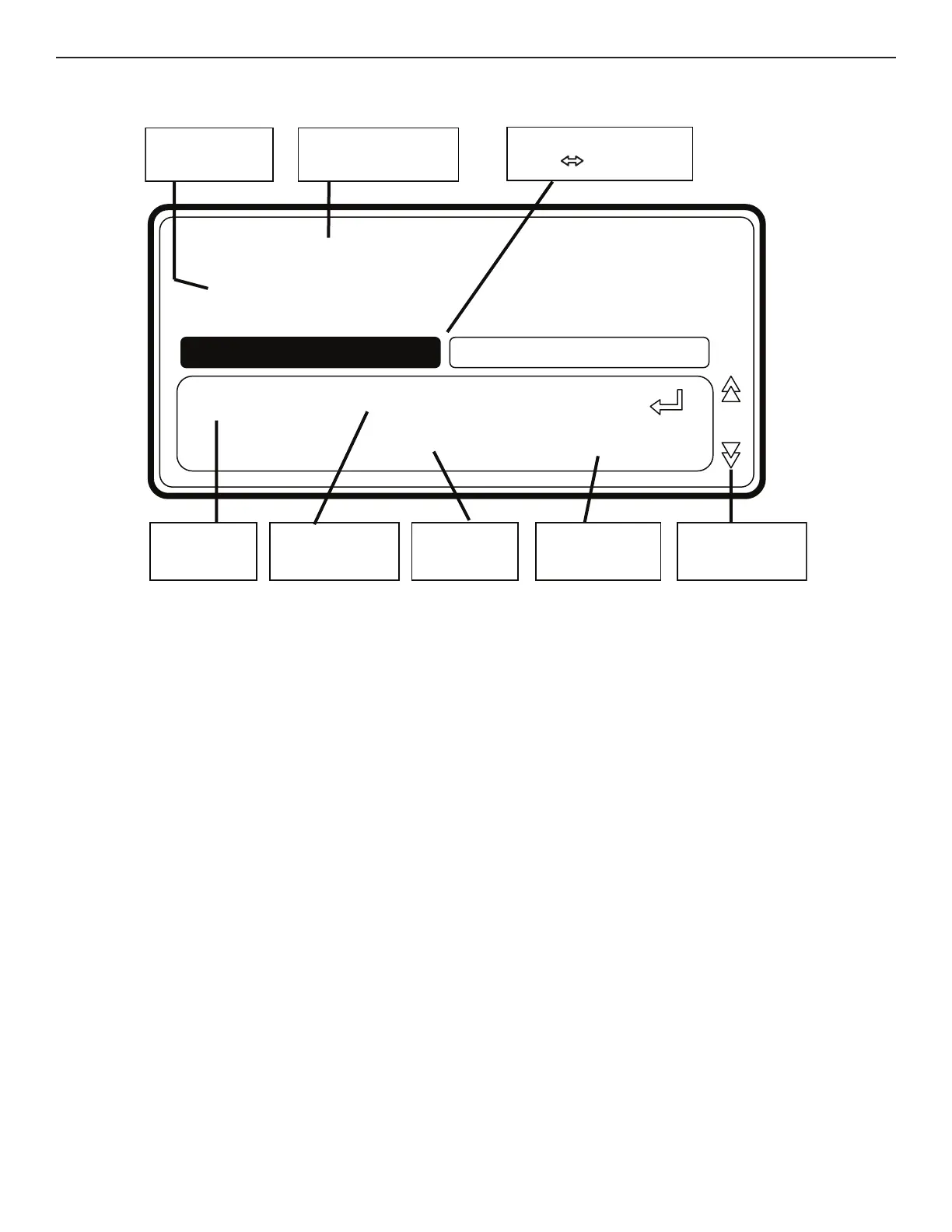
Step number Program number
+ name
STEP
Wash Spin part
Menu
item
Value menu
item
Original
value
Limits
menu item
Position
menu item
Spin
Wash
Program 1: HOT INTENS
Step 2
Time: 8.0 min
8.0 [4.0-20.0]
5
This section provides a detailed explanation about programming the Wash Sequences.
n Each program step contains a Wash segment and a Drain/Spin segment.
n First, the Wash segment must be selected; each item can be programmed.
n Next the Drain/Spin segment must be selected, each item can be programmed.
n Without making changes you can see item by item, by pressing ARROW DOWN or UP.
n If you want to make changes:
– Insert a new value.
– Enable or disable a setting by pressing YES or NO.
– Select a list element by pressing LEFT ARROW or RIGHT ARROW.
NOTE: You must press ENTER to confirm each selection.
n Default values were pre-programmed into each step to make programming easier.
See WASH PROGRAMS for a general explanation of creating wash programs.
n See each list element by using the LEFT ARROW or RIGHT ARROW symbols at the right side of the display.
n The arrow down symbol on the display points to the last Menu Item: EXIT.


 To Next Page