35
OPERATION
Start a Laundry Load
n The washer must be properly installed before operation.
See the Installation Instructions for your washer.
n Configuration and Initialization Menu must have the correct
settings before operation.
n Wash cycles will not start unless the washer control is in the
run mode.
1. Switch on the Power: The display will light up. When the
program is ready to be started, “Select Cycle _ _” will
display.
2. To load the washer: Open the door and load the laundry into
the drum. When the drum is loaded, close the door.
3. Put laundry products into the laundry product dispensers.
Put the correct amount of laundry products into the
dispensers.
4. Start a wash program: Up to 99 programs can be selected.
The first 20 are the standard Wash programs discussed
in “Programmed Cycles”. Additional programs are available
for North America. Insert the program number and press
START
.
NOTE: If there is no program available for a specific program
number, INVALID is displayed.
5. During the cycle, the cycle time will decrease minute by minute
and gives you an indication how long it will take before the
cycle is finished.
n For each Wash program Step, first you will see the
Wash Sequence, then you will see the Drain/Extraction
Sequence.
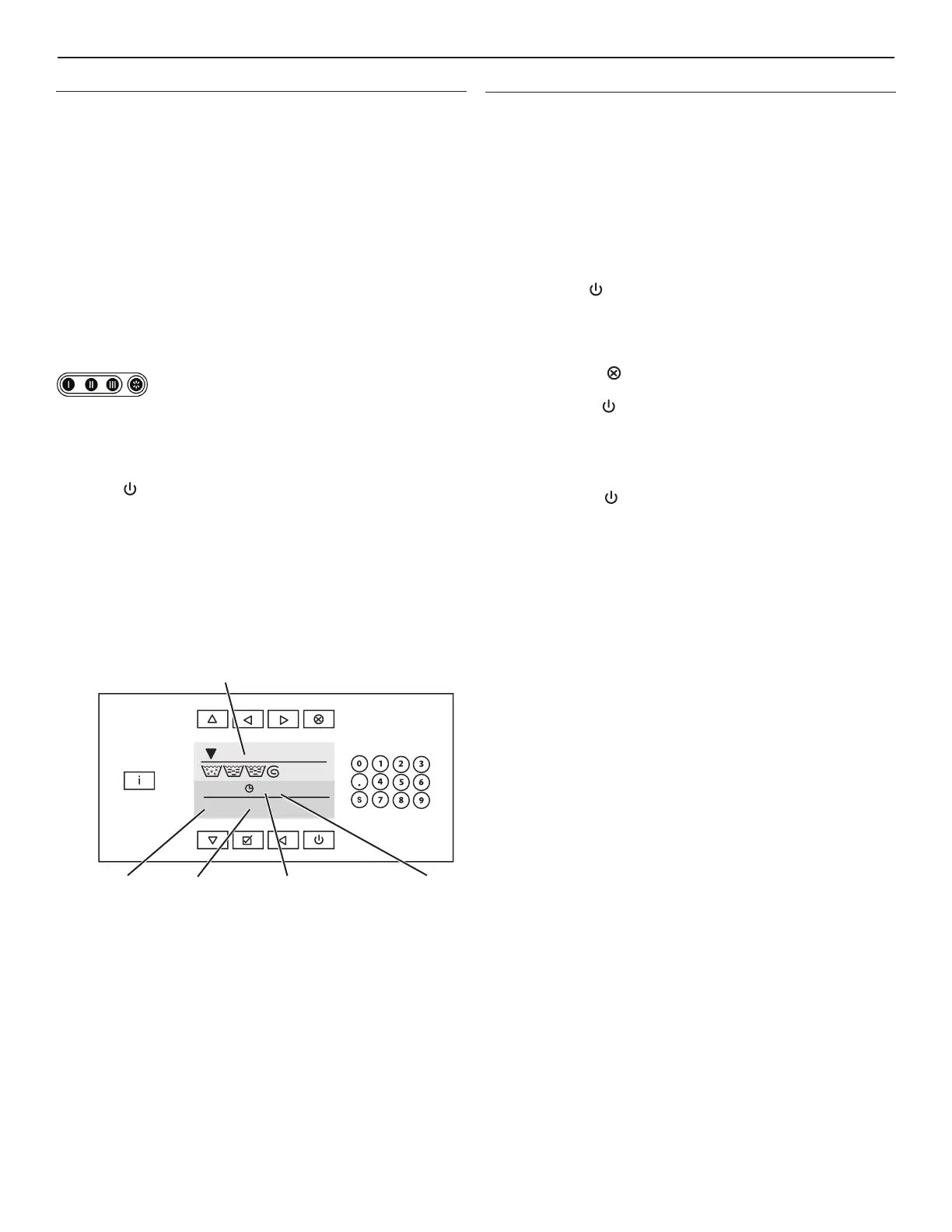
n A Progress Bar shows the progression of the wash cycle.
During the Wash Sequence, pre-programmed
water inlets indicate which soap dispenser needs
to be filled with laundry product.
Cycle Options
Time Delay
To enter a delay time is performed during washer startup:
1. Enter the selected Program Number.
2. Press DOT. The Delay time message will be displayed. The door
and the soap door must be closed first.
3. Now you can insert the value for a delay time. “Washer will start
after _ _ : _ _” First insert a value for the Hours, then insert a value
for the minutes. The minimum delay time is 1 minute [ 00:01].
The maximum delay time is 99 hours 59 minutes [99:59].
4. Press START
. The delay time will start to decrease and the
door will lock immediately. Once the delay time is over, the wash
cycle will start automatically.
NOTES:
n The Delay Time Sequence can be interrupted by
pressing Stop
.
n “Select Cycle _ _” is displayed. Insert the program number and
press START
.
Advancing the Wash Program
n Press to increase Wash Sequence time.
n Press to decrease Wash Sequence time.
n Press START
to skip this step.
Wash Time
When the wash program begins, REMAINING CYCLE TIME
displays and the clock symbol will blink. The REMAINING CYCLE
TIME counter will stop and the clock symbol will stop blinking if extra
time is required. The REMAINING CYCLE TIME counter will stop
when the washer requires extra time to:
n Complete the cycle,
n Fill the tub,
n Heat the water (if the Wait For Temperature option is
selected),
n Drain the tub (if the water is not drained in 30 seconds
and the automatic extended drain time is started), or
n End the spin sequence.
Prog 12: ECO COLOR
34 Min.
Wash program
number
Wash program
name
Remaining time
in wash program
Time unit
Progression bar


 To Next Page