MBIT Technologies
*
www.mbit.com.au 10
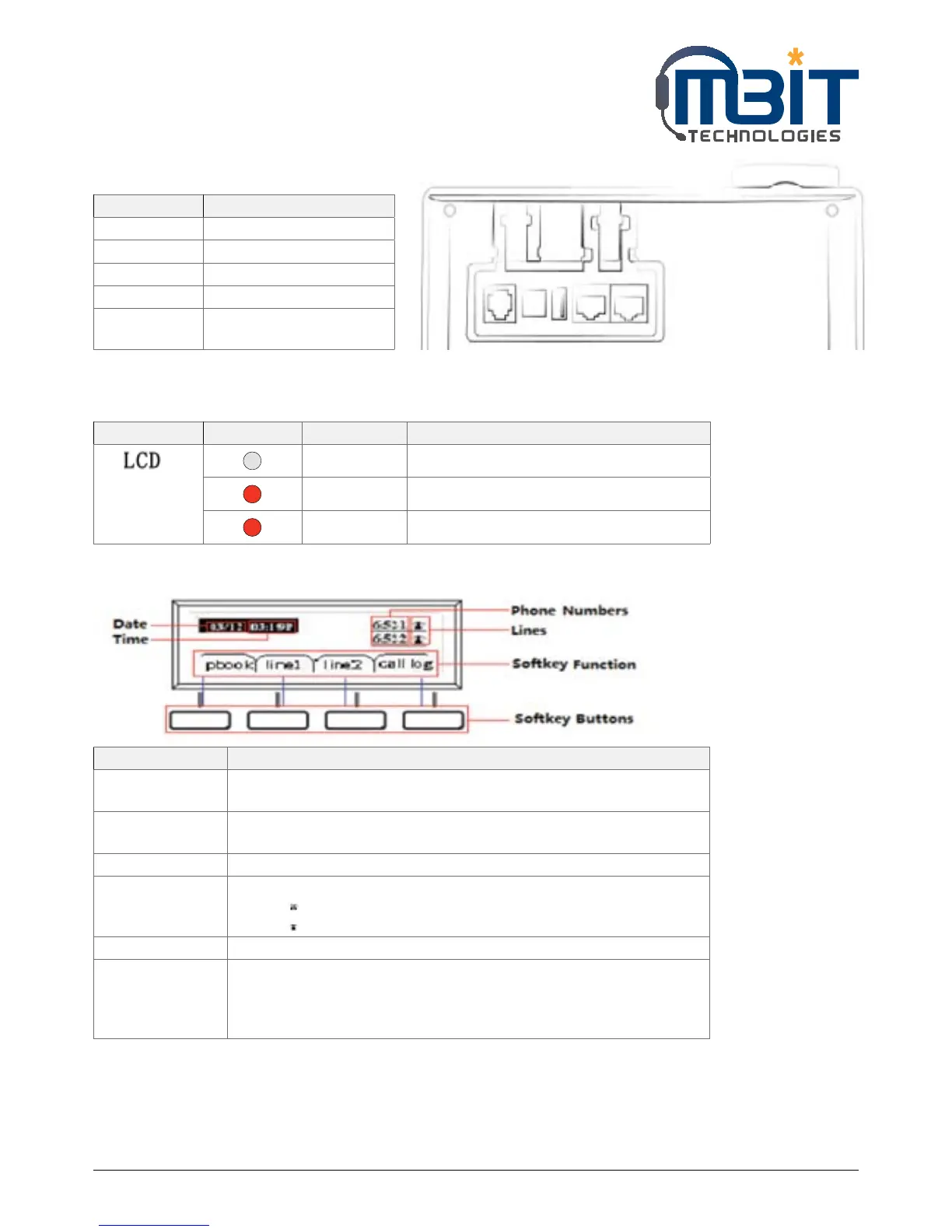
3.2 Rear Panel
Part Name Description of Function
Line Connect to PSTN
USB Use the USB for storage
DC 5V Power port
PC Connects to a PC
Internet Connects to the Ethernet
switch, router or Internet
3.3 LEDs Indicator
LED Colour Status Description
OFF Power off or Phone is standby
Red In use
Blink Red Have a new call or Voice MSG or is updating
3.4 Get Familiar with LCD
Name Description of Function
Date To display the current date.
Date format is mm/dd
Time To display the current time.
Time format is mm:ss (A or P)
Phone Numbers To display the phone number of lines.
Lines To display the status of lines.
The icon means unregistered.
The icon mean registered.
Softkey Function To display the current softkey function.
Softkey Buttons You can use the softkey button to highlight the item displayed on the LCD
screen and then configuration.
One button directs to one softkey function, the blue line in the left picture
displays the corresponding relationship.


 To Next Page