MBIT Technologies
*
www.mbit.com.au 56
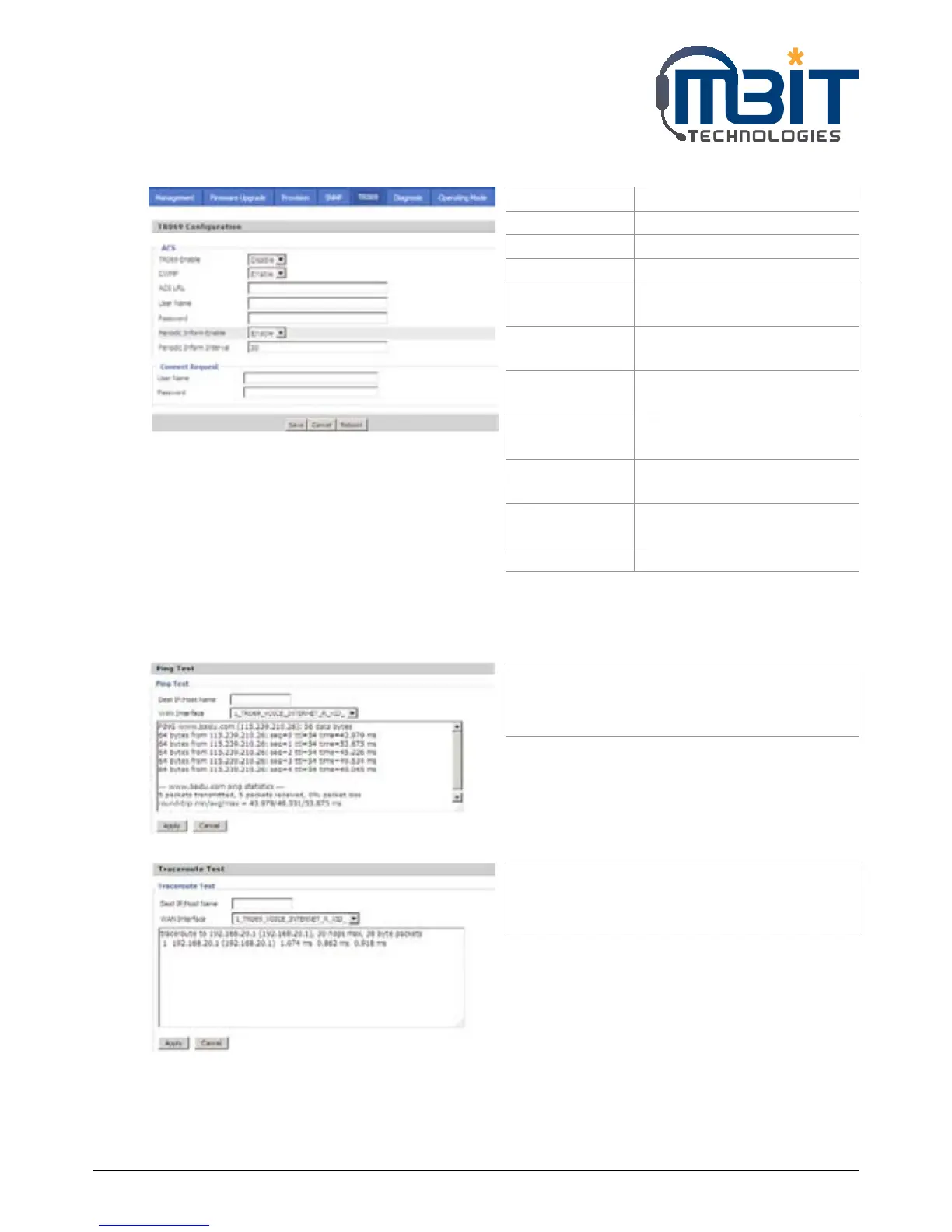
7.8.5 TR069
7.8.6 Diagnoisis
In this page, user can do ping test and traceroute test to diagnose the device’s connection status.
Field Name Description
TR069 Enable If or not enable TR069
CWMP If or not enable TR069
ACS URL The URL of TR069 server
User Name The bb100’s user name for
connecting to TR069 server
Password The bb100’s password for
connecting to TR069 server
Periodic Inform
Enable
If or not enable periodic
information
Periodic Inform
Interval
The interval to send
information to TR069 server
User Name The TR069 server’s user name
for connecting to bb100
Password The TR069 server’s password for
connecting to bb100
SSL Key Fill in SSL key.
1. Ping Test
Enter the destination IP or host name, and then
click Apply, device will perform ping test.
2. Traceroute Test
Enter the destination IP or host name, and then
click Apply, device will perform traceroute test.


 To Next Page