EasyManua.ls Logo

MDS E-PGM+ - User Manual

MDS E-PGM+
37 pages
Print Icon
To Next Page IconTo Next Page
Loading...
MDS
1
Microcontroller Development System
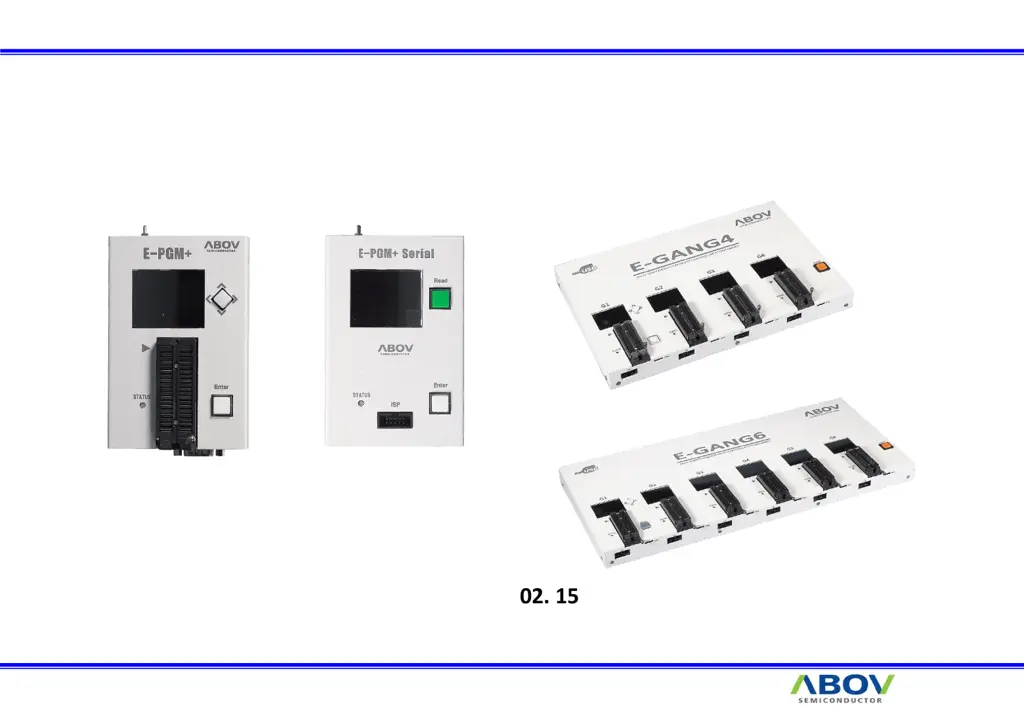
E-PGM+ / E-PGM Serial / E-GANG Manual
2021. 02. 15
ABOV Semiconductor MDS Team

Questions and Answers

Summary

E-PGM+ and E-PGM Serial Specifications

E-GANG4 and E-GANG6 Specifications

Updating E-PGM+ and E-GANG Devices

Software Update Procedure

Step-by-step guide for updating firmware using the software, including device selection and file loading.

Microcontroller Programming

E-PGM+ Programming Workflow

Process of programming a microcontroller using the E-PGM+ device, including checking checksum and options.

Socket and ISP Connector Pinouts

Pin Mapping for Socket and ISP

Detailed mapping of signals for the device socket and ISP connector, including VDD, GND, DATA, etc.

Device Connections: AC33 M Series UART

UART Connections for AC33 M Devices

Specifies UART pin connections for AC33M6128/8128 and AC33M3064/4064 MCUs.

Device Connections: MC80 F7708 UART ISP

UART ISP Connections for MC80 F7708

Details the UART ISP pin connections for the MC80F7708 microcontroller.

Device Connections: 32-bit MCU SWD

SWD Interface Connections

Explains SWD (Serial Wire Debug) interface pin connections for 32-bit MCUs.

Device Connections: AC33 M Series SPI

SPI Connections for AC33 M Devices

Details SPI interface pin connections for AC33M6128/8128 and AC33M3064/4064 MCUs.

Handler Connections: E-PGM+;E-PGM Serial

Handler Cable and Signal Outputs

Describes handler cable connector and output signals (Good/Fail) for E-PGM+ and E-PGM Serial.

Handler Connections: E-GANG

E-GANG Handler Interface Details

Details handler interface cable and connections for E-GANG4 and E-GANG6 devices.

Troubleshooting: Software Errors

WDAPI1010.DLL Missing Error

Resolves the error message indicating WDAPI1010.DLL is missing from the system.

Troubleshooting: File and Execution Issues

Firmware Folder and Executable Path

Addresses issues related to firmware folder location and executing the program via desktop shortcuts.

Troubleshooting: USB Driver

USB Driver Installation and Resolution

Guide for uninstalling, managing, and reinstalling the USB driver to resolve connection issues.

Writing Errors and Solutions

Common Writing Errors (Part 1)

Details common error messages during programming like No DPID, Power Check, and Trim Check failed.

Writing Errors and Solutions - Part 2

Common Writing Errors (Part 2)

Covers errors like Debug Power Request Fail and CPU Reset during programming.

ISP Connection Overview

ISP Connection Diagram

Illustrates the connection diagram between the MCU and the Writer for ISP mode.

Device Connectors and Ports

Front and Rear Panel Connectors

Details the available connectors on the device, including USB, ISP, RS-232, and SWD.

HPO File Structure

HPO File Format Explained

Describes the structure of an HPO file, including device name, option, VDD, and hex code.

Running with HPO Files

Executing with HPO Files Example

Demonstrates how to run the E-PGM+ software by loading an HPO file via command line.

PC Mode Software Operation

Configuring Serial ID in PC Mode

Guide to setting the Gang ID and configuring the Serial ID using the PC mode software.

Key Displayed Information

Verification of Device and Firmware Data

Explains the important information displayed on the device after firmware update, such as Device Name and Checksum.

Gang Mode Operation

Multiple Device Programming in Gang Mode

Details how to perform multiple writes simultaneously in gang mode by connecting start signals.

Specific Device: MC97 F1104 S;1204 S;1316 S (1;3)

Vpp Level and SW3 Switch Configuration

Explains Vpp voltage levels and the configuration of the SW3 switch for these specific devices.

Specific Device: MC97 F1104 S;1204 S;1316 S (2;3)

ISP Connections and 200 Ohm Resistor

Details ISP connections and the requirement of a 200 Ohm resistor for MCUs to prevent damage.

Specific Device: MC97 F1104 S;1204 S;1316 S (3;3)

Resistor Placement for Vpp Line

Instructions on how to move the 200 Ohm resistor to the Vpp line when removing it from the board.

Product Comparison: E-PGM+ vs E-PGM Serial

Feature Comparison Table

Compares key features such as socket writing, supported devices, buffer size, and protection circuits.

Setting Device VDD

Adjusting VDD for ISP and LVR

Guidelines for setting VDD, considering ISP reset IC voltage and LVR requirements.

Device Password Protection

Lock and Unlock Password Procedures

Explains how to enable password lock and unlock the device by matching the hex-value password.

Setting Unique Serial ID

Configuring Start Address and ID Value

Details on setting the serial ID, including start address, length, and the ID value itself.

Limiting Write Operations

Available Write Count Configuration

Enables setting a limit for the number of write operations, with a range of 1 to 1,000,000.

E-PGM Tool Self-Check

Performing Tool Self-Test

Steps to perform a self-check on the E-PGM tool to verify its functionality.

Offline Code Checksum

Calculating Checksum Without PC

Procedure to obtain a checksum without a PC connection by saving HPO and selecting the device.

Tool Options: Erase Data Flash

Data Flash Erasing during Write

Option to erase Data Flash during the write sequence for supported devices.

Summary

E-PGM+ and E-PGM Serial Specifications

E-GANG4 and E-GANG6 Specifications

Updating E-PGM+ and E-GANG Devices

Software Update Procedure

Step-by-step guide for updating firmware using the software, including device selection and file loading.

Microcontroller Programming

E-PGM+ Programming Workflow

Process of programming a microcontroller using the E-PGM+ device, including checking checksum and options.

Socket and ISP Connector Pinouts

Pin Mapping for Socket and ISP

Detailed mapping of signals for the device socket and ISP connector, including VDD, GND, DATA, etc.

Device Connections: AC33 M Series UART

UART Connections for AC33 M Devices

Specifies UART pin connections for AC33M6128/8128 and AC33M3064/4064 MCUs.

Device Connections: MC80 F7708 UART ISP

UART ISP Connections for MC80 F7708

Details the UART ISP pin connections for the MC80F7708 microcontroller.

Device Connections: 32-bit MCU SWD

SWD Interface Connections

Explains SWD (Serial Wire Debug) interface pin connections for 32-bit MCUs.

Device Connections: AC33 M Series SPI

SPI Connections for AC33 M Devices

Details SPI interface pin connections for AC33M6128/8128 and AC33M3064/4064 MCUs.

Handler Connections: E-PGM+;E-PGM Serial

Handler Cable and Signal Outputs

Describes handler cable connector and output signals (Good/Fail) for E-PGM+ and E-PGM Serial.

Handler Connections: E-GANG

E-GANG Handler Interface Details

Details handler interface cable and connections for E-GANG4 and E-GANG6 devices.

Troubleshooting: Software Errors

WDAPI1010.DLL Missing Error

Resolves the error message indicating WDAPI1010.DLL is missing from the system.

Troubleshooting: File and Execution Issues

Firmware Folder and Executable Path

Addresses issues related to firmware folder location and executing the program via desktop shortcuts.

Troubleshooting: USB Driver

USB Driver Installation and Resolution

Guide for uninstalling, managing, and reinstalling the USB driver to resolve connection issues.

Writing Errors and Solutions

Common Writing Errors (Part 1)

Details common error messages during programming like No DPID, Power Check, and Trim Check failed.

Writing Errors and Solutions - Part 2

Common Writing Errors (Part 2)

Covers errors like Debug Power Request Fail and CPU Reset during programming.

ISP Connection Overview

ISP Connection Diagram

Illustrates the connection diagram between the MCU and the Writer for ISP mode.

Device Connectors and Ports

Front and Rear Panel Connectors

Details the available connectors on the device, including USB, ISP, RS-232, and SWD.

HPO File Structure

HPO File Format Explained

Describes the structure of an HPO file, including device name, option, VDD, and hex code.

Running with HPO Files

Executing with HPO Files Example

Demonstrates how to run the E-PGM+ software by loading an HPO file via command line.

PC Mode Software Operation

Configuring Serial ID in PC Mode

Guide to setting the Gang ID and configuring the Serial ID using the PC mode software.

Key Displayed Information

Verification of Device and Firmware Data

Explains the important information displayed on the device after firmware update, such as Device Name and Checksum.

Gang Mode Operation

Multiple Device Programming in Gang Mode

Details how to perform multiple writes simultaneously in gang mode by connecting start signals.

Specific Device: MC97 F1104 S;1204 S;1316 S (1;3)

Vpp Level and SW3 Switch Configuration

Explains Vpp voltage levels and the configuration of the SW3 switch for these specific devices.

Specific Device: MC97 F1104 S;1204 S;1316 S (2;3)

ISP Connections and 200 Ohm Resistor

Details ISP connections and the requirement of a 200 Ohm resistor for MCUs to prevent damage.

Specific Device: MC97 F1104 S;1204 S;1316 S (3;3)

Resistor Placement for Vpp Line

Instructions on how to move the 200 Ohm resistor to the Vpp line when removing it from the board.

Product Comparison: E-PGM+ vs E-PGM Serial

Feature Comparison Table

Compares key features such as socket writing, supported devices, buffer size, and protection circuits.

Setting Device VDD

Adjusting VDD for ISP and LVR

Guidelines for setting VDD, considering ISP reset IC voltage and LVR requirements.

Device Password Protection

Lock and Unlock Password Procedures

Explains how to enable password lock and unlock the device by matching the hex-value password.

Setting Unique Serial ID

Configuring Start Address and ID Value

Details on setting the serial ID, including start address, length, and the ID value itself.

Limiting Write Operations

Available Write Count Configuration

Enables setting a limit for the number of write operations, with a range of 1 to 1,000,000.

E-PGM Tool Self-Check

Performing Tool Self-Test

Steps to perform a self-check on the E-PGM tool to verify its functionality.

Offline Code Checksum

Calculating Checksum Without PC

Procedure to obtain a checksum without a PC connection by saving HPO and selecting the device.

Tool Options: Erase Data Flash

Data Flash Erasing during Write

Option to erase Data Flash during the write sequence for supported devices.

MDS E-PGM+ Specifications

General IconGeneral
ROM512 KB
Flash Memory512 KB
ADC Channels16
DisplayLCD
Communication InterfacesI2C, SPI, UART