14 / 32 Piezosurgery // GB
MANUAL OF USE AND MAINTENANCE
05.3 - Description of the Display and Functions
This point describes the three “screens” shown on the Piezosurgery display and their
functions.
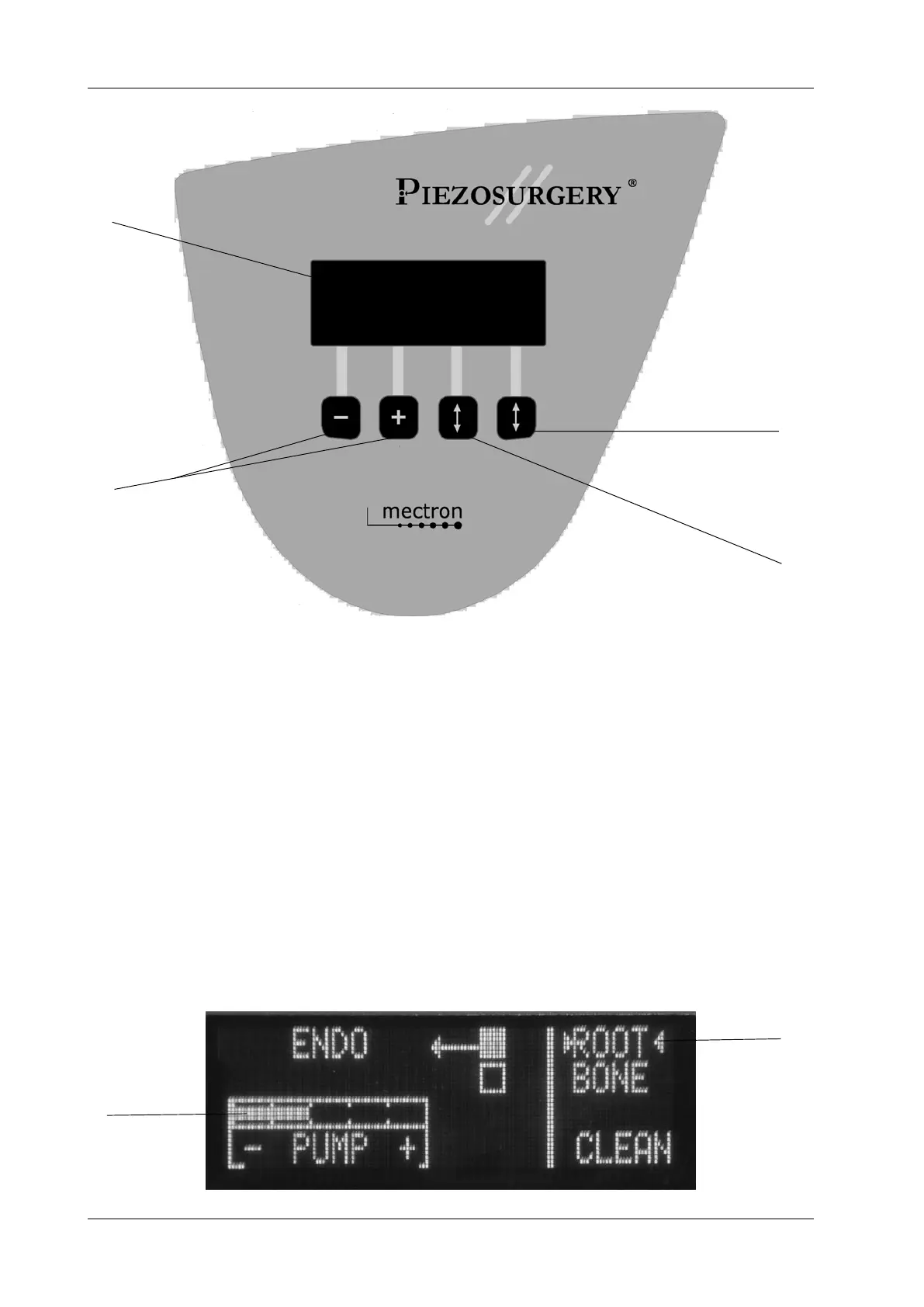
With the Piezosurgery device, two different power modes can be used. These are ROOT
and BONE. Press the arrow key (Fig.6 - Ref.D) to set the required power mode. The type
of power that has been chosen will be indicated between two pointers (Fig.7 - Ref.B).
Device in the ROOT mode Fig. 7 - In the ROOT mode, press the power-level key (Fig.6
- Ref.C) to set the following functions:
- ENDO
- PERIO
To adjust the delivery rate of the pump, press the + and – keys (Fig.6 - Ref.B). In the
ROOT mode, the speed can be set to between nought and five. The display will show the
speed that has been selected (Fig.7 - Ref.A).
C
D
A
B
Fig. 6
Fig. 7
A
B



 To Next Page