EN
Charge battery | 10
3 Charge battery
Press simultaneously, then follow the instructions on
the display
to acknowledge an acoustic alarm (see chapter 13)
Battery low
Approximately 30 minutes before the battery is fully empty an acoustic signal sounds and the
battery symbol [
] starts to blink. The acoustic signal can be muted but the battery symbol
continues to blink until the battery is empty. The set pressure is maintained but the battery
should be recharged as soon as possible.
Battery empty
The battery symbol will blink with an acoustic sound for 10 minutes prior to the battery fully
discharging, unless the pump is switched off earlier. The acoustic sound cannot be muted
during the 10
minutes. If Thopaz is not connected to a power source the system will switch off
automatically after 10 minutes. The negative pressure is not maintained after the system turns off.
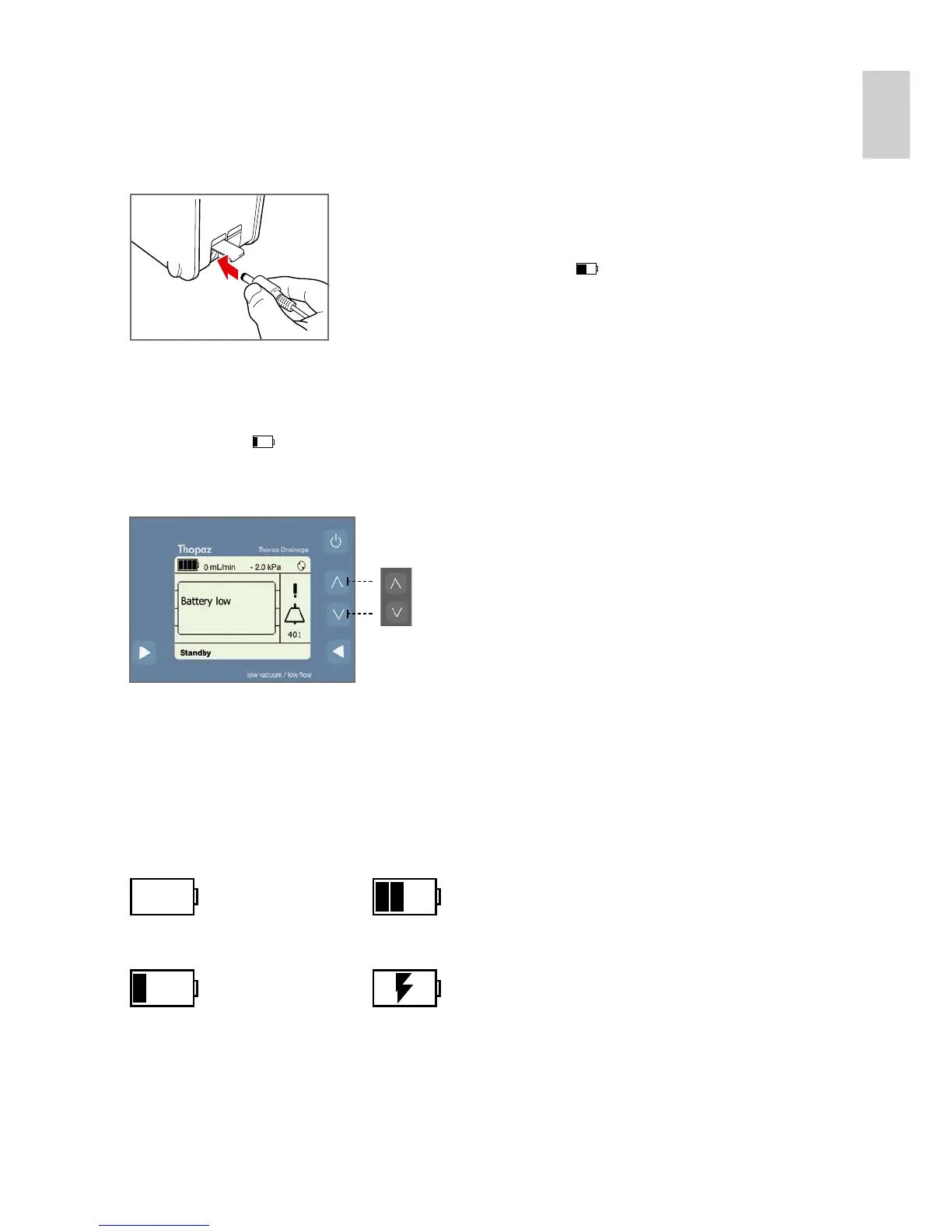
Plug the Thopaz Power supply into a wall outlet and open the small
protection cover to access the DC socket. Plug the coaxial power
supply into the DC socket. Moving bars on the battery display will
indicate charging is occurring [ ].
1. Battery empty
(sign is blinking)
3. Battery is being charged
(moving bars)
2. Battery almost empty 4. Battery is fully charged





 To Next Page