EN
Preparation for use / operating instructions | 24
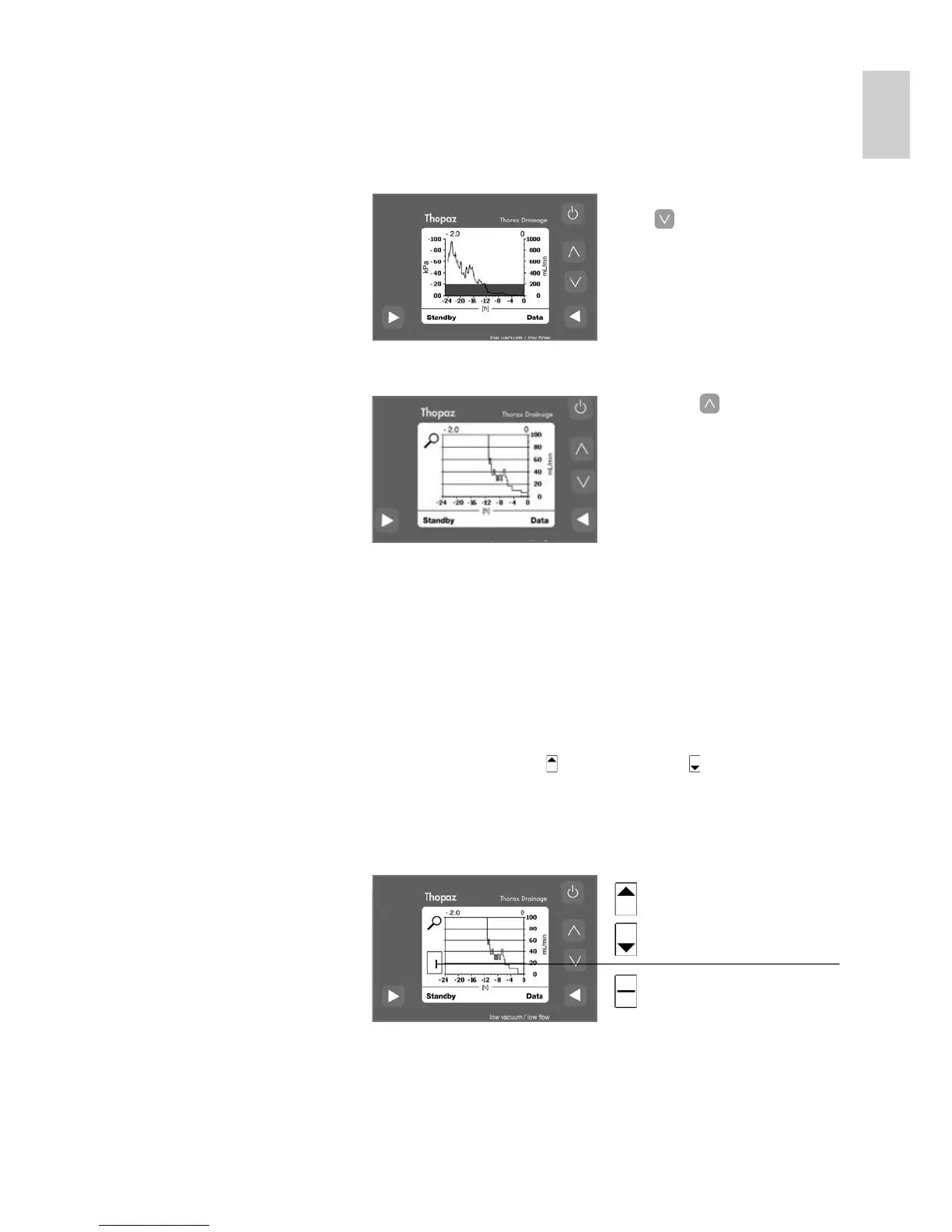
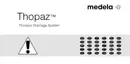
If the flow rate does not exceed 100 mL / min. for at least
24 hours, Thopaz will display the graph in the zoom mode
directly.
The flow scale is reduced from 1000 mL / min. to 100 mL / min.
Zoom mode 1.1 In Graph mode press
[
] to activate zoom
function.
2.1 Press [ ] to return to
graph function.
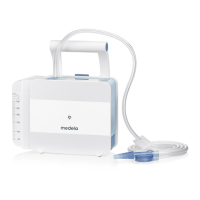
Catheter check – The catheter check is only visible in zoom mode when the
flow is 0 mL / min.
– Ask the patient to breathe slowly and deeply 3 times.
– In zoom mode, a pressure difference from minimal 0.3 kPa
between inspiration [
] and expiration [ ] is displayed at
a flow of 0 mL / min. This pressure difference is an indication
for the respiration cycle of the patient and confirms that the
patient catheter (drain) is not clogged.
8.7
Patient
catheter
(drain)
open
Patient catheter (drain)
clogged?
Important: The catheter check works only with a patient
catheter (drain) in the interpleural space.
Operation





 To Next Page