MVR Lite-UG01-EN-200324-OB
<11>
MVR Lite User Guide - English
Important:
Remove remote’s battery protective tab or insert the battery before using.
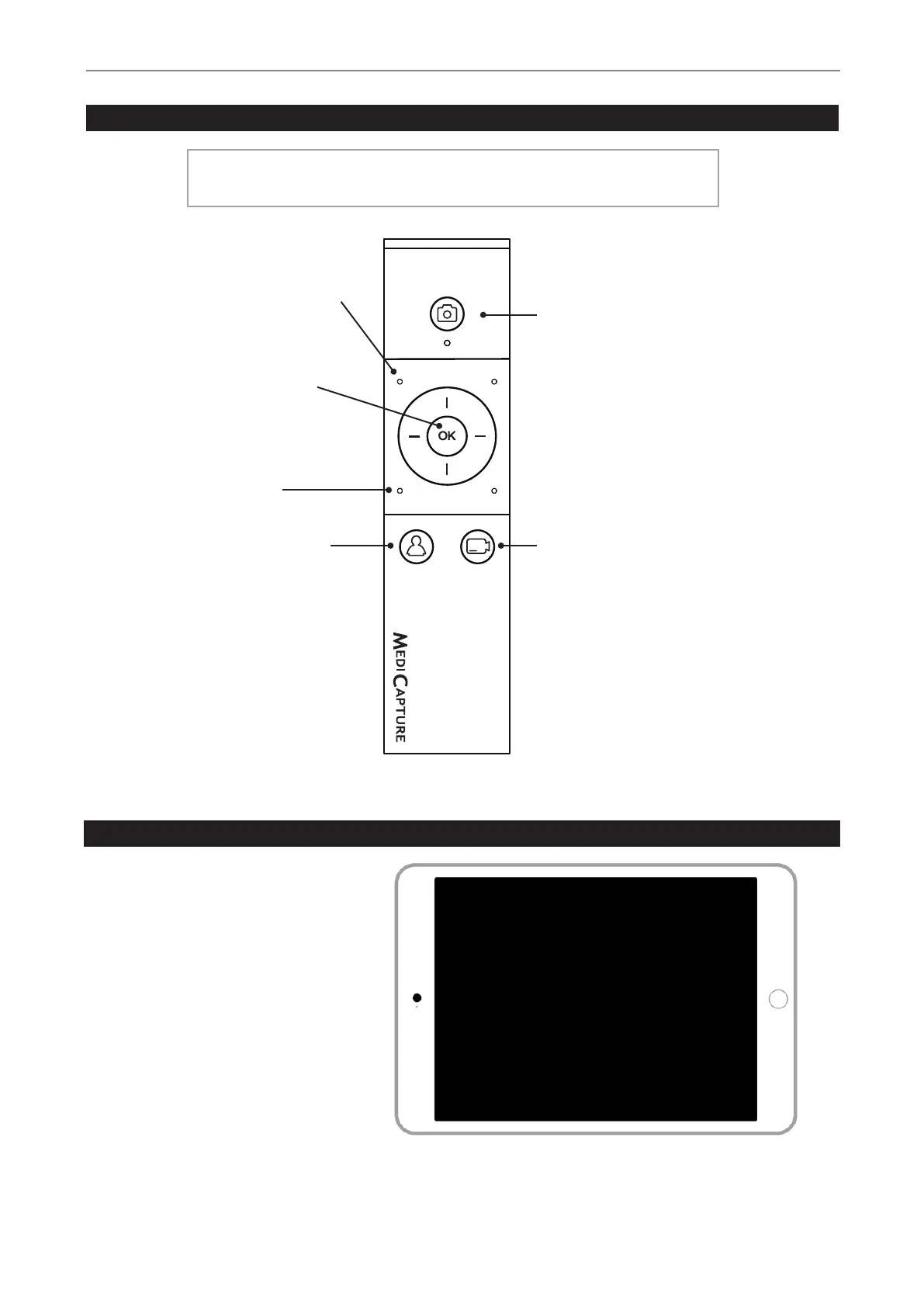
Remote Control
Navigation Wheel:
OK Button = Select button.
OK 3 seconds = Video Pause
“Esc” button:
New Patient button:
Press before each
recording session. Opens
a new folder / new study.
END OF STUDY:
Closes the recording study
for next steps.
Capture Photo button:
Records the image on the
monitor to the storage(s).
Record Video button:
Records video clips of what is
being displayed on monitor.
Press once to start recording
and again to stop.
Input selection button:
Toggle between Input 1
and Input 2
Remote control with a Remote Device (tablet) by using the MVR Remote App
Android remote devices (tablets) can be used
for external control of MVR Lite, either via USB
connection as an external touchscreen monitor
(= USB tethering) or wirelessly as a handhold
portable device.
MediCapture recommends to use pre-installed and
tested MediCapture tablets.
Example: TBHI9PRO – Remote Tablet
For further instructions about setup and use
of a tablet as a remote control, please contact
MediCapture for the document User Guide
Supplement, Tablet.


 To Next Page