MVR Lite-UG01-EN-200324-OB
<13>
MVR Lite User Guide - English
Using Patient Button to End Recording Study
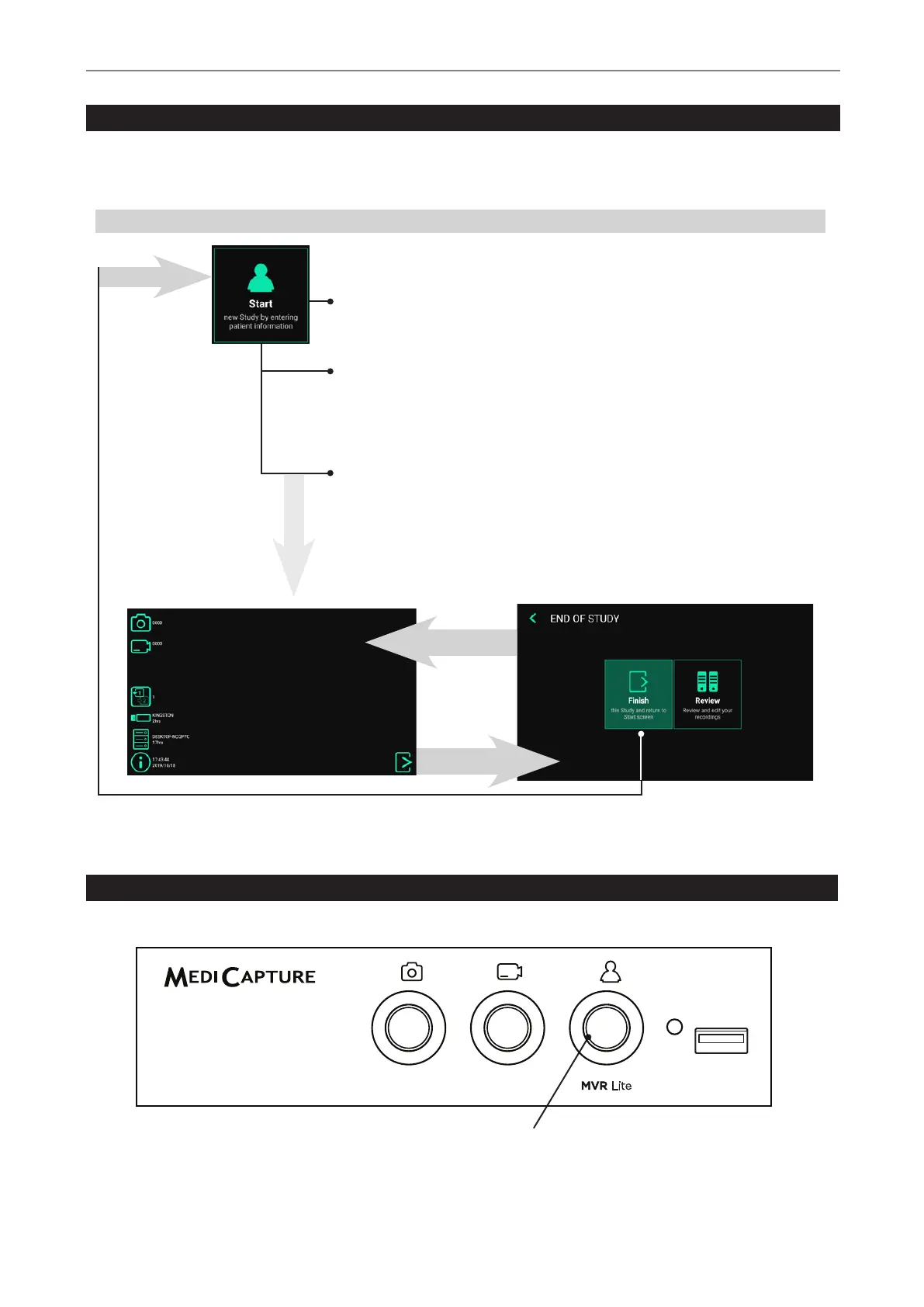
You can use the Patient button on the front to nish a study. [USB keyboard: Key “F3” has the same function as the Patient button.]
Light Ring
Is illuminated green when a recording
study can be closed (END OF STUDY)
Creating Patient Data
The workow for patient data input depends on the settings for Patient Info. ➤ Settings ➤ System ➤ Patient Info
MVR Lite starts with a dened home screen after switching-on or after a study was nished.
Workow after MVR Lite was switched on:
No Patient Info
MVR Lite creates a folder to store images and
videos recorded in that study.
Manual Patient Info
You can type in patient information to assign
images and videos to a patient. To input patient
information, please use an external touch monitor
or a USB keyboard.
START
End of study
Back to study
(live screen)
Live screen for recording
Tap on Start, press the Patient button on the front [or
use “F3” key on your keyboard] to start a new study.


 To Next Page