Disassembly and Reassembly
16 - 17
Injector Head - Plunger Position Pot (continued)
Plunger Pot
Replacement
1. Hold the pot assembly with the gear facing away from you. Turn
the gear counter-clockwise until the gear turns no further. Rotate
the gear clockwise 1/4 turn.
2. Install the new pot assembly with the two screws previously
removed. The pot assembly cannot be tightened until pot calibra
-
tion is complete.
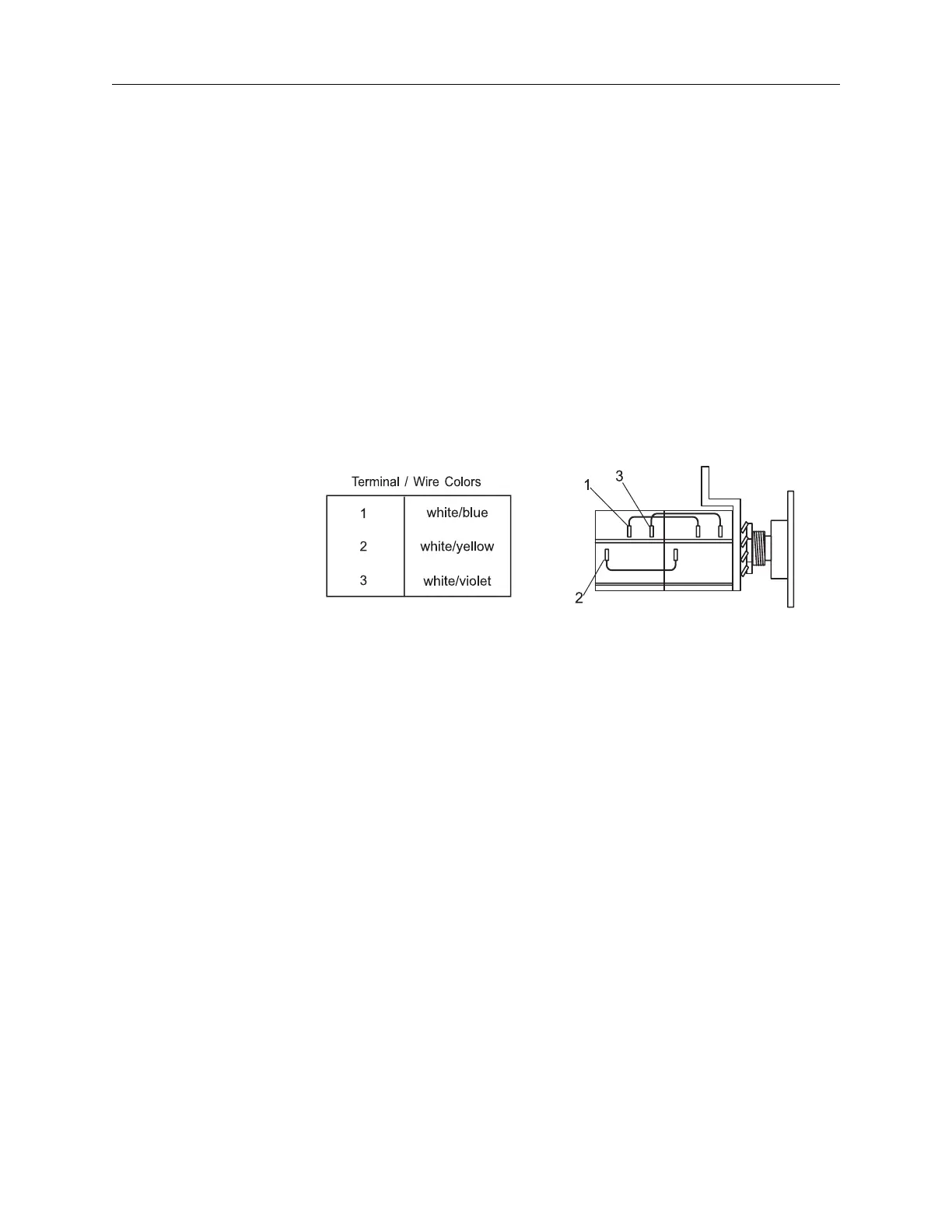
3. Carefully reattach the wires and solder (refer to the chart below).
Ensure that the wires are positioned away from moving parts.
Figure 16.2: Plunger Pot Terminal Identification
4. For the following measurements, connect the DVM ground to ter-
minal 3 on the plunger position pot.
5. Apply power. Disregard any messages that may appear on the
Sentinel. Advance the plunger at least 2 ml to satisfy the plunger
pot test, then reverse the plunger to the rear limit .
6. Measure the wiper voltage on terminal 2 of the plunger position
pot. With the pot disengaged, turn the pot shaft gear until the volt
-
age reads 0.250 VDC +0/-0.020 VDC.
7. Reengage the pot gear, maintaining the voltage as measured in
the previous step, and tighten the pot screws. Ensure that the
gears do not jam.



 To Next Page