www.megger.comDLRO100E, 100X & 100H – 100A
15
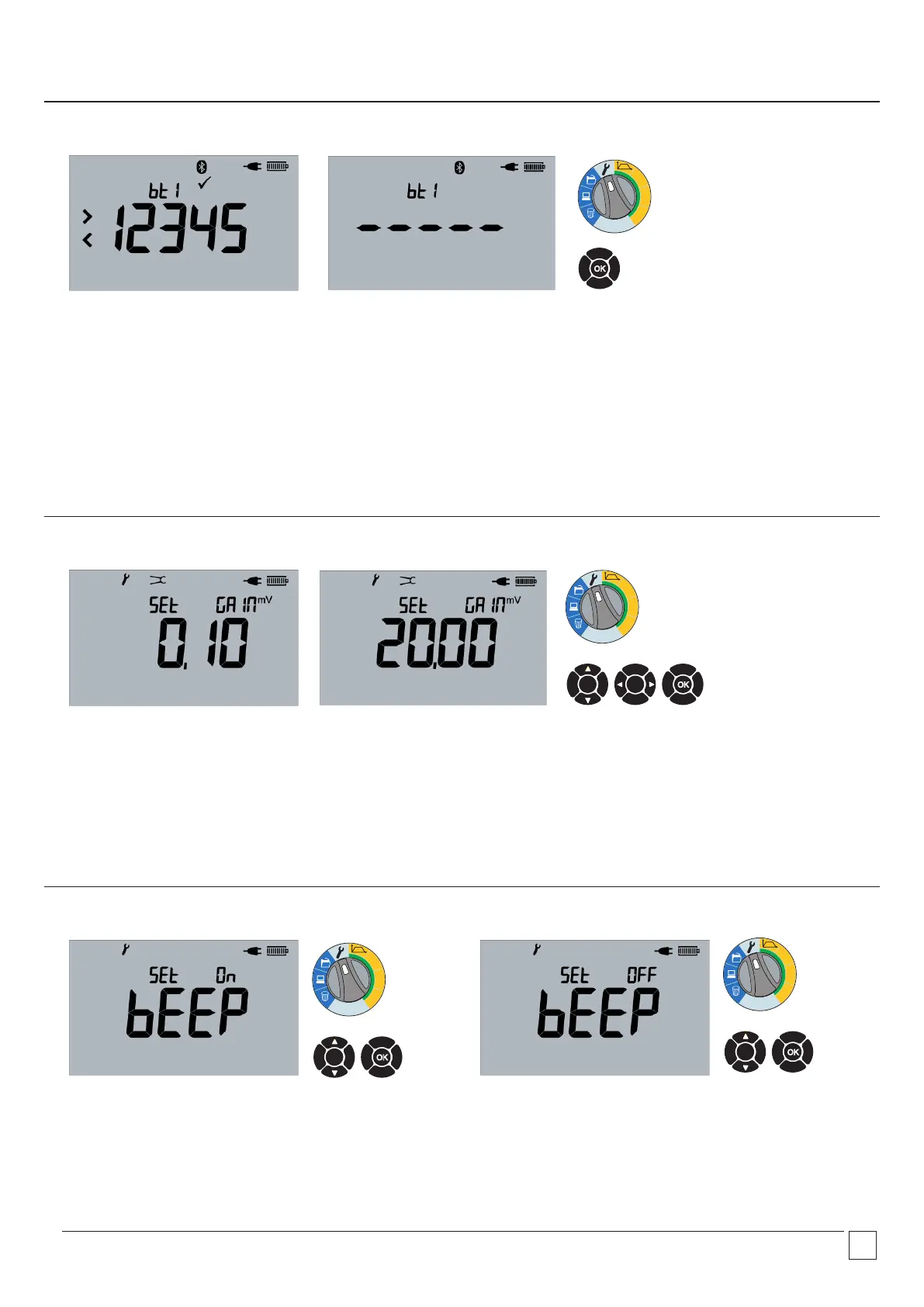
2.18 Buzzer settings - ON 2.19 Buzzer settings - OFF
Press Up and Down arrows to adjust setting ON to OFF.
Select OK to set and proceed.
Press Up and Down arrows to adjust setting OFF to ON.
Select OK to set and proceed.
2.17 Set clamp gain
Adjust Gain with UP and DOWN arrows between 0.1 mV/A and 20.00 mV/A.
Navigate using LEFT and RIGHT arrows or select OK to accept.
NOTE: The clamp must be zeroed before measurements start for accurate readings. The clamp current measurement is not displayed
on the instrument.
100A
50A
10A
Ω
100A
50A
10A
Ω
100A
50A
10A
Ω
OK
OK
OK
Clamp gain (X and H models only)
Buzzer settings
NOTE: When in settings, user can exit by moving the Range rotary switch away from the setting position (Spanner icon)
Select existing pair.
Press OK for 3 seconds to begin pairing process.
2.16 Bluetooth
®
—overwriting
100A
50A
10A
Ω
OK


 To Next Page