www.megger.comDLRO100E, 100X & 100H – 100A
12
2. Instrument set-up
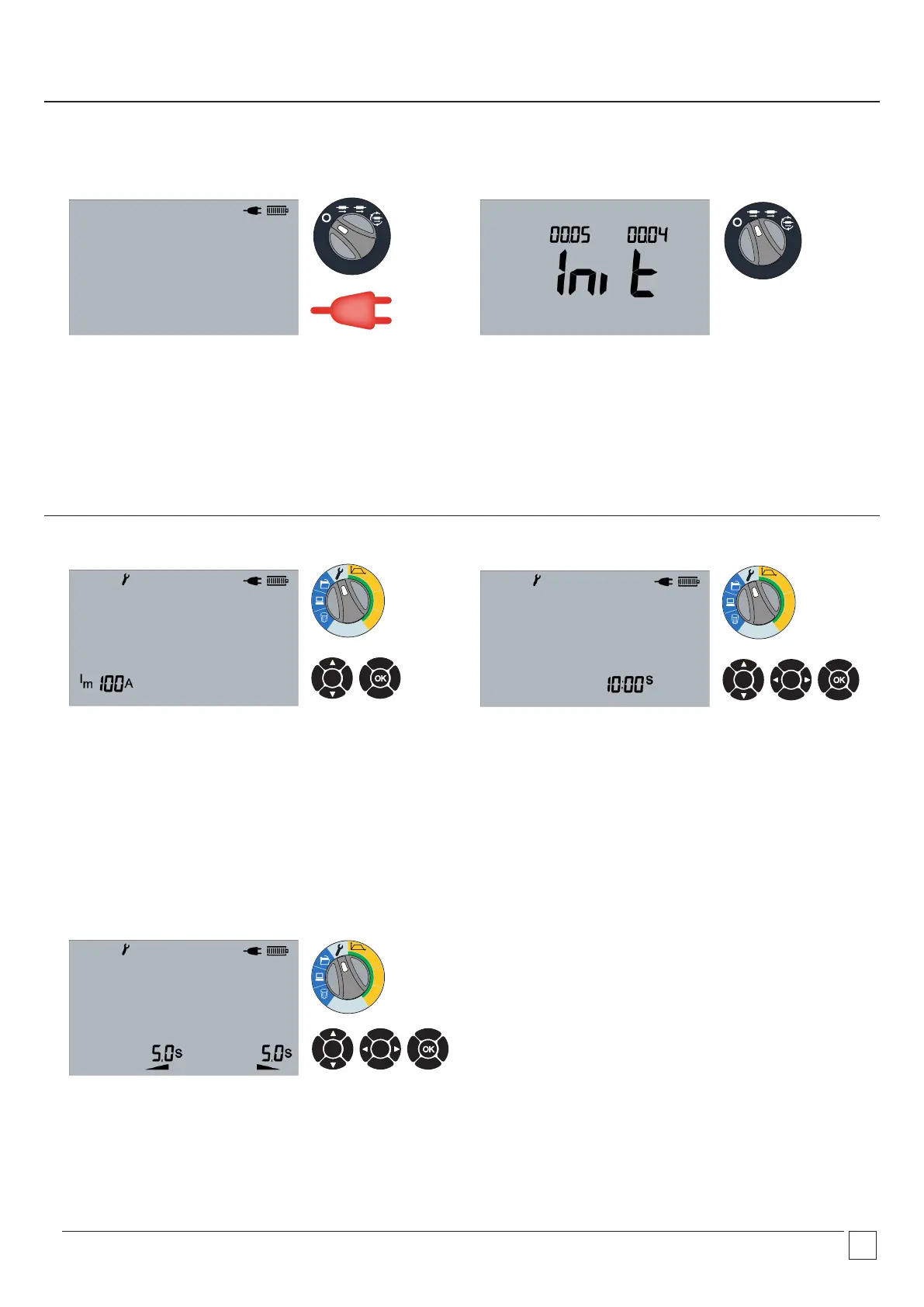
Charging and turning the instrument on
User settings
2.2 Screen
Successful initialisation.
100A
50A
10A
Ω
100A
50A
10A
Ω
100A
50A
10A
Ω
OK
2.3 Set max current
Maximum current adjusted between 10 A and 100 A with UP
and DOWN arrows. Select OK to accept and progress to set test
duration.
For test durations of greater than 10 minutes the current setting
is limited to a maximum of 59A
OK
OK
2.4 Set test duration
Test duration is adjusted with UP and DOWN arrows. Minutes and
seconds are selected with LEFT and RIGHT arrows. Select OK to
accept.
For currents of above 59A the test duration is limited to a .
maximum of 10 minutes.
Instrument switched off, mains connected and battery charging.
Fans will be running.
MAN
AUTO
2.1 Charging screen – Instrument 0ff
2.5 Set Ramp Up/Down
Ramp Up/Down duration adjusted with UP and DOWN arrows.
Seconds and half seconds selected with LEFT and RIGHT arrows.
Select OK to accept.
MAN
AUTO


 To Next Page