14
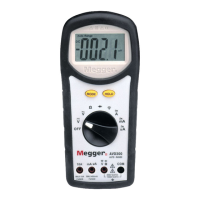
1) Set rotary switch to position.
2) Default at Capacitance. Press button to
select diode test
3) Insert red (+) test lead into jack and black (–)
test lead into COM input jack.
4) Connect the test leads and observe the digital display.
5) Normal forward voltage drop (forward biased) for a
good silicon diode is between 0.400V to 0.900V. A
reading higher than that indicates a leaky diode
(defective). A zero reading indicates a shorted diode
(defective). An OL indicates an open diode
(defective).
6) Reverse the test leads connections (reverse biased)
across the diode.
7) The digital display shows OL if the diode is good. Any
other readings indicate the diode is resistive or
shorted (defective).
d.c., a.c., a.c.+Hz of µA, mA or A Functions
1) Set rotary switch to A mA or µA
2) Insert red (+) test lead into mA µA jack and black (–)
test lead into C O M input jack for current
measurements below 400mA. Insert red (+) test lead
into A jack and black (–) test lead into COM input jack
for current measurements up to 10A mA or A ranges
will be selected automatically after test leads are
plugged in.
3) Default at d.c. Press button to select a.c., and
press again to select a . c . + H z in dual display if
required.
4) Connect the test leads and observe the digital display.
WARNINGS
Do not measure any circuit that draws more than the
current ratings of the protection fuses. If the fuse
blows, you might be injured or damage the meter.
Do not attempt a current measurement where the
open circuit voltage is above 500V for mA µA jack;
and 600v for A jack. Suspected open circuit voltage
must be checked with voltage functions.
Vo l t a ge output current clamp adaptors are
recommended to use with the meter adaptor or
vo l t age functions for making high current
measurements.



 To Next Page