7
10. mA µA Input Jack for 400mA, 40mA, 4000µA o r
4 0 0 µ A current functions, colour coded.
11 . Pushbutton to store displayed data for
later recall.
1 2 . Pushbutton. Press to select secondary
functions. Press and hold for 1second to
turn on the LCD backlight (M 8 0 3 7o n l y ) .
1 3 . Pushbutton. Press to select 40,000
counts. Press and hold for 1 second to
activate RECORD function.
14. Pushbutton. Press to select 4,000
counts fast mode. Press and hold for
1 second to activate CREST function.
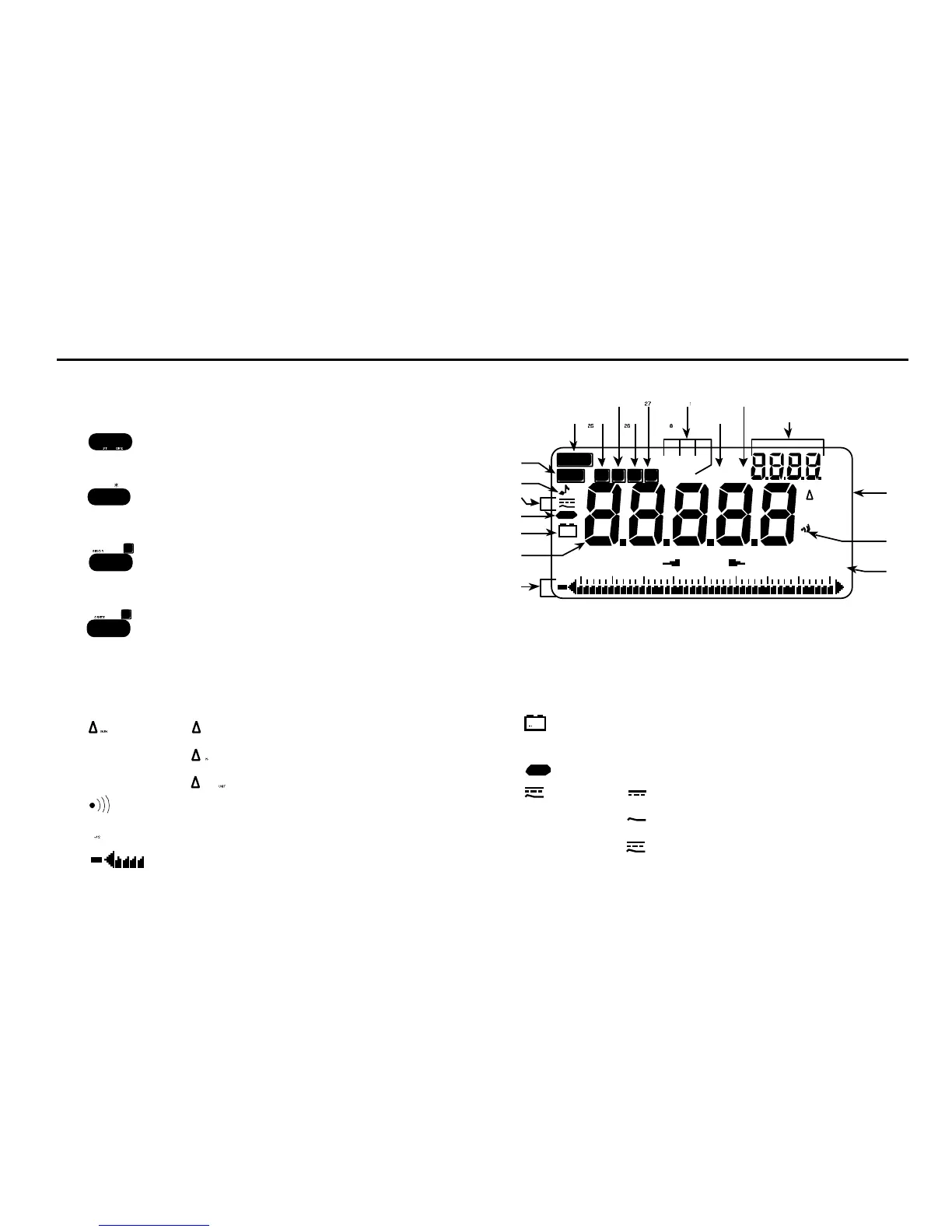
LCD Features
15. indicates relative zero.
indicates relative percentage change.
indicates relative per unit.
16. Indicates audible continuity function.
17. Analogue bar graph scale.
18. Analogue bar graph with overrange flag
and polarity.
1 9 . DATA Main digital readings of data being
measured.
20. Low battery alert. Replace battery as
soon as possible to ensure accuracy.
21. Indicates negative polarity.
22. direct current (d.c.) is selected.
alternating current (a.c.) is selected.
indicates d.c.+a.c. is selected.



 To Next Page