28
WARNING
To avoid electrical shock, remove test leads and any
input signals before opening the case. Do not operate
with open case. Install only the same type of fuse or
equivalent.
Battery Replacement Procedure
When the battery symbol appears in the display,
replace the battery as soon as possible to ensure
accuracy. The meter uses a single standard 9V alkaline
battery (NEDA1604A, JIS6AM6 or IEC6LF22).
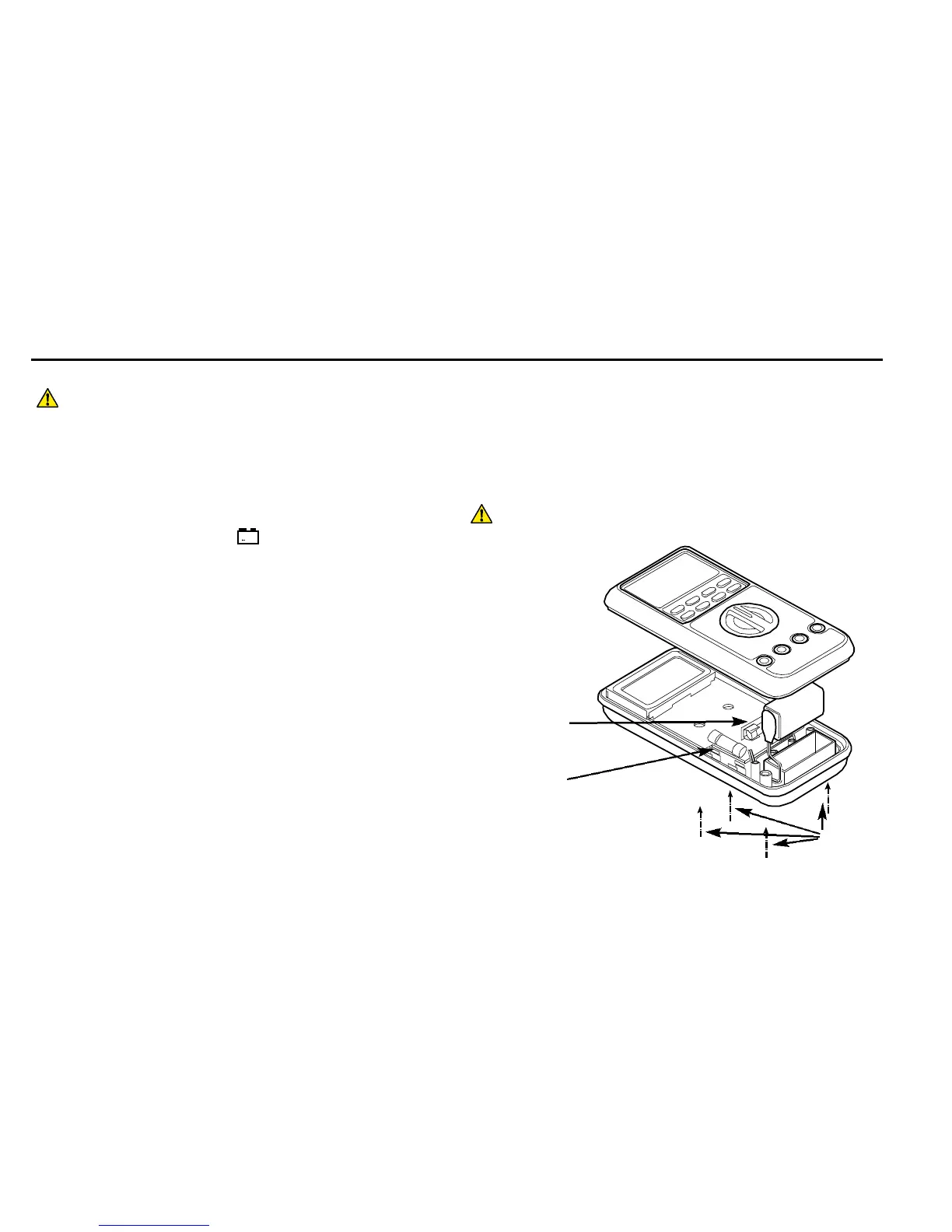
1) Disconnect the meter from any circuit and remove the
test leads from the input jacks.
2) Turn the meter OFF.
3) Loosen the four captive screws from the case bottom
and turn the case over.
4) Lift the end of the case top nearest the input jacks
until it unsnaps from the case bottom.
5) Gently lift the battery from the battery compartment,
and disconnect the battery from the battery connector.
6) Snap the battery connector to the terminals of the
replacement battery, and re-insert the battery into the
battery compartment. Dress the battery leads so that
they are properly seated in the compartment groove
and will not be pinched between the case top and
case bottom.
7) Replace the case top, ensuring that all the gaskets
are properly seated and the two clips on the case top
(near the LCD side) are engaged.
8) Re-fasten the four captive screws.
WARNING



 To Next Page