54 TM1700-SERIES ZP-BL16E BL1448GE
4 CABA LOCAL
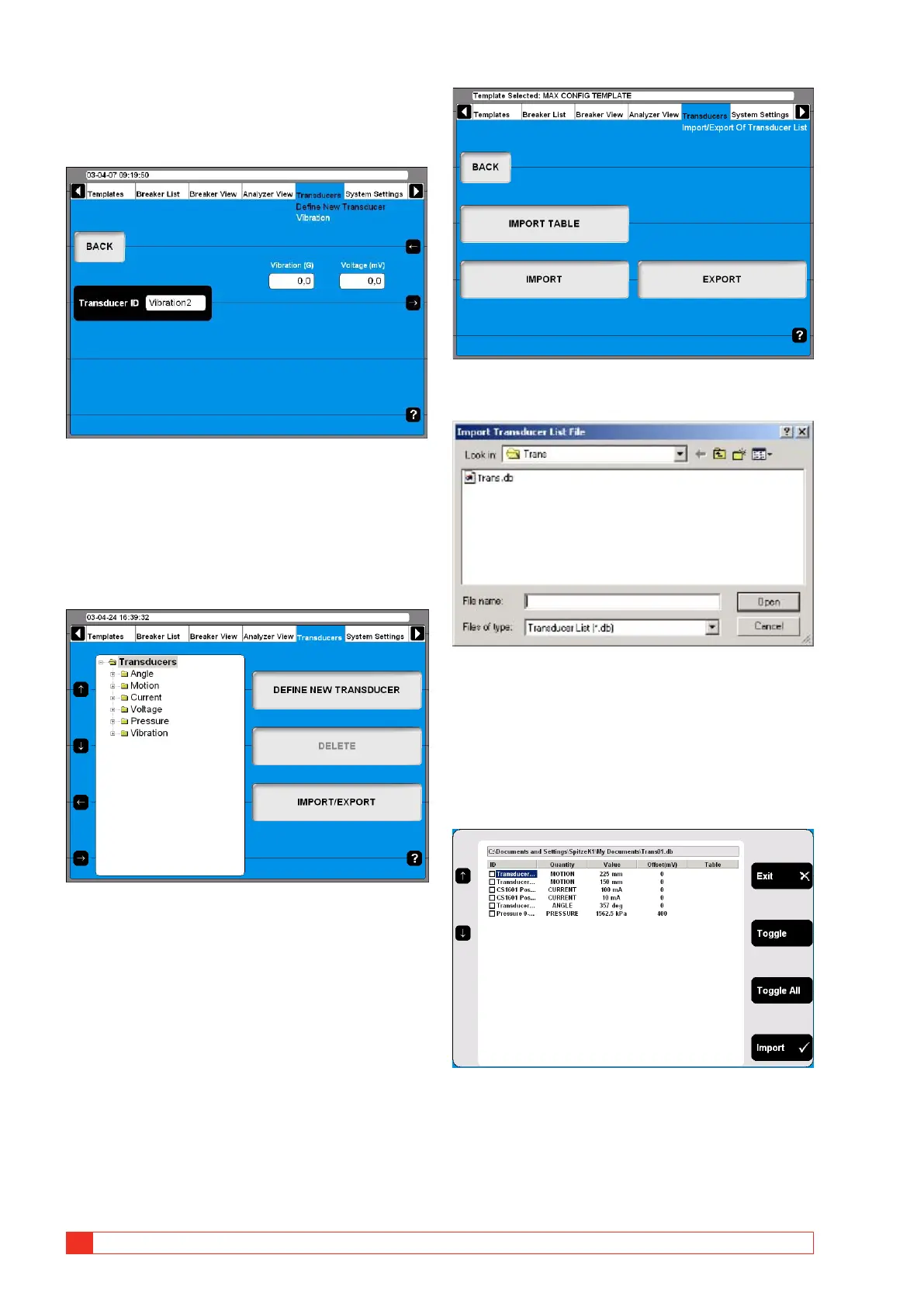
Defining vibration transducers
1]
Press the “Vibration” button on the “DEFINE
NEW TRANSDUCER” screen.
2] Enter the transducers ratio values.
3] Type in a significant name for the transducer
into the “Transducer ID” field.
4] Press the “BACK” button to leave this screen.
Import/export of transducer list
1] Press the “IMPORT/EXPORT” button, the fol-
lowing screen appears.
2] Upon pressing one of the buttons a Win-
dows® file selection box will appear.
3] Select the appropriate file and click on
“Open”.
Transducers are imported from or exported
to a transducer list file that can contain a
number of different transducers. To be able
to import and export selected transducers
from into that list the following screen ap-
pears.
4] Navigate to any transducer by using the ar-
row up/down buttons on the left hand side.
5] Select marked transducer for import by press-
ing the “Toggle” button.



 To Next Page